
QoS being enabled after firmware update.

QoS being enabled after firmware update.

QoS being enabled after firmware update.
Tuesday
Tags: #QoS
Model: Deco X50  
Hardware Version: V1
Firmware Version: 1.3.1 Build 20251122

Thank you so much.


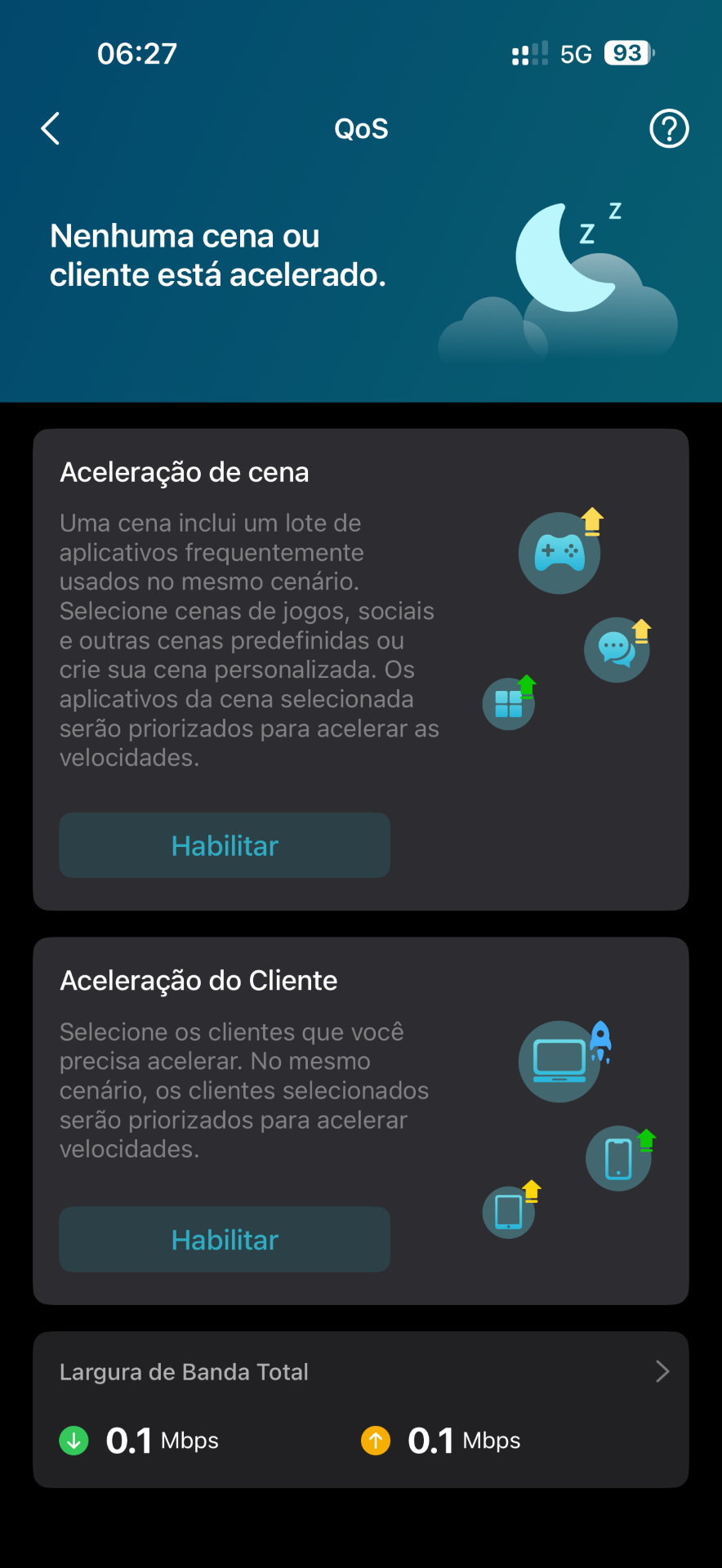
After updating to 1.3.1 Build 20251122, my network became a mess. Some devices had internet access while others didn't, and some sites would load while others wouldn't.


After 7 hours of troubleshooting, I discovered that the firmware update enabled QoS with a 0.1 Mbps speed limit. Apparently, this is a recurring issue, as I found a Reddit post from a year ago with the same problem.


I lost a night's sleep fixing a problem that should never have happened 🤡
 

  1      
  1      
#1
Options
1 Reply
Re:QoS being enabled after firmware update.
Yesterday - last edited Yesterday

  @juniorkyo 

Hi, thank you very much for the feedback.

After resetting the QOS upload/download bandwidth, are the reported issues fixed?

If you haven't rebooted Deco after resetting the QOS bandwidth, you can refer to this link to submit the Deco App log(How to submit Deco APP logHow to submit Deco APP log), and also include the web UI system log together.


It has been reported to the senior engineer for extra attention. Based on the previous feedback, the QOS was enabled before the firmware upgrade. It was triggered with a very low probability. After the firmware upgrade, it lost the preset bandwidth and automatically used the real-time speed rate.


Thanks a lot.

Best regards.

  0  
  0  
#2
Options
