
Access point temporarily full

On two occasions, WiFi clients have been unable to connect to my new Archer BE550, instead receiving the error "Access point temporarily full". I only have 15 devices (12 WiFi and 3 Ethernet) connected, the WiFi devices being a mix of 2.4 GHz, 5 GHz and 6GHz.
I've never experienced this with any previous router. What's going on?
- Copy Link
- Subscribe
- Bookmark
- Report Inappropriate Content

Since it's not clear what exactly is the root cause of your issue there's another thing you could do - downgrade the router FW to the previous release (v1.2.3) and test again.
Another option - If you're willing to try a pre-release (beta) FW for BE550 v2 go through this thread.
- Copy Link
- Report Inappropriate Content
Additional information...
On the most recent occasion, after my phone was unable to connect using the 2.4GHz and 5GHz bands, it was able to successfully connect a few minutes later using the 6GHz band.
- Copy Link
- Report Inappropriate Content

Hi,
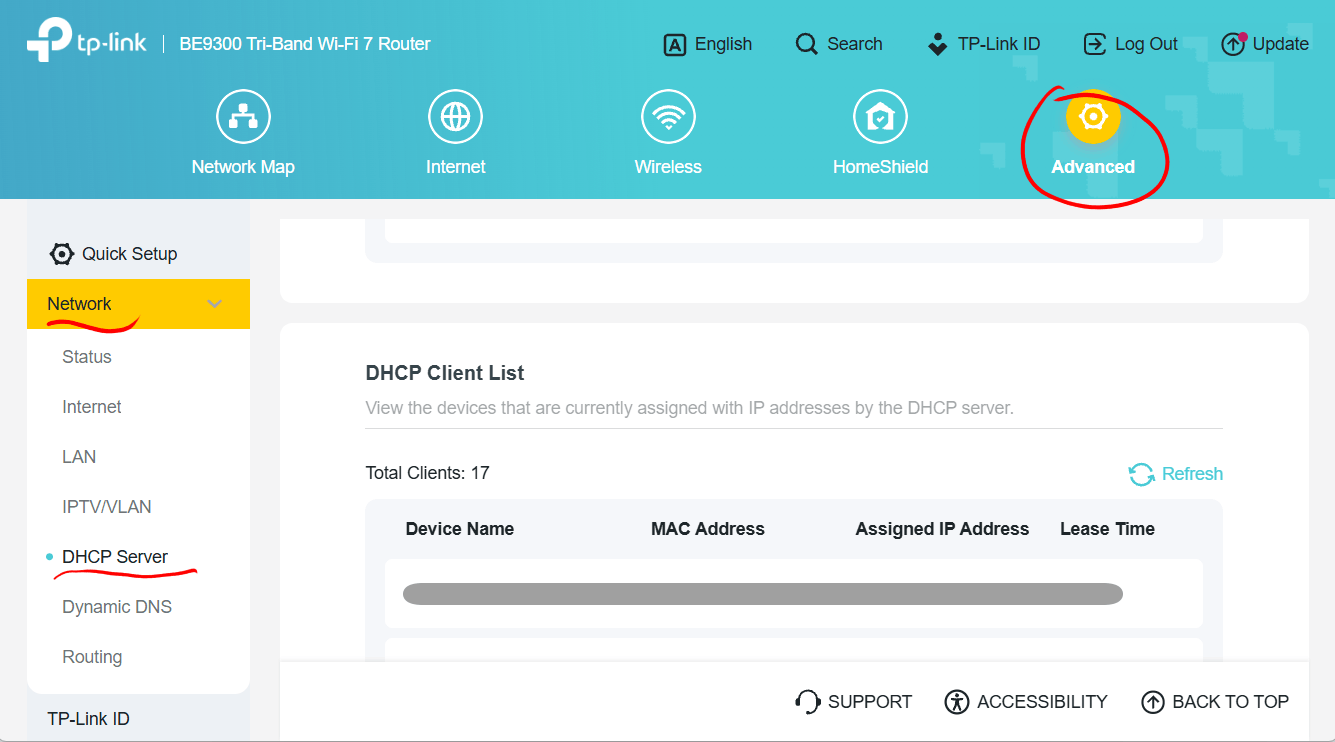
Can you please check the number of "Total Clients" shown in the router's "DHCP Client List"?
Is it same (or just slightly higher) than the number of devices you have actually connected?
- Copy Link
- Report Inappropriate Content
@woozle Thanks for replying.
Currently, I have 17 clients connected according to the network map, and 18 showing in the DHCP client list.
You will note that these numbers are higher than the ones I was able to achieve earlier. I recently (a couple of hours ago) enabled MU-MIMO to see if that changes anything. This could be a coincidence, of course.
- Copy Link
- Report Inappropriate Content
How about your DHCP Pool, is it big enough to accomodate more that 15 devices:
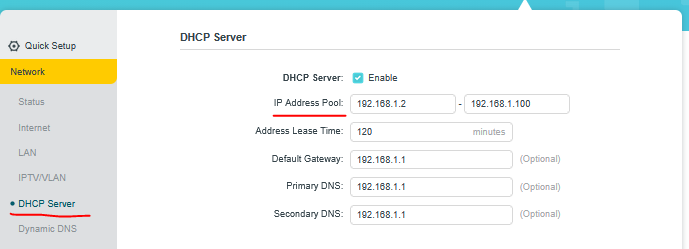
Make sure your LAN Subnet mask is 255.255.255.0
Any Access Control whitelisting, Parental Controls or HomeShield features activated ?
If none of these help reboot the router and test again.
- Copy Link
- Report Inappropriate Content
@terziyski Absolutely, loads of space in the DHCP pool: 192.168.0.2 to 192.168.0.253. I don't think lack of IP addresses is the problem 😅
Edit: No access control, parental controls or Homeshield features activated. Subnet mask is 255.255.255.0. Pretty much a vanilla setup. After the first occurrence a couple of weeks ago, I rebooted the router, but obviously it's happened again. This is not something one should expect from a top of the line router 😢
Edit: After the first occurrence, I implemented a weekly reboot (3am Monday), so it has only taken a little over 3 days for the problem to reoccur following the most recent reboot.
- Copy Link
- Report Inappropriate Content
Since it's not clear what exactly is the root cause of your issue there's another thing you could do - downgrade the router FW to the previous release (v1.2.3) and test again.
Another option - If you're willing to try a pre-release (beta) FW for BE550 v2 go through this thread.
- Copy Link
- Report Inappropriate Content
@terziyski Thanks for the suggestions. Since this is a new router, and I upgraded to the latest firmware within minutes of installing it, I've never used the previous version of the firmware. It's therefore not clear when the problem was introduced.
I'm a great believer in moving forward when it comes to software/firmware, so I'm interested in trying the beta version. Thanks for the link!
- Copy Link
- Report Inappropriate Content
Information
Helpful: 0
Views: 1443
Replies: 7
Voters 0
No one has voted for it yet.