
After several updates, the connection remains unstable.

It remains incomprehensible what drives the system.
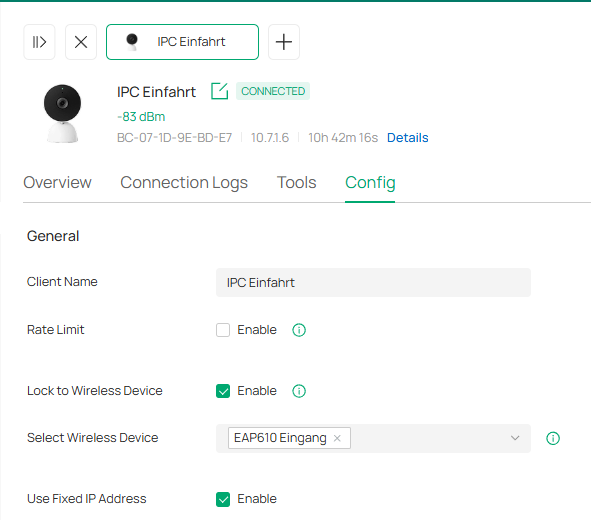
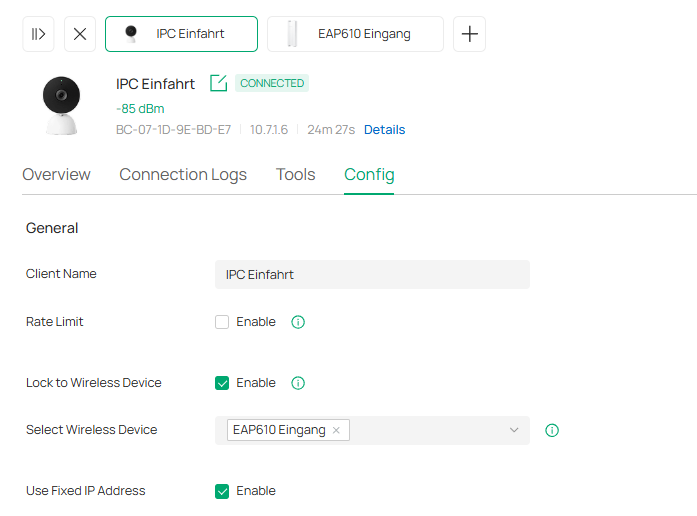
The camera(IPC Einfahrt) is mounted 10m from the EAP 610 and lock to it.
The EAP115 Wall is approximately 50m away.
Although the camera is tethered to the EAP610, which is mounted right next to it, it connects to the EAP 115 Wall.
The system detects the poor and unstable connection, but does not change it according to the specifications.
One would expect the system to bind clients to the best access point, not the worst.
But even the lock is ignored.

- Copy Link
- Subscribe
- Bookmark
- Report Inappropriate Content


Hi @VolkerS
Thanks for posting in our business forum.
May I know if you are using a non-VIGI camera? May I know the model of it?
May I ask for the network topology and did you refer to the "lock to AP" between the camera and EAP610?
You may try to check the camera if it is support 2.4G only, and try to put it closer to the EAP as the signal shows not good.
If the issue still persists, please try to contact the local support and provide with the forum ID.
- Copy Link
- Report Inappropriate Content
Are you using a camera from a manufacturer other than VIGI? Could you please tell me the model?
VIGI C540W
Could you please tell me the network topology?
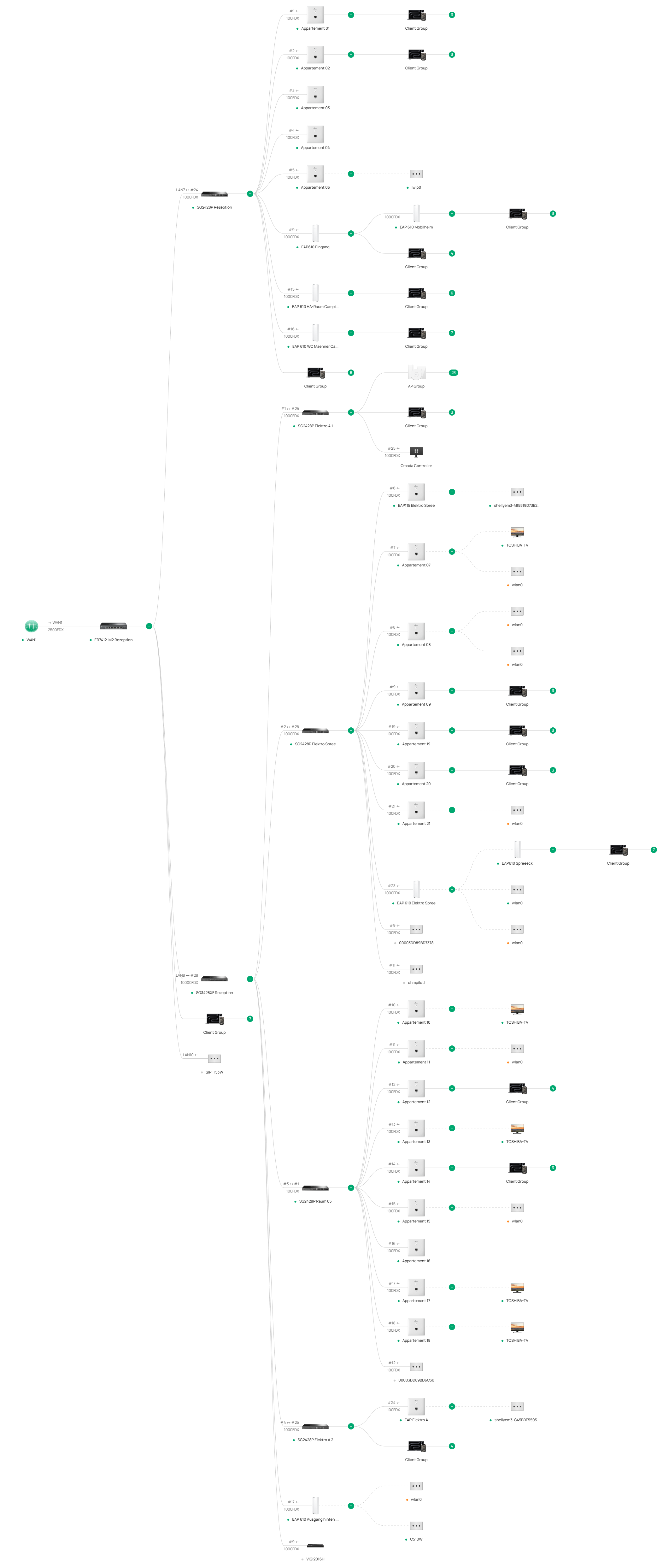
Have you checked the connection between the camera and the EAP610 ("Lock to AP")?
Lock to AP is not working.
Please check if the camera only supports 2.4 GHz and place it closer to the EAP, as the signal seems to be weak.
The EAP is located 10 meters from the camera. The signal cannot be too weak there.
If the problem persists, please contact local support and provide the forum ID. Sincerely!
TP-Link should also be working on the support, but thanks for the heads-up.
- Copy Link
- Report Inappropriate Content
The stupid camera locks itself out of the system after a restart.

The camera is paired with the EAP610, but after a restart, it connects to an EAP115 Wall, which is simply too far away for a stable connection, and therefore goes offline.
This is a glaring system failure that TP-Link either doesn't want to fix or can't fix. The third-party Instar camera connects to the EAP610 without any problems after a restart.
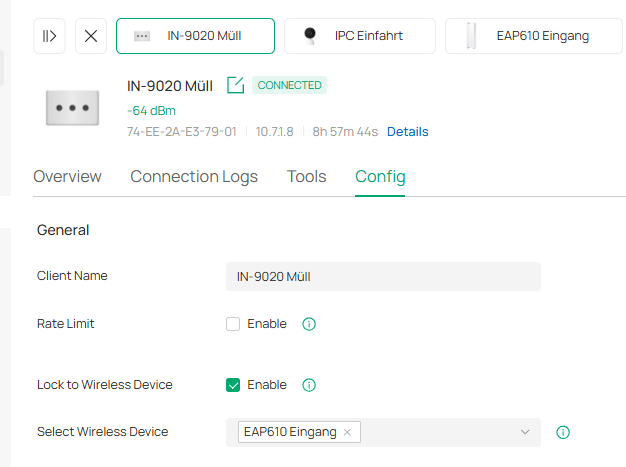
The classic statement, "You're using a device from a third-party manufacturer, so we can't help you," doesn't apply in this case. Unfortunately, there's still no help available.
I had already clearly explained the Wi-Fi behavior and its consequences to support. So what?
- Copy Link
- Report Inappropriate Content
Hi @VolkerS
It seems you have many omada EAP and clients, so please try to check if the APs have latest firmware versions.
In the meantime, you may refer to these guides to improve the wireless performance:
- Copy Link
- Report Inappropriate Content
Hello,
thanks for the links.
All access points always have the latest firmware. I update regularly because I always hope that something will finally improve. I'm now certain that it's a fundamental problem that TP-Link can't or won't change. This is already evident from the fact that a VIGI camera can't connect to its assigned access point. IP addresses are assigned to Wi-Fi clients over long distances, even though the signal strength doesn't allow for a stable connection and there are access points with stronger signals nearby. TP-Link seems unable to handle the entire process in a segmented network with multiple access points. The router also seems to be contributing to these shortcomings.
If the problem were solvable, a support employee would solve it.
- Copy Link
- Report Inappropriate Content
Hi @VolkerS
Sorry that the previous suggestion did not resolve your issue. The issue you reported is indeed a noticeable abnormality. Rest assured, we will definitely work to find out the reason as soon as possible.
One point: the VIGI C540-W only supports 2.4G. Could you please confirm whether the SSID of the EAP610-outdoor has 2.4G enabled? If not, the IPC can indeed only attempt to connect to the EAP115-wall. If you don’t mind, could you set up a 2.4G-only SSID specifically for the EAP610-outdoor and see if the problem persists?
VolkerS wrote
Hello,
thanks for the links.
All access points always have the latest firmware. I update regularly because I always hope that something will finally improve. I'm now certain that it's a fundamental problem that TP-Link can't or won't change. This is already evident from the fact that a VIGI camera can't connect to its assigned access point. IP addresses are assigned to Wi-Fi clients over long distances, even though the signal strength doesn't allow for a stable connection and there are access points with stronger signals nearby. TP-Link seems unable to handle the entire process in a segmented network with multiple access points. The router also seems to be contributing to these shortcomings.
If the problem were solvable, a support employee would solve it.
- Copy Link
- Report Inappropriate Content
Hi Vincent, thank you for your feedback.
Yes, the EAP610 also transmits on 2.4 GHz.
The internal system problems are characterized by the fact that binding a client (C540) to the EAP 610 doesn't work if the products are from TP-Link (Omada-Vigi).
My Instar camera always connects to the assigned access point (Omada-Instar).
It's also not due to a possible defect in a C540, as a second one behaves exactly the same way.
Furthermore:
I'm now convinced that TP-Link can't manage a multi-AP environment where each access point broadcasts the same SSID. I don't understand why this is the case, but practical experience confirms it. I tested this again today because I was having problems with a wired Zigbee hub, and its system check diagnosed an unstable/missing internet connection for its clients.
The problem is even more apparent with my phone.
It's assigned an IP address from the allocated VLAN, but it can't access the internet. See screenshots.
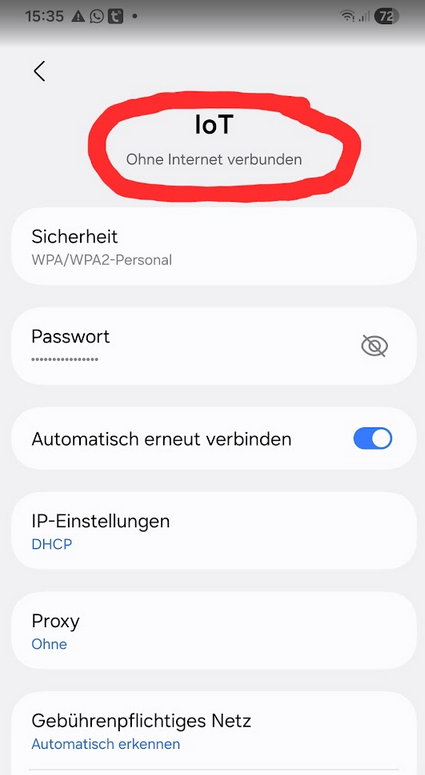
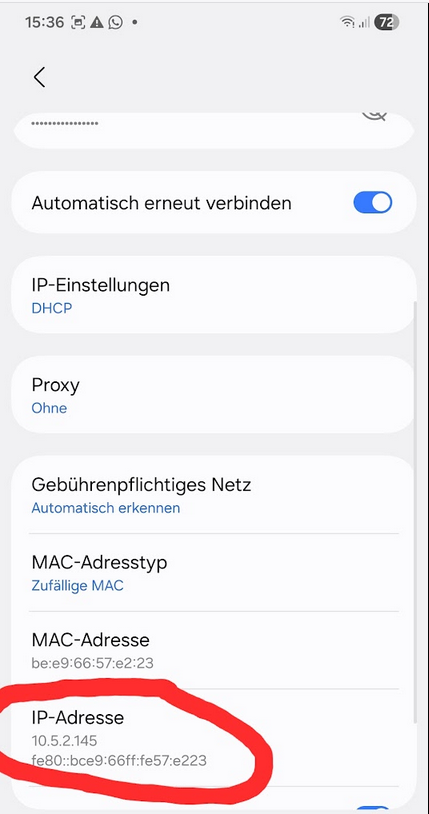
I removed this access point (EAP115Wall) from the Wi-Fi group as a test.
Then I created a new group specifically for this access point
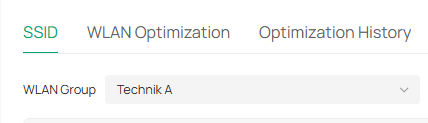
and a separate SSID for it.

Both the mobile phone and the Zigbee hub were able to access the internet without any problems.
I've always shied away from the effort, but I'm now going to create a separate group for each access point and assign each one its own SSID. Luckily, Omada can manage at least the number of groups I need, at least in theory.
I hope this will solve the connection problems.
I had hoped the manufacturer would address this. But that was in vain.
FYI:
A new problem has arisen.
I can no longer reach all devices on the network via the Omada app. This affects both switches and access points.
However, all devices are accessible via the cloud.
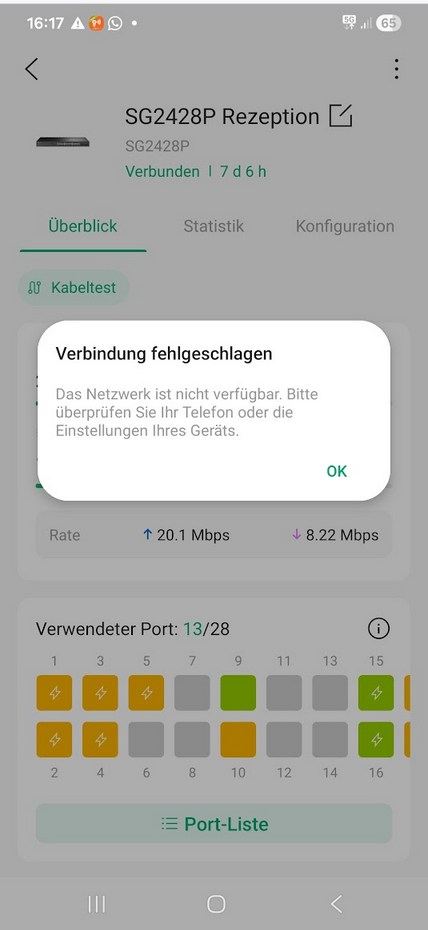
The connection problems are obviously not related to the phone. The error message makes no sense.
Omada Controller:
Currently, my controllers indicate every time I access them that an update is available, but it cannot be successfully installed. The hotline's strange response—that the updates haven't been rolled out yet—is quite surprising.
I would have expected an apology for the inconvenience and an immediate fix for the error of offering updates for installation even before they've been rolled out.
OMADA is an online management system.
Support should be able to help immediately.
But apparently, they can't.
Despite everything, Happy Easter!
- Copy Link
- Report Inappropriate Content
https://www.reddit.com/r/TPLink_Omada/comments/u0hrci/any_way_to_lock_a_wireless_client_into_an_ap/?tl=de&utm_source=share&utm_medium=web3x&utm_name=web3xcss&utm_term=1&utm_content=share_button
Das Verbindungsproblem existiert wohl schon ewig!
- Copy Link
- Report Inappropriate Content

Hi @VolkerS
Thanks for the reply. Please see my replies below:
VolkerS wrote
Hi Vincent, thank you for your feedback.
Yes, the EAP610 also transmits on 2.4 GHz.
The internal system problems are characterized by the fact that binding a client (C540) to the EAP 610 doesn't work if the products are from TP-Link (Omada-Vigi).
My Instar camera always connects to the assigned access point (Omada-Instar).
It's also not due to a possible defect in a C540, as a second one behaves exactly the same way.
Furthermore:
I'm now convinced that TP-Link can't manage a multi-AP environment where each access point broadcasts the same SSID. I don't understand why this is the case, but practical experience confirms it. I tested this again today because I was having problems with a wired Zigbee hub, and its system check diagnosed an unstable/missing internet connection for its clients.
The problem is even more apparent with my phone.
It's assigned an IP address from the allocated VLAN, but it can't access the internet. See screenshots.
I removed this access point (EAP115Wall) from the Wi-Fi group as a test.
Then I created a new group specifically for this access point
and a separate SSID for it. >>>>Will the VIGI C540-W connect to this SSID?
Both the mobile phone and the Zigbee hub were able to access the internet without any problems.
I've always shied away from the effort, but I'm now going to create a separate group for each access point and assign each one its own SSID. Luckily, Omada can manage at least the number of groups I need, at least in theory.
I hope this will solve the connection problems.
I had hoped the manufacturer would address this. But that was in vain.
FYI:
A new problem has arisen.
I can no longer reach all devices on the network via the Omada app. This affects both switches and access points.
However, all devices are accessible via the cloud.
>>Does this persist? Please try to exit the Omada APP totally, turn off the data and turn it back on, and try again.
The connection problems are obviously not related to the phone. The error message makes no sense.
Omada Controller:
Currently, my controllers indicate every time I access them that an update is available, but it cannot be successfully installed. The hotline's strange response—that the updates haven't been rolled out yet—is quite surprising.
I would have expected an apology for the inconvenience and an immediate fix for the error of offering updates for installation even before they've been rolled out.
OMADA is an online management system.
Support should be able to help immediately.
>>>Sorry for that. We will fixed it ASAP. For now, you can Dismiss this notice, once the new update is released, you will get the notice again.
But apparently, they can't.
Despite everything, Happy Easter!
- Copy Link
- Report Inappropriate Content
Hi @VolkerS
Thank you so much for taking the time to post the issue on the TP-Link community!
To better assist you, I've created a support ticket via your registered email address and escalated it to our support engineer to look into the issue. The ticket ID is TKID260455195. Please check your inbox and confirm that the support email was received. Thanks!
Once the issue is resolved, please update this thread with your solution to help others who may encounter the same problem.
Many thanks for your excellent cooperation and patience!
- Copy Link
- Report Inappropriate Content
Information
Helpful: 0
Views: 774
Replies: 10
Voters 0
No one has voted for it yet.