
Cannot connect TP-Link OpenVPN client to another router

I have a different router running DD-WRT and hosting an OpenVPN server. I am able to connect to it from a laptop using OpenVPN Connect. When I apply the same OpenVPN client config (.ovpn file) to my TP-Link router, it stalls on "Connecting". I cannot find any logs from the TP-Link to assist in debugging, and the server shows no record of it attempting to connect. The TP-Link router definitely has internet access because I can connect to it and browse the web (it is running on my phone's hotspot, and will ultimately be my travel router).
My OpenVPN server is running OpenVPN version 2.6.10. I found this TP-Link FAQ but it seems to be too old to work with this server version: https://www.tp-link.com/us/support/faq/3317/
What version of OpenVPN does TP-Link use?
Do you have an example OpenVPN config file that I could copy?
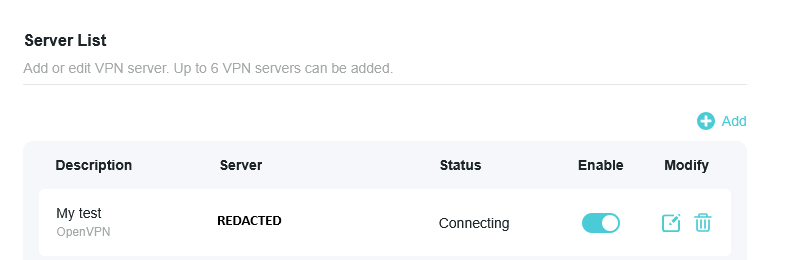
The client has no username or password and the client connection (.ovpn file) looks like this:
client
dev tun
proto udp
remote REDACTED 1194
nobind
persist-key
persist-tun
resolv-retry infinite
remote-cert-tls server
auth-nocache
verb 4
float
tun-mtu 1500
auth SHA256
comp-lzo adaptive
data-ciphers aes-128-cbc
<ca>
-----BEGIN CERTIFICATE-----
REDACTED
-----END CERTIFICATE-----
</ca>
<cert>
-----BEGIN CERTIFICATE-----
REDACTED
-----END CERTIFICATE-----
</cert>
<key>
-----BEGIN PRIVATE KEY-----
REDACTED
-----END PRIVATE KEY-----
</key>
- Copy Link
- Subscribe
- Bookmark
- Report Inappropriate Content

Hi,
From the GPL code that TP-Link posted on their webpage your router appears to use OpenVPN 2.4.11.
The "data-ciphers" option was supposedly introduced in OpenVPN 2.5.
I suggest you comment-out or remove the "data-ciphers aes-128-cbc" line from the *.ovpn file and then try again. This works for my Archer AX53 router.
However, it is weird that your server shows nothing at all. Even if server and client were to use two incompatible versions of OpenVPN, the connection attempt should still be visible in the server logs.
When you tested with the laptop running OpenVPN Connect, were you also connected to that same phone's hotspot?
- Copy Link
- Report Inappropriate Content
Hi,
From the GPL code that TP-Link posted on their webpage your router appears to use OpenVPN 2.4.11.
The "data-ciphers" option was supposedly introduced in OpenVPN 2.5.
I suggest you comment-out or remove the "data-ciphers aes-128-cbc" line from the *.ovpn file and then try again. This works for my Archer AX53 router.
However, it is weird that your server shows nothing at all. Even if server and client were to use two incompatible versions of OpenVPN, the connection attempt should still be visible in the server logs.
When you tested with the laptop running OpenVPN Connect, were you also connected to that same phone's hotspot?
- Copy Link
- Report Inappropriate Content
Thank you, so I needed to use OpenVPN 2.4.11 as a client with a server running openVPN 2.6.10.
I replaced `data-ciphers` in the client config with the older `cipher` command, and I do see a log on my server and the VPN client even shows "Connected" now!
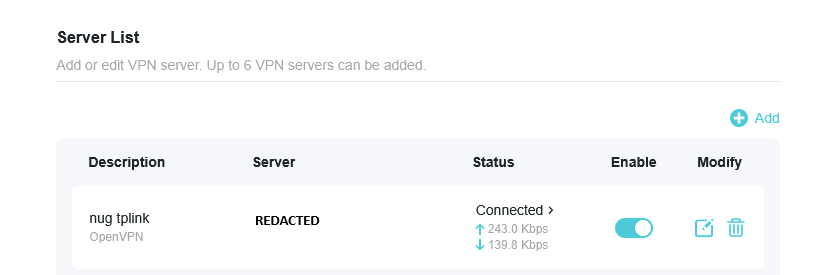
However I am unable to query or ping any online resource now while the VPN client is enabled. I think the problem has to do with my configuration though and not the TP-Link device because, while this configuration actually shows a connection, I cannot see any online results even when using Windows OpenVPN Connect.
In the server logs, I see an error: "Authenticate/Decrypt packet error: cipher final failed". I will continue to investigate what configuration works to not only establish a connection but also send data. Thank you very much @woozle for helping me get unstuck!
For posterity, this is what the server log shows then this OpenVPN client connects from the TP-Link router (all sensitive data has been obscured):
20260217 13:34:32 173.99.193.120:35029 VERIFY OK: depth=1 CN=redacted-ca
20260217 13:34:32 173.99.193.120:35029 NOTE: --mute triggered...
20260217 13:34:32 173.99.193.120:35029 1 variation(s) on previous 3 message(s) suppressed by --mute
20260217 13:34:32 I 173.99.193.120:35029 peer info: IV_VER=2.4.11
20260217 13:34:32 I 173.99.193.120:35029 peer info: IV_PLAT=linux
20260217 13:34:32 I 173.99.193.120:35029 peer info: IV_PROTO=2
20260217 13:34:32 I 173.99.193.120:35029 peer info: IV_NCP=2
20260217 13:34:32 I 173.99.193.120:35029 peer info: IV_CIPHERS=AES-256-GCM:AES-128-GCM:AES-128-CBC
20260217 13:34:32 I 173.99.193.120:35029 peer info: IV_LZO=1
20260217 13:34:32 I 173.99.193.120:35029 peer info: IV_COMP_STUB=1
20260217 13:34:32 I 173.99.193.120:35029 peer info: IV_COMP_STUBv2=1
20260217 13:34:32 I 173.99.193.120:35029 peer info: IV_TCPNL=1
20260217 13:34:32 173.99.193.120:35029 TLS: move_session: dest=TM_ACTIVE src=TM_INITIAL reinit_src=1
20260217 13:34:32 173.99.193.120:35029 NOTE: --mute triggered...
20260217 13:34:32 173.99.193.120:35029 2 variation(s) on previous 3 message(s) suppressed by --mute
20260217 13:34:32 I 173.99.193.120:35029 [tplink-client] Peer Connection Initiated with [AF_INET]173.99.193.120:35029
20260217 13:34:32 I tplink-client/173.99.193.120:35029 MULTI_sva: pool returned IPv4=10.8.0.2 IPv6=(Not enabled)
20260217 13:34:32 tplink-client/173.99.193.120:35029 OPTIONS IMPORT: reading client specific options from: /tmp/openvpn_cc_0b1d759e3d2caec2.tmp
20260217 13:34:32 tplink-client/173.99.193.120:35029 MULTI: Learn: 10.8.0.2 -> tplink-client/173.99.193.120:35029
20260217 13:34:32 tplink-client/173.99.193.120:35029 NOTE: --mute triggered...
20260217 13:34:32 tplink-client/173.99.193.120:35029 1 variation(s) on previous 3 message(s) suppressed by --mute
20260217 13:34:32 W tplink-client/173.99.193.120:35029 ******* WARNING *******: '--auth none' was specified. This means no authentication will be performed on received packets meaning you CANNOT trust that the data received by the remote side have NOT been manipulated. PLEASE DO RECONSIDER THIS SETTING!
20260217 13:34:33 tplink-client/173.99.193.120:35029 Data Channel: cipher 'AES-128-CBC' auth '[null-digest]' peer-id: 0 compression: 'lzo'
20260217 13:34:33 tplink-client/173.99.193.120:35029 NOTE: --mute triggered...
20260217 13:34:33 tplink-client/173.99.193.120:35029 1 variation(s) on previous 3 message(s) suppressed by --mute
20260217 13:34:33 tplink-client/173.99.193.120:35029 PUSH: Received control message: 'PUSH_REQUEST'
20260217 13:34:33 tplink-client/173.99.193.120:35029 NOTE: --mute triggered...
20260217 13:34:33 tplink-client/173.99.193.120:35029 1 variation(s) on previous 3 message(s) suppressed by --mute
20260217 13:34:33 N tplink-client/173.99.193.120:35029 Authenticate/Decrypt packet error: cipher final failed
20260217 13:34:33 tplink-client/173.99.193.120:35029 NOTE: --mute triggered...
20260217 13:34:36 1 variation(s) on previous 3 message(s) suppressed by --mute
20260217 13:34:36 MANAGEMENT: Client connected from [AF_INET]127.0.0.1:38376
- Copy Link
- Report Inappropriate Content
What mode of the TL-WR1502X are you currently using? Is it the "Hotspot (WISP)" mode, where the router is connected wirelessly to the smartphone hotspot?
If so, then can you try to connect your smartphone to the TL-WR1502X using "USB Tethering" mode instead and see if that makes any difference for OpenVPN?
- Copy Link
- Report Inappropriate Content
I was using "Hotspot" and the TP-Link router got internet while connected to my phone (just not while OpenVPN Client was enabled).
Switching to "Router" and using USB Tethering also got internet and still no OpenVPN data transfer (even dns).
I have modified my client config's --cipher command to use AES-256-GCM since that seems to be a default. I have my DD-WRT router running the OpenVPN Server with this configuration (see image below). Notice the Encryption Cipher is AES-256-GCM and so is First Data Cipher (which may be a mistake). Below this image I included the client config and the server log...
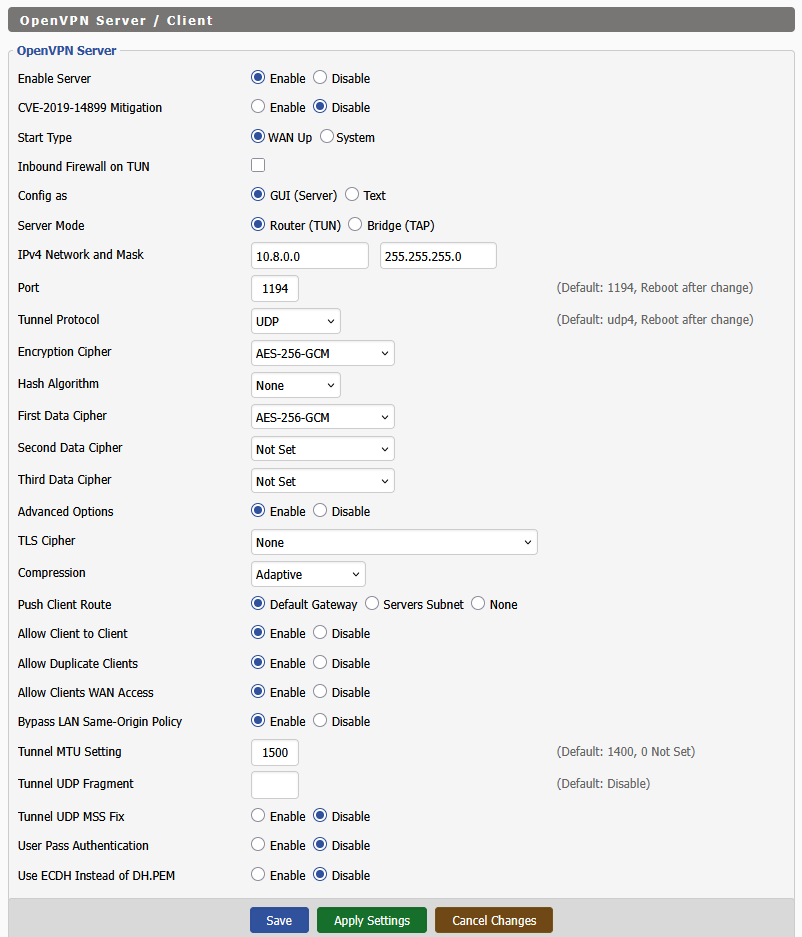
This is the top part of the client config file:
client
dev tun
proto udp
remote REDACTED 1194
nobind
persist-key
persist-tun
resolv-retry infinite
remote-cert-tls server
auth-nocache
verb 4
float
tun-mtu 1500
comp-lzo adaptive
cipher AES-256-GCM
<ca>
...
Notice this OpenVPN server log below (while using tethering). I don't even see an error message in here! I will try a different internet connection soon (maybe the iphone is screwing with it)...
20260219 02:01:44 173.99.193.129:31594 VERIFY OK: depth=1 CN=redacted-ca
20260219 02:01:44 173.99.193.129:31594 NOTE: --mute triggered...
20260219 02:01:44 173.99.193.129:31594 1 variation(s) on previous 3 message(s) suppressed by --mute
20260219 02:01:44 I 173.99.193.129:31594 peer info: IV_VER=2.4.11
20260219 02:01:44 I 173.99.193.129:31594 peer info: IV_PLAT=linux
20260219 02:01:44 I 173.99.193.129:31594 peer info: IV_PROTO=2
20260219 02:01:44 I 173.99.193.129:31594 peer info: IV_NCP=2
20260219 02:01:44 I 173.99.193.129:31594 peer info: IV_CIPHERS=AES-256-GCM:AES-128-GCM
20260219 02:01:44 I 173.99.193.129:31594 peer info: IV_LZO=1
20260219 02:01:44 I 173.99.193.129:31594 peer info: IV_COMP_STUB=1
20260219 02:01:44 I 173.99.193.129:31594 peer info: IV_COMP_STUBv2=1
20260219 02:01:44 I 173.99.193.129:31594 peer info: IV_TCPNL=1
20260219 02:01:44 173.99.193.129:31594 TLS: move_session: dest=TM_ACTIVE src=TM_INITIAL reinit_src=1
20260219 02:01:44 173.99.193.129:31594 NOTE: --mute triggered...
20260219 02:01:44 173.99.193.129:31594 2 variation(s) on previous 3 message(s) suppressed by --mute
20260219 02:01:44 I 173.99.193.129:31594 [tplink-client] Peer Connection Initiated with [AF_INET]173.99.193.129:31594
20260219 02:01:44 I tplink-client/173.99.193.129:31594 MULTI_sva: pool returned IPv4=10.8.0.2 IPv6=(Not enabled)
20260219 02:01:44 tplink-client/173.99.193.129:31594 OPTIONS IMPORT: reading client specific options from: /tmp/openvpn_cc_48b2545b714e0e60.tmp
20260219 02:01:44 tplink-client/173.99.193.129:31594 MULTI: Learn: 10.8.0.2 -> tplink-client/173.99.193.129:31594
20260219 02:01:44 tplink-client/173.99.193.129:31594 NOTE: --mute triggered...
20260219 02:01:45 tplink-client/173.99.193.129:31594 1 variation(s) on previous 3 message(s) suppressed by --mute
20260219 02:01:45 tplink-client/173.99.193.129:31594 Data Channel: cipher 'AES-256-GCM' peer-id: 0 compression: 'lzo'
20260219 02:01:45 tplink-client/173.99.193.129:31594 NOTE: --mute triggered...
20260219 02:01:45 tplink-client/173.99.193.129:31594 1 variation(s) on previous 3 message(s) suppressed by --mute
20260219 02:01:45 tplink-client/173.99.193.129:31594 PUSH: Received control message: 'PUSH_REQUEST'
20260219 02:01:45 tplink-client/173.99.193.129:31594 NOTE: --mute triggered...
- Copy Link
- Report Inappropriate Content
Would you be able to manually change the "--mute" parameter in the config of the OpenVPN server? (i.e. increase the number that triggers the muting of repetitive messages)
Perhaps the message we need to see is getting discarded.
- Copy Link
- Report Inappropriate Content
I changed the "--mute" parameter and included the full log below. I made some tweaks to the config and server but status is the same: connected with no internet. I have a suspicion that the issue is with routing settings on the DD-WRT server.
I'm sorry for the slow responses; this is not my day job. I really appreciate you taking the time to help. I may start a thread on the DD-WRT site...
Client config:
client
dev tun
proto udp
remote REDACTED 1194
nobind
persist-key
persist-tun
resolv-retry infinite
auth-nocache
verb 4
float
tun-mtu 1300
auth SHA256
comp-lzo no
cipher AES-256-GCM
Full server log (sensitive data has been redacted):
20260223 22:43:12 W NOTE: the current --script-security setting may allow this configuration to call user-defined scripts
20260223 22:43:12 Diffie-Hellman initialized with 2048 bit key
20260223 22:43:12 net_iface_new: add tun2 type ovpn-dco
20260223 22:43:12 I DCO device tun2 opened
20260223 22:43:12 I net_iface_mtu_set: mtu 1300 for tun2
20260223 22:43:12 I net_iface_up: set tun2 up
20260223 22:43:12 I net_addr_v4_add: 10.8.0.1/24 dev tun2
20260223 22:43:12 W Could not determine IPv4/IPv6 protocol. Using AF_INET
20260223 22:43:12 Socket Buffers: R=[180224->180224] S=[180224->180224]
20260223 22:43:12 I UDPv4 link local (bound): [AF_INET][undef]:1194
20260223 22:43:12 I UDPv4 link remote: [AF_UNSPEC]
20260223 22:43:12 MULTI: multi_init called r=256 v=256
20260223 22:43:12 IFCONFIG POOL IPv4: base=10.8.0.2 size=253
20260223 22:43:12 I Initialization Sequence Completed
20260223 22:43:12 MANAGEMENT: Client connected from [AF_INET]127.0.0.1:48932
20260223 22:43:12 D MANAGEMENT: CMD 'state'
20260223 22:43:12 MANAGEMENT: Client disconnected
20260223 22:43:12 MANAGEMENT: Client connected from [AF_INET]127.0.0.1:48936
20260223 22:43:12 D MANAGEMENT: CMD 'state'
20260223 22:43:12 MANAGEMENT: Client disconnected
20260223 22:43:12 MANAGEMENT: Client connected from [AF_INET]127.0.0.1:48950
20260223 22:43:12 D MANAGEMENT: CMD 'state'
20260223 22:43:12 MANAGEMENT: Client disconnected
20260223 22:43:12 MANAGEMENT: Client connected from [AF_INET]127.0.0.1:48966
20260223 22:43:12 MANAGEMENT: Client disconnected
20260223 22:43:12 MANAGEMENT: Client connected from [AF_INET]127.0.0.1:48978
20260223 22:43:12 D MANAGEMENT: CMD 'status 2'
20260223 22:43:12 MANAGEMENT: Client disconnected
20260223 22:43:12 MANAGEMENT: Client connected from [AF_INET]127.0.0.1:48988
20260223 22:43:12 D MANAGEMENT: CMD 'status 2'
20260223 22:43:12 MANAGEMENT: Client disconnected
20260223 22:43:12 MANAGEMENT: Client connected from [AF_INET]127.0.0.1:48990
20260223 22:43:12 D MANAGEMENT: CMD 'log 500'
20260223 22:43:12 MANAGEMENT: Client disconnected
20260223 22:43:20 179.18.193.199:51914 VERIFY OK: depth=1 CN=redacted-ca
20260223 22:43:20 179.18.193.199:51914 VERIFY OK: depth=0 CN=tplink-client
20260223 22:43:21 I 179.18.193.199:51914 peer info: IV_VER=2.4.11
20260223 22:43:21 I 179.18.193.199:51914 peer info: IV_PLAT=linux
20260223 22:43:21 I 179.18.193.199:51914 peer info: IV_PROTO=2
20260223 22:43:21 I 179.18.193.199:51914 peer info: IV_NCP=2
20260223 22:43:21 I 179.18.193.199:51914 peer info: IV_CIPHERS=AES-256-GCM:AES-128-GCM
20260223 22:43:21 I 179.18.193.199:51914 peer info: IV_LZO=1
20260223 22:43:21 I 179.18.193.199:51914 peer info: IV_COMP_STUB=1
20260223 22:43:21 I 179.18.193.199:51914 peer info: IV_COMP_STUBv2=1
20260223 22:43:21 I 179.18.193.199:51914 peer info: IV_TCPNL=1
20260223 22:43:21 179.18.193.199:51914 TLS: move_session: dest=TM_ACTIVE src=TM_INITIAL reinit_src=1
20260223 22:43:21 179.18.193.199:51914 TLS: tls_multi_process: initial untrusted session promoted to trusted
20260223 22:43:21 179.18.193.199:51914 Control Channel: TLSv1.2 cipher TLSv1.2 ECDHE-RSA-AES256-GCM-SHA384 peer certificate: 2048 bits RSA signature: RSA-SHA256
20260223 22:43:21 I 179.18.193.199:51914 [tplink-client] Peer Connection Initiated with [AF_INET]179.18.193.199:51914
20260223 22:43:21 I tplink-client/179.18.193.199:51914 MULTI_sva: pool returned IPv4=10.8.0.2 IPv6=(Not enabled)
20260223 22:43:21 tplink-client/179.18.193.199:51914 OPTIONS IMPORT: reading client specific options from: /tmp/openvpn_cc_32ddb7ac49153c61.tmp
20260223 22:43:21 tplink-client/179.18.193.199:51914 MULTI: Learn: 10.8.0.2 -> tplink-client/179.18.193.199:51914
20260223 22:43:21 tplink-client/179.18.193.199:51914 MULTI: primary virtual IP for tplink-client/179.18.193.199:51914: 10.8.0.2
20260223 22:43:22 tplink-client/179.18.193.199:51914 Data Channel: cipher 'AES-256-GCM' peer-id: 0
20260223 22:43:22 tplink-client/179.18.193.199:51914 Timers: ping 10 ping-restart 240
20260223 22:43:22 tplink-client/179.18.193.199:51914 PUSH: Received control message: 'PUSH_REQUEST'
20260223 22:43:22 tplink-client/179.18.193.199:51914 SENT CONTROL [tplink-client]: 'PUSH_REPLY redirect-gateway def1 route-gateway 10.8.0.1 topology subnet ping 10 ping-restart 120 ifconfig 10.8.0.2 255.255.255.0 peer-id 0 cipher AES-256-GCM' (status=1)
20260223 22:47:09 179.18.193.199:17993 VERIFY OK: depth=1 CN=redacted-ca
20260223 22:47:09 179.18.193.199:17993 VERIFY OK: depth=0 CN=tplink-client
20260223 22:47:10 I 179.18.193.199:17993 peer info: IV_VER=2.4.11
20260223 22:47:10 I 179.18.193.199:17993 peer info: IV_PLAT=linux
20260223 22:47:10 I 179.18.193.199:17993 peer info: IV_PROTO=2
20260223 22:47:10 I 179.18.193.199:17993 peer info: IV_NCP=2
20260223 22:47:10 I 179.18.193.199:17993 peer info: IV_CIPHERS=AES-256-GCM:AES-128-GCM
20260223 22:47:10 I 179.18.193.199:17993 peer info: IV_LZO=1
20260223 22:47:10 I 179.18.193.199:17993 peer info: IV_COMP_STUB=1
20260223 22:47:10 I 179.18.193.199:17993 peer info: IV_COMP_STUBv2=1
20260223 22:47:10 I 179.18.193.199:17993 peer info: IV_TCPNL=1
20260223 22:47:10 179.18.193.199:17993 TLS: move_session: dest=TM_ACTIVE src=TM_INITIAL reinit_src=1
20260223 22:47:10 179.18.193.199:17993 TLS: tls_multi_process: initial untrusted session promoted to trusted
20260223 22:47:10 179.18.193.199:17993 Control Channel: TLSv1.2 cipher TLSv1.2 ECDHE-RSA-AES256-GCM-SHA384 peer certificate: 2048 bits RSA signature: RSA-SHA256
20260223 22:47:10 I 179.18.193.199:17993 [tplink-client] Peer Connection Initiated with [AF_INET]179.18.193.199:17993
20260223 22:47:10 I tplink-client/179.18.193.199:17993 MULTI_sva: pool returned IPv4=10.8.0.3 IPv6=(Not enabled)
20260223 22:47:10 tplink-client/179.18.193.199:17993 OPTIONS IMPORT: reading client specific options from: /tmp/openvpn_cc_0a75dcb2571650bc.tmp
20260223 22:47:10 tplink-client/179.18.193.199:17993 MULTI: Learn: 10.8.0.3 -> tplink-client/179.18.193.199:17993
20260223 22:47:10 tplink-client/179.18.193.199:17993 MULTI: primary virtual IP for tplink-client/179.18.193.199:17993: 10.8.0.3
20260223 22:47:11 tplink-client/179.18.193.199:17993 Data Channel: cipher 'AES-256-GCM' peer-id: 0
20260223 22:47:11 tplink-client/179.18.193.199:17993 Timers: ping 10 ping-restart 240
20260223 22:47:11 tplink-client/179.18.193.199:17993 PUSH: Received control message: 'PUSH_REQUEST'
20260223 22:47:11 tplink-client/179.18.193.199:17993 SENT CONTROL [tplink-client]: 'PUSH_REPLY redirect-gateway def1 route-gateway 10.8.0.1 topology subnet ping 10 ping-restart 120 ifconfig 10.8.0.3 255.255.255.0 peer-id 1 cipher AES-256-GCM' (status=1)
20260223 22:47:39 tplink-client/179.18.193.199:51914 SIGTERM[soft ovpn-dco: ping expired] received client-instance exiting
20260223 22:47:47 MANAGEMENT: Client connected from [AF_INET]127.0.0.1:53198
20260223 22:47:47 D MANAGEMENT: CMD 'state'
20260223 22:47:47 MANAGEMENT: Client disconnected
20260223 22:47:47 MANAGEMENT: Client connected from [AF_INET]127.0.0.1:53200
20260223 22:47:47 D MANAGEMENT: CMD 'state'
20260223 22:47:47 MANAGEMENT: Client disconnected
20260223 22:47:47 MANAGEMENT: Client connected from [AF_INET]127.0.0.1:53206
20260223 22:47:47 D MANAGEMENT: CMD 'state'
20260223 22:47:47 MANAGEMENT: Client disconnected
20260223 22:47:47 MANAGEMENT: Client connected from [AF_INET]127.0.0.1:53208
20260223 22:47:47 MANAGEMENT: Client disconnected
20260223 22:47:47 MANAGEMENT: Client connected from [AF_INET]127.0.0.1:53210
20260223 22:47:47 D MANAGEMENT: CMD 'status 2'
20260223 22:47:47 MANAGEMENT: Client disconnected
20260223 22:47:47 MANAGEMENT: Client connected from [AF_INET]127.0.0.1:53224
20260223 22:47:47 D MANAGEMENT: CMD 'status 2'
20260223 22:47:47 MANAGEMENT: Client disconnected
20260223 22:47:47 MANAGEMENT: Client connected from [AF_INET]127.0.0.1:53238
20260223 22:47:47 D MANAGEMENT: CMD 'log 500'
19691231 18:00:00
- Copy Link
- Report Inappropriate Content
So I finally found some time to test this myself (it took me some time to install DD-WRT and then configure OpenVPN). Although, I had to use an Archer AXE75 router in place of your TL-WR1502X.
The Archer AXE75 uses the same OpenVPN version 2.4.11. Due to lack of Hotspot mode and USB Tethering I connected my smartphone via Ethernet Tethering.
The first issue I encountered was exactly like what you reported. I had to remove the line "data-ciphers AES-256-GCM" before anything happened at all in the log.
Then the Archer AXE75 connected, but I could not browse the Internet via the OpenVPN connection.
It seemed like DNS resolution didn't work, so I added two lines (see below) to my client *.ovpn file and then I was able to browse the Internet.
Maybe you can also try this and see if it makes any difference for you? (of course there are more ways to add a DNS server address, like in the router's "DHCP Server" settings or on the client device itself, but since the issue was related to the VPN I chose to include it in the VPN client config file)
-----------------------------------------------
dhcp-option DNS 1.1.1.1
register-dns
-----------------------------------------------
Theoretically it should also work by adding the line push "dhcp-option DNS 1.1.1.1" to the "Additional Configuration" section on the DD-WRT router, but I have not tested this.
- Copy Link
- Report Inappropriate Content

Hi, I have a similar problem where I can connect from AX53 to C6 using OVPN, but on the PC that I select to use VPN, I can't get internet. The settings in the ovpn file are as follows:
client
dev tun
proto udp
float
nobind
cipher AES-128-CBC
comp-lzo adaptive
resolv-retry infinite
remote-cert-tls server
persist-key
persist-tun
remote x.x.x.x xxxx
How do I get internet and VPN on AX53 and selected PC at the same time?
- Copy Link
- Report Inappropriate Content
Hi,
It is quite unusual that the OpenVPN connection between two TP-Link routers doesn't work properly.
Whenever I've seen people report issues here there is usually a third party VPN server or client involved.
Anyway, as long as "Client Access -> Internet and Home Network" is selected in the settings of the Archer C6's OpenVPN server, the PC connecting through the VPN client should be able to access the Internet via the VPN connection.
- Copy Link
- Report Inappropriate Content
Information
Helpful: 0
Views: 772
Replies: 9
Voters 0
No one has voted for it yet.