DL110 offline

DL110 offline

DL110 offline
DL110 offline
a week ago - last edited a week ago
Model: Tapo DL110  
Hardware Version: V1
Firmware Version: 1.0.26 Build 251107 Rel 181526

I did all of my Tapo cameras, sensors, hub, and door lock connection at once and make sure everything go well before leaving my new home. But the DL110 just offline while other Tapo devices still online.


This is the 2nd time already, I feel really frustrated and not secured while I am oversea for holidays. 


Please suggest how to solve this problem and how to prevent this happen again?

  0      
  0      
#1
Options
1 Reply
Re:DL110 offline
Tuesday

  @Pat_YY 


Make sure your door lock is connected to Wi‑Fi. Bluetooth only provides local access within a short range. To control the lock remotely, the device must be connected to your Wi‑Fi network. How to set up Tapo Smart Door Lock


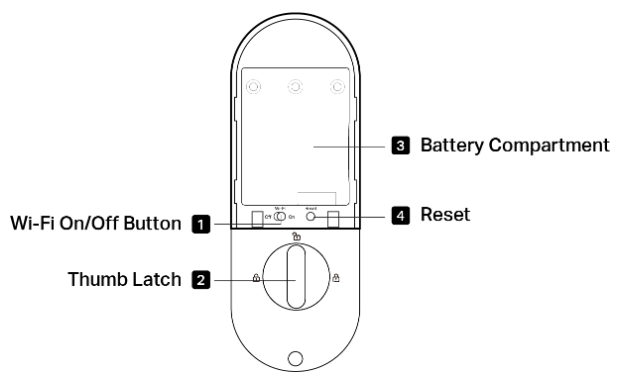
If the Wi‑Fi button is already enabled (it is on by default), check your router’s client list to see whether the door lock is still connected. If it is not, reconnect the lock and check its signal strength. If the signal is too weak, disconnections are likely to occur, again. If this is your case, check here to learn about How to check and improve the network connection stability of Tapo&Kasa smart devices.

CES 2026 Meet TP-Link AI Assistant and More New Products!
  0  
  0  
#2
Options