
ArcherAX55 Slow internet only on Network Kables

I've Internect Connect with 240mBit.
It works before the Router with 240mBit
After the Router (Connected to one of the 4 1000mBit Ports I've only 100mBits.
I've connect to and from the Router with a Cat5e Network Cable.
With Wifi I've a 240mBit Connection and on my Smartphone I Receive 240mBits.
Only over the Network Cable the Traffic will be slow down.
Do you have any suggestions how to fix it?
Thanks.
Regards Helmut
- Copy Link
- Subscribe
- Bookmark
- Report Inappropriate Content

Hi,
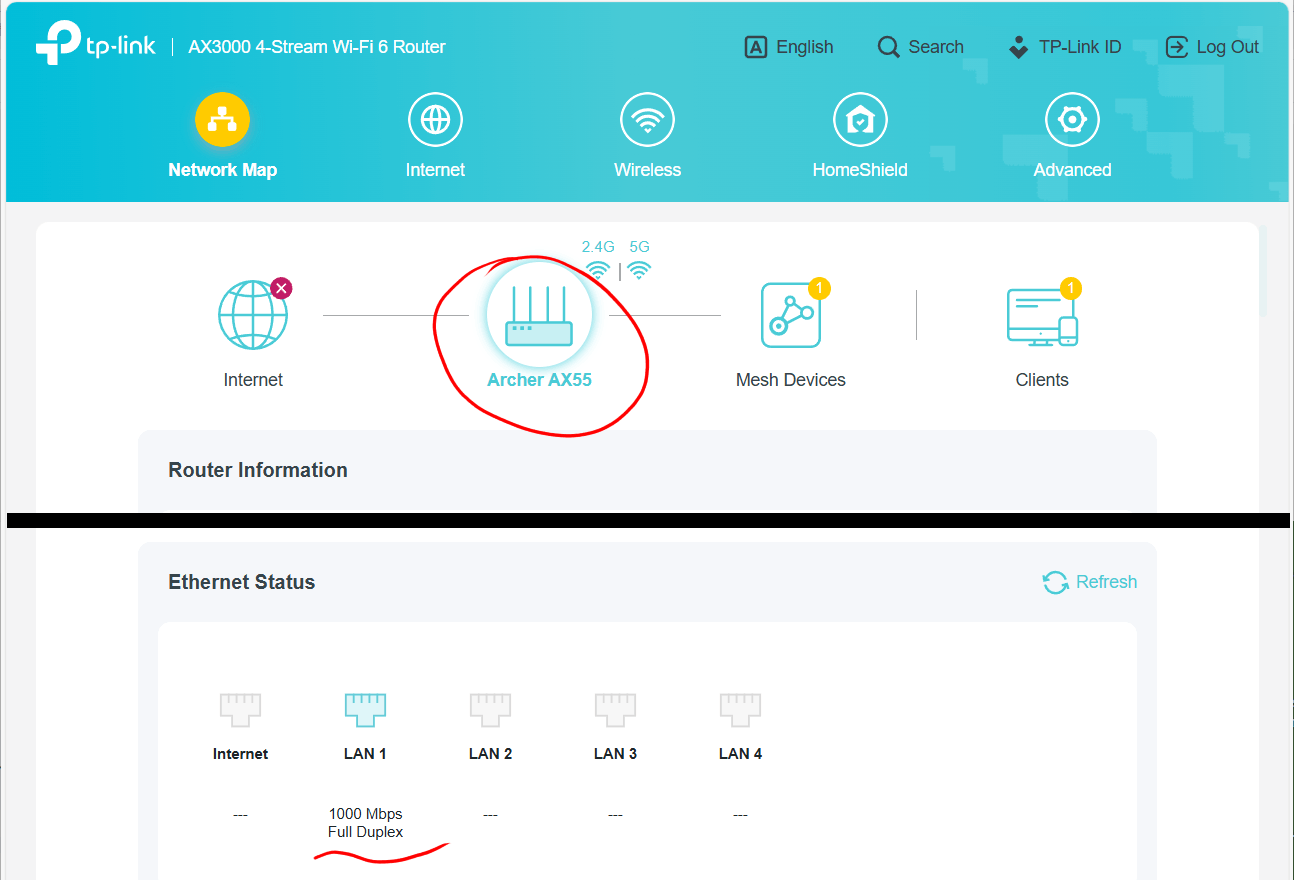
Please check on your AX55 if the Ethernet Status shows 100 Mbps or 1000 Mbps for the LAN port to which you are connected.
If it says 100 Mbps, then in most cases this is caused by an Ethernet cable of insufficient quality. It is very rare that the Ethernet port of a router is defective. Also verify the network adapter of the computer is indeed capable of 1000 Mbps and not limited to 100 Mbps by hardware or software.
- Copy Link
- Report Inappropriate Content
Hi,
Please check on your AX55 if the Ethernet Status shows 100 Mbps or 1000 Mbps for the LAN port to which you are connected.
If it says 100 Mbps, then in most cases this is caused by an Ethernet cable of insufficient quality. It is very rare that the Ethernet port of a router is defective. Also verify the network adapter of the computer is indeed capable of 1000 Mbps and not limited to 100 Mbps by hardware or software.
- Copy Link
- Report Inappropriate Content
- Copy Link
- Report Inappropriate Content
Any chance there might be "Speed Limits" of 100 Mbps set on the AX55 for the Ethernet client device(s)? I am just asking because it has happened to me before that I set some speed limit and then forgot about it, which later resulted in me wasting time for troubleshooting.
- Copy Link
- Report Inappropriate Content
I've changed nothing.
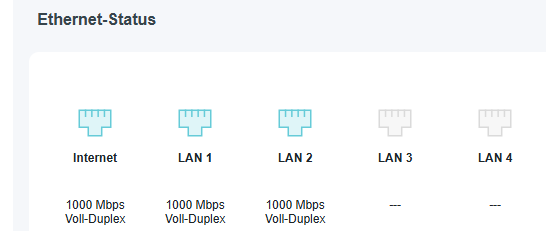
All Ports are on 1000 Mbps Full Duplex.
QoS ist activated with 1000 Mbps.
Is that ok?
Any other suggestions?
- Copy Link
- Report Inappropriate Content
Was the speed via the Ethernet ports always limited to 100 Mbps or have you previously seen higher speeds?
For a test, can you please switch the QoS off and then check if that makes any difference?
- Copy Link
- Report Inappropriate Content
Thanks for your Question. That helps me to check.
Last week I've switched my Internet Provider.
Bevore I'd 300mBit from Magenta
I've switched back to Magente for a test.
With Magenta I receive with speedtest.net 260mbit on my PC and 300mBit on Wifi.
My new Internet Connection is 240mBit from LidlConnect.
With Lidl Connect and speedtest.net I've 240mBit with Wifi and only 120mBit on my PC)
That's misterious.
Do you have a explanation?
Thanks.
Regards.
- Copy Link
- Report Inappropriate Content
Please also try another speed test website for comparison, for example fast.com
I have seen posts on this forum where users reported vastly different test results from different speed test websites. However, the reasons for that are not known.
Actually, the ultimate test would be to download a large file from a fast server on the Internet and check the speed numbers shown by the web browser. (browsers usually show MByte/s, so 240 MBit/s would be about 30 MByte/s)
- Copy Link
- Report Inappropriate Content
Information
Helpful: 0
Views: 536
Replies: 7
Voters 0
No one has voted for it yet.