
TX20U Nano AX1800 Slow Speeds

I'm receiving slow speeds on my Archer TX20U Nano AX1800 adapter (recently purchased a day ago). Not sure what's wrong or if I'm missing something in regard to settings etc, but kind of expected to be a plug n play and realistically have speed results better than what I'm getting in comparison to my other WiFi adapters via lappy and desktop.
What I've tried ...
- Installed latest drivers
- Connecting USB WiFi device to different USB ports on both laptop (USB 2.0) and desktop (USB 2.0 and USB 5Gbps & 10Gbps)
- Testing on laptop was 2 metres from the router
- Testing on desktop is about 10 metres from router
- Unchecked 'Allow the computer to turn off this device to save power' option via Power Management
Speed Tests via Laptop
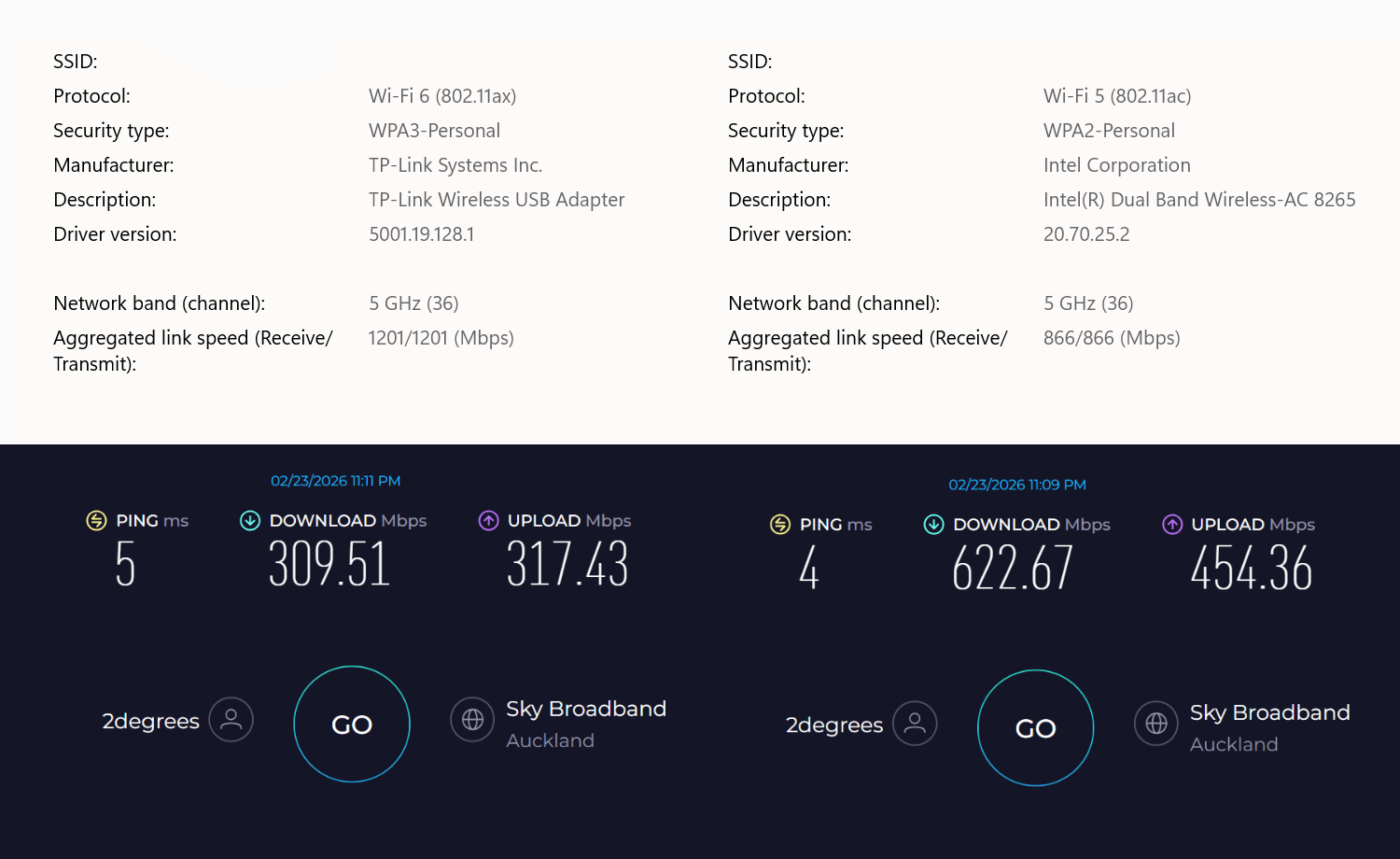
Speed Tests via Desktop
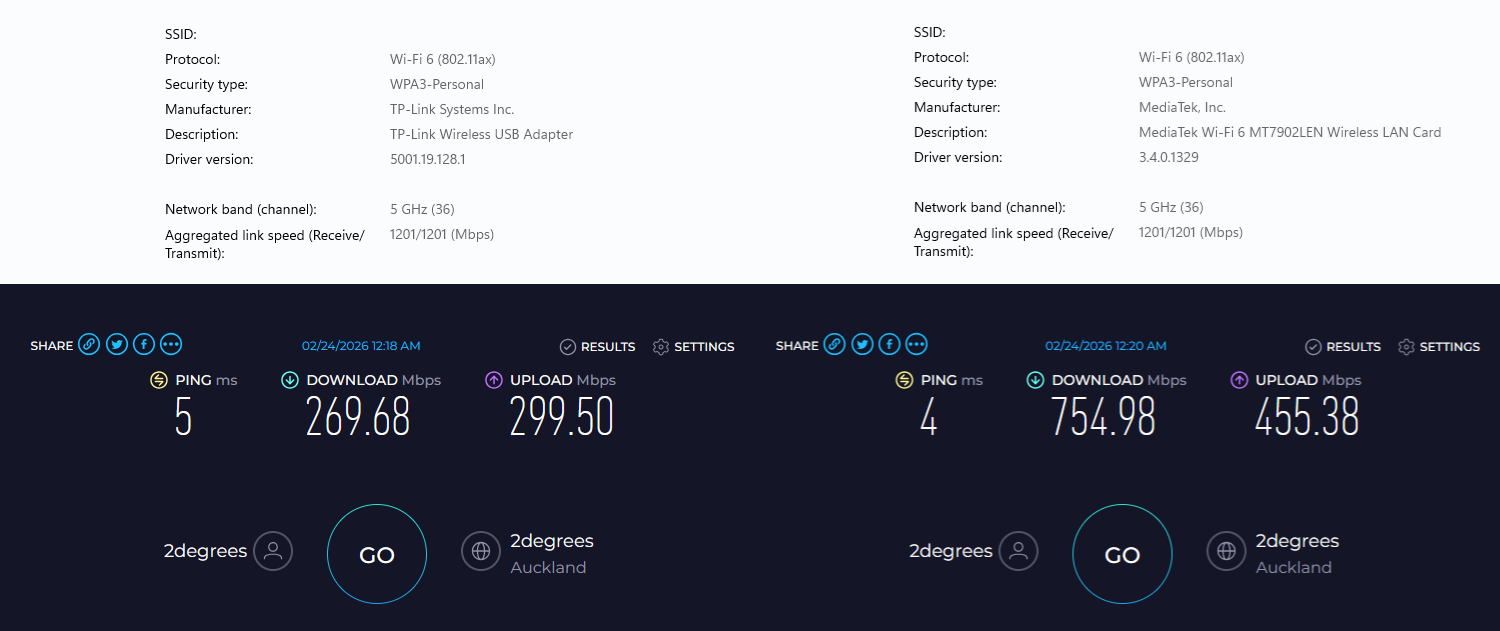
Any help will be much appreciated, thanks in advance.
- Copy Link
- Subscribe
- Bookmark
- Report Inappropriate Content

Hi,
"Connecting USB WiFi device to different USB ports on both laptop (USB 2.0) ..."
While the theoretical speed of USB 2.0 is 480 Mbps (which is what is usually being advertised) the practically achievable maximum is just around 300 Mbps, no matter if it's a Wi-Fi adapter or something like a hard disk.
And even if you are plugged into an USB 3 port (be it 5 Gbps or 10 Gbps), I recommend you check that the TX20U Nano is indeed running in USB 3 mode, as occasionally these USB Wi-Fi dongles may get stuck in USB 2 "Hi-Speed" mode, despite being plugged in an USB 3 port.
"Testing on desktop is about 10 metres from router"
10 metres might not seem all too much, but for these "Nano" style Wi-Fi adapters with their very tiny built-in antennas this is already challenging. Some time ago I ran a test comparing a "Nano" Wi-Fi adapter against another USB Wi-Fi adapter that uses the same Wi-Fi chip, but equipped with regular "bunny-ear" antenna. At some distance the "Nano" adapter was only able to achieve around one third of the download/upload speeds that the larger Wi-Fi adapter achieved.
- Copy Link
- Report Inappropriate Content
Hi,
"Connecting USB WiFi device to different USB ports on both laptop (USB 2.0) ..."
While the theoretical speed of USB 2.0 is 480 Mbps (which is what is usually being advertised) the practically achievable maximum is just around 300 Mbps, no matter if it's a Wi-Fi adapter or something like a hard disk.
And even if you are plugged into an USB 3 port (be it 5 Gbps or 10 Gbps), I recommend you check that the TX20U Nano is indeed running in USB 3 mode, as occasionally these USB Wi-Fi dongles may get stuck in USB 2 "Hi-Speed" mode, despite being plugged in an USB 3 port.
"Testing on desktop is about 10 metres from router"
10 metres might not seem all too much, but for these "Nano" style Wi-Fi adapters with their very tiny built-in antennas this is already challenging. Some time ago I ran a test comparing a "Nano" Wi-Fi adapter against another USB Wi-Fi adapter that uses the same Wi-Fi chip, but equipped with regular "bunny-ear" antenna. At some distance the "Nano" adapter was only able to achieve around one third of the download/upload speeds that the larger Wi-Fi adapter achieved.
- Copy Link
- Report Inappropriate Content
@woozle appreciate your response.
I understand the USB 2.0 limitations, but saw recommendations to test it via USB 3 and thought I'd give it a shot.
After my original post, I had tested the device on another W11 desktop where the router is located at and the adapter was pretty much sitting 50cm away from the router and I was getting the same speed results.
I returned the item for their tech team to make a physical assessment and find a remedy, but once I got to the shop, they instantly gave me a refund and so I paid an extra $20 NZD + refund cash for an ASUS PCE-AX3000 as a replacement. I was keen on this nano device for its ultra-compact design and its signal rate offerings, but was put off with USB WiFi options after several days of testing, tweaking settings, researching solutions, only to end up with the same results.
I think I would have been content if it at least hit stable 500+ Mbps DL / 400 Mbps UL speeds.
Through my testing on 3 different desktops and a laptop, I also encountered random freezing, then reboots and GSOD (W11) which according to the logs, pointed to the WLAN device.
Anyway easily installed PCIe WiFi card, ran some quick tests and am getting average speeds of 800+ Mbps DL / 490+ Mbps UL and that's all I wanted, my old machine (Linux) to gain internet access via wireless capability and some good speeds in comparison to my previous Powerline adapter setup.
Appreciate your reply though.
- Copy Link
- Report Inappropriate Content
The ASUS PCE-AX3000 is certainly a good choice. According to its specs and the supplied driver it should be equipped with an Intel AX200 M.2 Wi-Fi module.
When it comes to Wi-Fi cards/adapters the most important thing is actually the Wi-Fi chip. What brand name is printed on the product and the box it came in is secondary.
Most Wi-Fi cards/adapters are based on Wi-Fi chips made by either Intel, MediaTek or Realtek, and it's probably fair to say that (at least in my opinion) Intel is the most reputable and Realtek the least.
"Through my testing on 3 different desktops and a laptop, I also encountered random freezing, then reboots and GSOD (W11) which according to the logs, pointed to the WLAN device."
There have been quite a few posts here by users facing those same issues with these Realtek-based USB Wi-Fi adapters.
According to my own experience, the same Realtek USB Wi-Fi adapter might work perfectly fine on one computer, but when plugged into another (different) computer it might become hardly usable.
- Copy Link
- Report Inappropriate Content
Information
Helpful: 0
Views: 1723
Replies: 3
Voters 0
No one has voted for it yet.