TP-Link App

TP-Link App

TP-Link App
TP-Link App
20 hours ago - last edited 11 hours ago
Model: Deco XE75 Pro  
Hardware Version:
Firmware Version:

My Mesh Network will not accept My internet/ wi- fi password the Deco app is still showing an old device ( X3 Deco P9 ) that have been replaced with 3x XE75 Pro I cannot get a password accepted to join the internet as I suspect/know that the app has incorrect details stored , I have tried removing the app and reinstalling but nothing changes, Can Anyone please help ?

  0      
  0      
#1
Options
1 Reply
Re:TP-Link App
10 hours ago

  @echnology 

Hi, how about the LED light status on the new Deco XE75 Pro? Is it solid green?


Were the old 3*Deco P9s powered off?

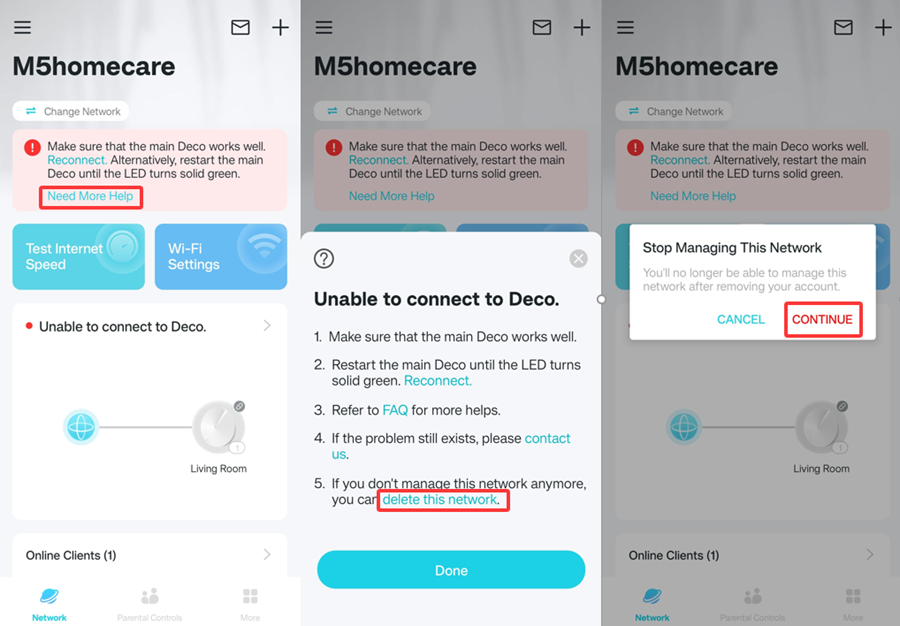
Have you tried to delete the P9 network on the Deco App first, then factory reset Deco XE75 pro(by holding the reset pinhole for one second only), and set it up again on the Deco App?

Three screenshots of the Deco App. The left screenshot shows a network connection issue prompt and an entry to get more help; the middle screenshot lists solutions for failing to connect to Deco, explicitly mentioning the option to delete this network; the right screenshot displays a prompt to stop managing the network, with a "Continue" button for confirmation.

Wait for your reply.

Best regards.

  0  
  0  
#2
Options