
LAN and Wi-Fi devices can't see each other

I have three devices connected to my router -- a wired PC, a wireless PC connected at 2.4GHz, and a security camera connected at 5GHz (same standard SSID, not using the Guest or IoT settings). My wireless PC is able to ping the wired PC, but the wired PC cannot ping the wireless PC; and neither PC is able to ping the camera.
In Wireless, Additional Settings, the AP Isolation setting is turned off, and in Security, Device Isolation, the Device Isolation setting is also turned off.
- Copy Link
- Subscribe
- Bookmark
- Report Inappropriate Content

According to this article https://www.tapo.com/en/faq/140/ the Tapo camera should respond to pings.
I've just tested my own Archer AX55 V1 again and I can ping successfully between any two client devices connected via Wi-Fi or Ethernet.
Did you update from a rather old firmware version to the current version 1.5.11?
If your configuration isn't all to complex, then perhaps you should bite the bullet and perform a "Factory Restore" on your Archer AX55 and then set it up again from scratch. In case you do, then test the ping stuff early on, before modifying a lot of settings.
- Copy Link
- Report Inappropriate Content
Hi,
If your PC is running Windows, then verify that your Wi-Fi network is not set as "Public network" (like in the screenshot below), as the firewall would block all incoming data packets in this case, including pings.
Regarding the unnamed security camera, were you able to ping it previously, when you were using another Wi-Fi router?
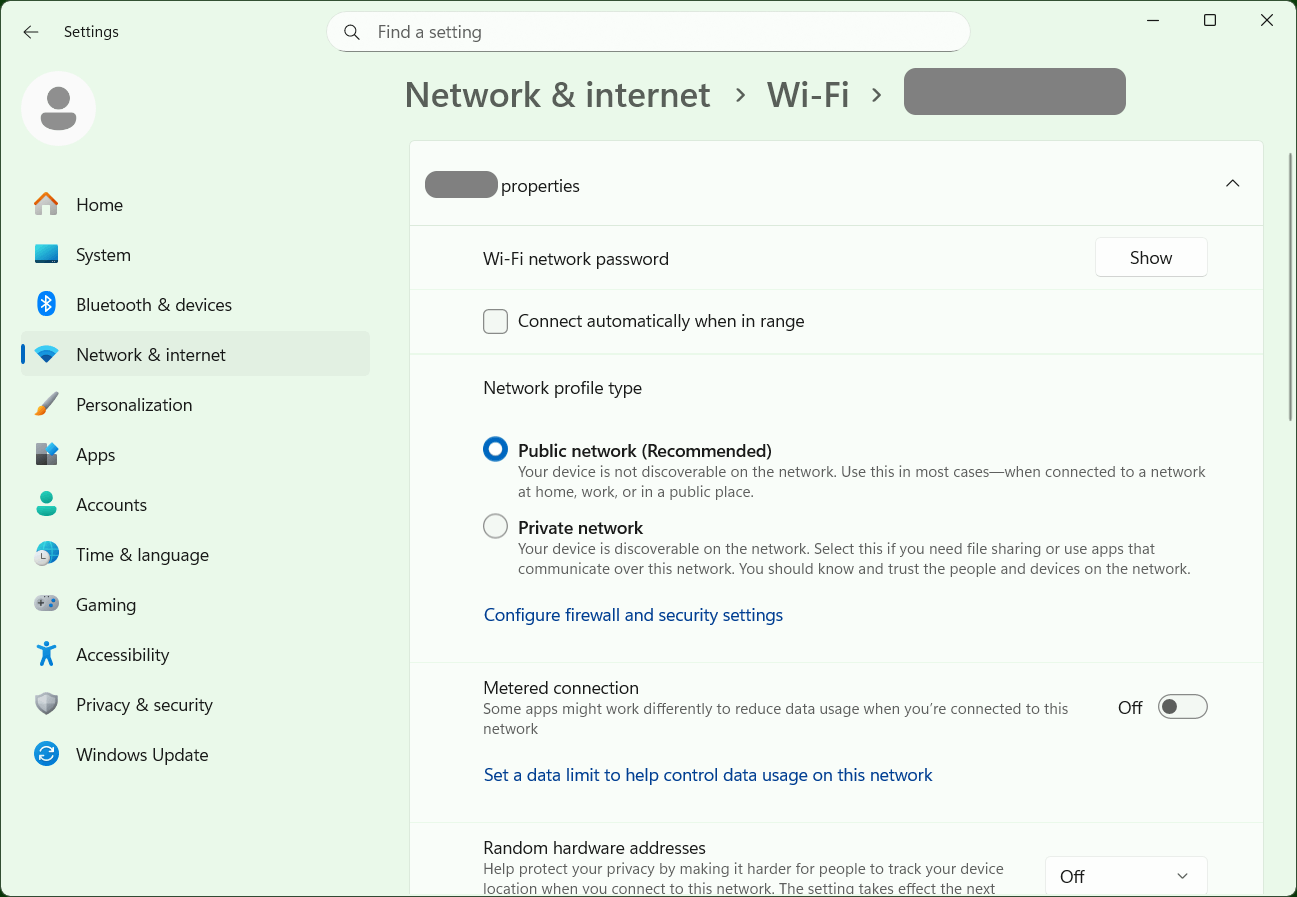
- Copy Link
- Report Inappropriate Content
@woozle The Windows PC does have it identified as a private network, so theoretically it should be responding to pings.
I've never used the security camera (a Tapo C645D) on another network, this is an all-new installation. It's possible the camera wouldn't respond to pings even if everything was connected properly, but the wired PC (a HomeAssistant OS PC) isn't able to connect to any of the services normally present on the camera, and the (wireless) Windows PC, when I issue the ping command, reports back with "destination host unreachable" (though I'm not sure if that response means the camera is just refusing to respond vs. the PC can't even get to it).
- Copy Link
- Report Inappropriate Content
According to this article https://www.tapo.com/en/faq/140/ the Tapo camera should respond to pings.
I've just tested my own Archer AX55 V1 again and I can ping successfully between any two client devices connected via Wi-Fi or Ethernet.
Did you update from a rather old firmware version to the current version 1.5.11?
If your configuration isn't all to complex, then perhaps you should bite the bullet and perform a "Factory Restore" on your Archer AX55 and then set it up again from scratch. In case you do, then test the ping stuff early on, before modifying a lot of settings.
- Copy Link
- Report Inappropriate Content
Did a factory reset, and it didn't seem to help. However, I don't think it's a problem with the router at this point.
With both PCs connected to the router wired, I was able to ping from Windows to HAOS, but not from HAOS back to Windows. A little searching led me to a page with instructions to enable Windows 11 to respond to pings (apparently Private Network isn't good enough these days). The TP-Link forum won't let me post the exact link, but the instructions were to: 1) go to Windows Security, 2) select Firewall & network protection, 3) click on Allow an app through the firewall, 4) click Change settings, and 5) turn on File and Printer Sharing.
Once I followed those instructions, Windows and HAOS were able to ping each other (but neither could ping the wireless camera).
I then took the Windows machine off of wired and connected wirelessly, and Windows and HAOS were still able to ping each other. (The Windows machine got a new IP when it went wireless, so I knew it wasn't "remembering" the same old route.)
I still can't get either device to ping the camera, but considering PCs can ping each other across Wi-Fi and LAN, I think the router is doing its part.
Thank you for your responses and helping me troubleshoot.
- Copy Link
- Report Inappropriate Content
Information
Helpful: 0
Views: 1137
Replies: 4
Voters 0
No one has voted for it yet.