
Archer AX72(US) Singapore - Latest Firmware Update

Hi, just wanted to check if the Singapore firmware (US/SG) will be updated to the latest as per the EU version?
The EU version has been updated from 1.2.6 to 1.4.3 and 1.4.5 in September 2025 but the SG version is not yet updated since July 2024.
Currently the latest firmware available is "Archer AX72(EU)_V1_1.4.5 Build 20250928" at this page:
Download for Archer AX72 | TP-Link United Kingdom | Published Date: 2025-09-30
But for the SG firmware, the latest available version is "Archer AX72(SG)_V1_1.2.6 Build 20240619" at the page:
Download for Archer AX72 | TP-Link Singapore | Published Date: 2024-07-09
It seems that from a post in an older thread on firmware updates, TP-Link needs to contact the Singapore local team to release new firmware versions on the TP-Link Singapore official website.
- Copy Link
- Subscribe
- Bookmark
- Report Inappropriate Content


Hello @creativezane ,
I noticed that the US version 1.4.6 has been released; you might want to try this version:
| Archer AX72(US)_V1_1.4.6 Build 20260112 |
||
|---|---|---|
- Copy Link
- Report Inappropriate Content
Hi @creativezane ,
Welcome to our community.
I've noticed your feedback, but I'm afraid I won't be able to get immediate updates on the firmware update's progress.
However, I do know that you can also manually update your SG version to the latest EU version firmware. The two are compatible.
Best Regards.
- Copy Link
- Report Inappropriate Content
@Joseph-TP Hi Joseph, thank you for your reply. I have actually attempted to manually update to the EU firmware but encountered an error. It seems that they are not compatible. Separately, EU firmware have restrictions on transmit power compared to the US/SG firmware, hence it is definitely better if the SG team would release the official firmware version. I am not in a rush but hope you can help to pass the message along to the Singapore team as this particular model is not compatible with OpenWRT due to the chipset. Thanks!
- Copy Link
- Report Inappropriate Content
Hi @creativezane ,
Can I see what error messages might appear during the update process? When manually updating firmware, please note the following:
1. Verify the firmware file:
• Ensure that the correct firmware is downloaded. The hardware version of the firmware should match the one on your router's bottom label
• Verify the format of the firmware file. The file uploaded should be a .bin file
2. Check for common error scenarios:
• If you see an error message "failed to upgrade" or the page keeps loading after uploading, wait for 5 minutes, then refresh the page
• Try using a different web browser (or incognito mode) to perform the upgrade
3. Reboot and retry:
• Reboot the router and try the upgrade process again
4. Ensure firmware is up-to-date:
• If the upgrade process bar gets stuck, wait for 5 minutes, then refresh the page
For more detailed instructions, you can visit What should I do if fail to upgrade the firmware of my TP-Link router?
Additionally, we understand you may be looking to improve device performance or functionality, but installing third-party firmware may introduce instability or even damage to your device. These firmwares have not been officially tested and certified by us and may not meet our product's security and performance standards. We do not recommend users update OpenWRT.
- Copy Link
- Report Inappropriate Content
@Joseph-TP Hi Joseph, I followed the instructions and extracted the EU 1.4.5 firmware bin file and uploaded it to the router but got an "Upload error." - it seems that the EU firmware is incompatible with the US v1 hardware.
I verified that it is not the router issue as I downloaded the latest firmware "AX72(SG)_V1_1.2.6 Build 20240619" from the SG website and it was able to successfully update to this bin file despite being on the same 1.2.6 firmware version already.
That is why I created this post to check if the SG team intends to upgrade the SG firmware (latest version 1.2.6) to the same version as the EU firmware (latest version 1.4.5).
- Copy Link
- Report Inappropriate Content
Hi @creativezane ,
Sorry for the late reply.
Can you tell me if it's still not possible to install version 1.4.5? To avoid missing your case and being unable to follow up, you can also contact Local Support via hotline.
- Copy Link
- Report Inappropriate Content
@Joseph-TP Hi Joseph, yes it is still not possible to install 1.4.5 (EU) onto the US/SG model I have.
- Copy Link
- Report Inappropriate Content
Hello @creativezane ,
I noticed that the US version 1.4.6 has been released; you might want to try this version:
| Archer AX72(US)_V1_1.4.6 Build 20260112 |
||
|---|---|---|
- Copy Link
- Report Inappropriate Content
@Joseph-TP Thanks Joseph, I managed to download and manually updated the firmware via the link you shared!
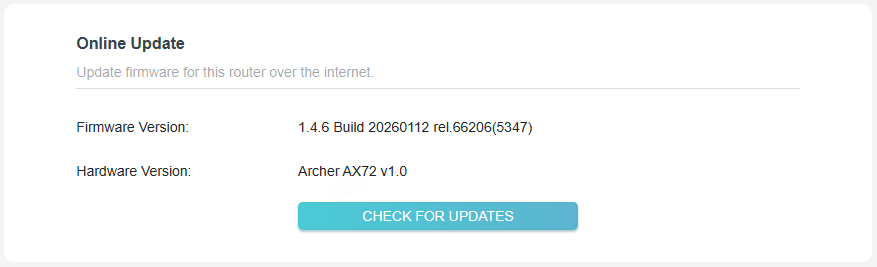
- Copy Link
- Report Inappropriate Content
Hello @creativezane ,
That's great! 
- Copy Link
- Report Inappropriate Content
Information
Helpful: 69
Views: 1090
Replies: 9
Voters 1