Missing list of error codes

Missing list of error codes

Missing list of error codes
Sunday
Model: TL-WA801ND  
Hardware Version: V4
Firmware Version: 3.16.9 Build 160913 Rel.42766n

The unit is configured as a Client and this is working fine when tested with several brands of routers and access points

However, in the production setup neither of our two TL-WA801NDs will connect to the production router,

The system log is not very helpful in displaying the cause of this.

Why is a clear reason for the problem not printed in the syslog ?

Error messages like MSG WARNU#647273 are useless when they cannot be looked up.

Why do these units not connect to our production router ?


####################################################################
#                    TL-WA801ND  System Log 
# Time = 2016-01-01  0:02:58 180s
# H-Ver = WA801ND v4 00000000 : S-Ver = 3.16.9 Build 160913 Rel.42766n 
# L = 192.168.0.254 : M = 255.255.255.0
# W1 = DHCP : W = 0.0.0.0 : M = 0.0.0.0 : G = 0.0.0.0
####################################################################

1st day 00:00:03     OTHER         INFO       System started
1st day 00:00:09     SECURITY      INFO       PPTP Passthrough enabled
1st day 00:00:09     SECURITY      INFO       L2TP Passthrough enabled
1st day 00:00:09     SECURITY      INFO       IPSEC Passthrough enabled
1st day 00:00:09     SECURITY      INFO       FTP ALG enabled
1st day 00:00:09     SECURITY      INFO       TFTP ALG enabled
1st day 00:00:09     SECURITY      INFO       H323 ALG enabled
1st day 00:00:09     SECURITY      INFO       RTSP ALG enabled
1st day 00:00:09     SECURITY      INFO       SIP ALG enabled
1st day 00:00:15     OTHER         WARNING    LAN IP and mask changed to c0a800fe ffffff00
1st day 00:00:16     DHCP          NOTICE     DHCP server started
1st day 00:00:17     OTHER         INFO       MSG WARNU#647270|
1st day 00:00:17     OTHER         INFO       Create Syslog Refresh Thread Success
1st day 00:00:17     OTHER         INFO       System Initialize Finished.
1st day 00:00:22     OTHER         INFO       MSG WARNU#647273|
1st day 00:00:28     OTHER         INFO       MSG WARNU#647365|
1st day 00:00:33     OTHER         INFO       MSG WARNU#647367|
1st day 00:00:34     DHCP          NOTICE     DHCP server started
1st day 00:00:38     OTHER         INFO       MSG WARNU#647365|
1st day 00:00:43     OTHER         INFO       MSG WARNU#647267|


  0      
  0      
#1
Options
1 Reply
Re:Missing list of error codes
11 hours ago - last edited 10 hours ago

  @joergent 


Based on available forum discussions, the message: 
MSG WARNU#647267 appears as an entry in the system logs of TP-Link network devices, such as the TL-WA901N, often appearing alongside connectivity issues or device lock-ups
  • Context: It is listed as an "OTHER, INFO" type message in system logs, often appearing frequently when the device is experiencing stability issues or failing to connect to a router.
  • Meaning: Specific definitions for these numeric codes are not explicitly listed in public TP-Link documentation, with users noting them as generic or unhelpful error messages. 
 
Troubleshooting Steps for Similar Issues:
If this warning is associated with a locking up or disconnected TP-Link device, common troubleshooting steps include:
  • Updating the device firmware to the latest version.
  • Checking for IP address conflicts between the access point and main router.
  • Checking the DHCP server settings.


An example of this informational warning message can be seen here

TL-WA801ND v4 lates FW release is from 10 years ago, so that's not an option for you.

You may consider the other two troubleshooting options mentioned.

Looking at the beginning of the log, TL-WA801ND has not received a WAN IP address, mask and gateway: "W = 0.0.0.0 : M = 0.0.0.0 : G = 0.0.0.0".

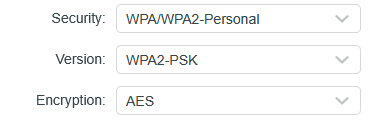
This could be related to your router wireless settings mismatch:


Or IP address conflict between the router DHCP server settings and the TL-WA801ND LAN IP address.

If this was helpful click on the arrow pointing upward to make it blue. If this solves your issue, click the star to make it blue as a "Recommended Solution". Tips:149wubkkfoLmNDjDbiTxx4ZU8mpcMA5CJt
  0  
  0  
#2
Options