
Middle light in AV600 Powerline adapter is not blinking

Hello
I have been using AV600 powerline adapters which is connected to the tp-link AC55. There was initially some issues at first and after sometime i didnt receive any network connection and the middle light in the AV600 always stayed off. Whatever I try I have the middle light (Powerline LED) that is always off.
I have tried: re-booting my router, updating the router firmware, different ethernet cables, different wall sockets, re-booting the adapters themselves. Still nothing.
Top light is on, middle light is off, bottom light is on.
Not sure what else I can do, any ideas?
Josh
- Copy Link
- Subscribe
- Bookmark
- Report Inappropriate Content

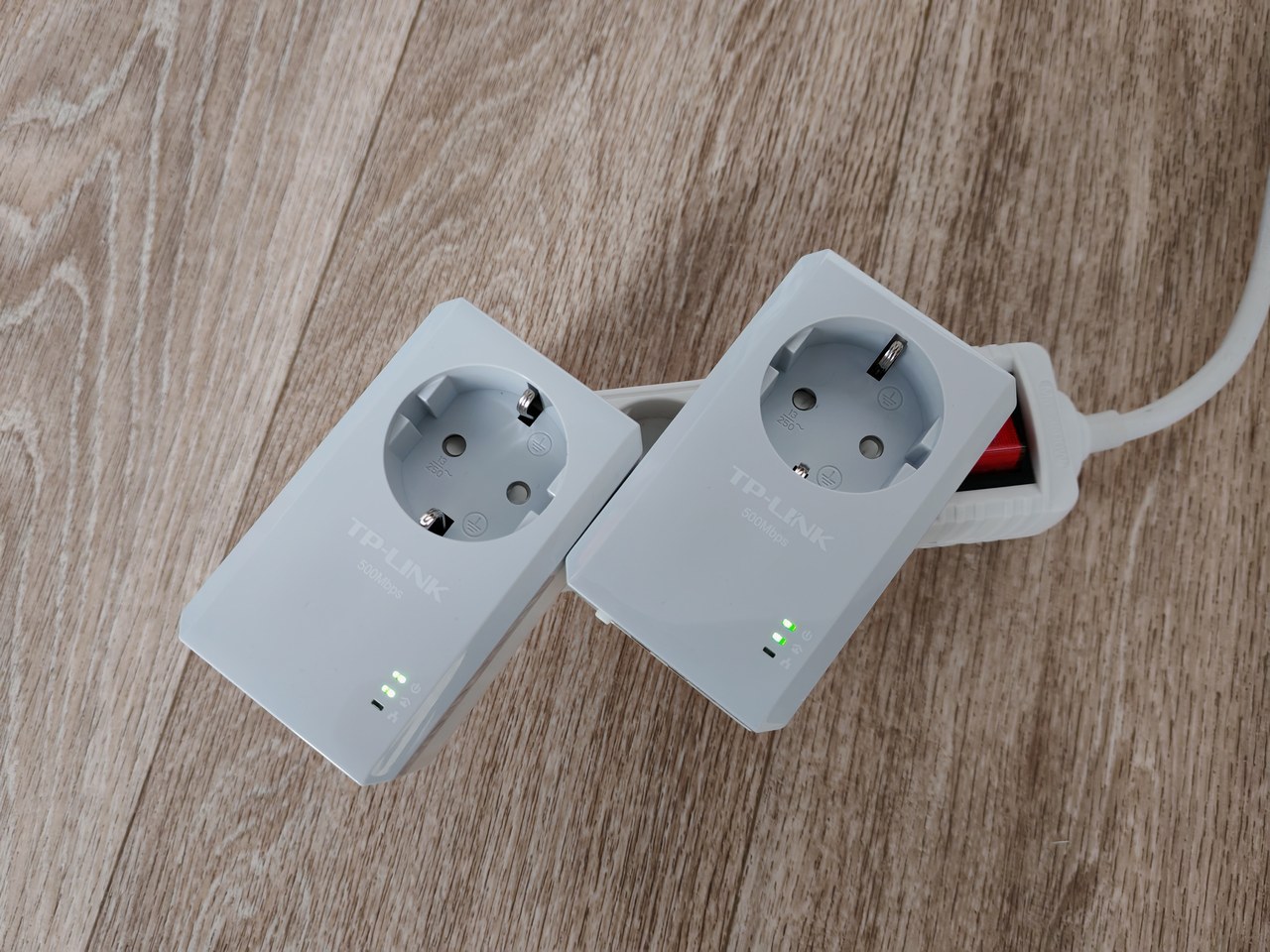
The LED indicating whether a router or other networking device is connected is the bottom LED.
The middle LED indicates if there is a Powerline connection between the two AV600 adapters.
The condition you first need to achieve is what is shown in the picture below. If the middle LEDs are off, then try to pair the two AV600 by pressing the "Pair" buttons.
- Copy Link
- Report Inappropriate Content
Hi,
The Powerline LEDs are supposed to be solid on when there is a good Powerline connection.
You mentioned you tried different wall sockets, but did you also try wall sockets that are very close to each other? (like no more than three meters apart)
If the Powerline LEDs still don't turn of when the two AV600 adapters are very close, then try to "pair" the AV600 adapters by pressing the "Pair" buttons on both adapters and then wait a little while.
- Copy Link
- Report Inappropriate Content
Hi,
I have connected the router and Powerline adapter in a double wall socket. Eventhough the middle light in the powerline doesn't turn green which shows the router to show orange colour. Clarify me if its wrong, I think its because i didn't have a network connection that's why it doesn't shows the light. Whether it will work if it connected to a modem?
- Copy Link
- Report Inappropriate Content
The LED indicating whether a router or other networking device is connected is the bottom LED.
The middle LED indicates if there is a Powerline connection between the two AV600 adapters.
The condition you first need to achieve is what is shown in the picture below. If the middle LEDs are off, then try to pair the two AV600 by pressing the "Pair" buttons.
- Copy Link
- Report Inappropriate Content
Information
Helpful: 0
Views: 435
Replies: 3
Voters 0
No one has voted for it yet.