
Cannot link to home hub have tried all 3 suggested methods

I have tried via WPS button,
Wifi symbol flashes white then goes out...
I set up the Tether app, I get to stage of entering home hub password, (CORRECTLY!!!) hit 'done' on keyboard, then page fails to move on... cursor still flashing but all 16 digits are entered.
Also tried via Web browser, get message: 'looks like you may have run into an issue... and suggests the other 2 methods already tried... can't get anywhere... HELP
- Copy Link
- Subscribe
- Bookmark
- Report Inappropriate Content

ClaireSc wrote
I have tried via WPS button,
Wifi symbol flashes white then goes out...
Hi,
Pardon the question, but you did press both WPS buttons, the one on your Wi-Fi router and the one on the RE315 (button with the lock symbol), right?
By the way, some Wi-Fi routers use dual-function buttons (for example, a short press of the button actuates one function and a long press actuates another function). If this was the case, then ensure the button is pressed correctly to initiate WPS on your router.
ClaireSc wrote
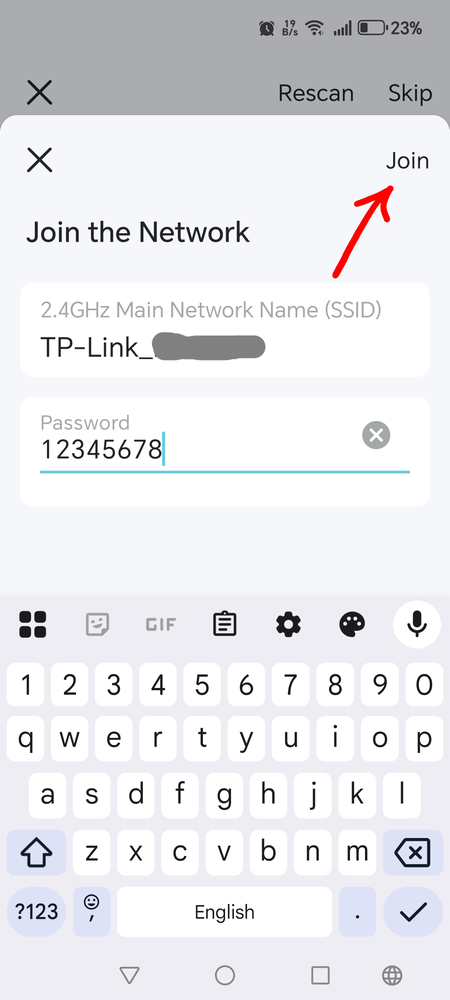
I set up the Tether app, I get to stage of entering home hub password, (CORRECTLY!!!) hit 'done' on keyboard, then page fails to move on... cursor still flashing but all 16 digits are entered.
What you describe is as intended. To "Join the network" you need to tap on "Join".
- Copy Link
- Report Inappropriate Content
ClaireSc wrote
I have tried via WPS button,
Wifi symbol flashes white then goes out...
Hi,
Pardon the question, but you did press both WPS buttons, the one on your Wi-Fi router and the one on the RE315 (button with the lock symbol), right?
By the way, some Wi-Fi routers use dual-function buttons (for example, a short press of the button actuates one function and a long press actuates another function). If this was the case, then ensure the button is pressed correctly to initiate WPS on your router.
ClaireSc wrote
I set up the Tether app, I get to stage of entering home hub password, (CORRECTLY!!!) hit 'done' on keyboard, then page fails to move on... cursor still flashing but all 16 digits are entered.
What you describe is as intended. To "Join the network" you need to tap on "Join".
- Copy Link
- Report Inappropriate Content
Many Thanks 🙏
I now have WiFi Extention in d'house!!!
I did not realise the tiny 'Join' at top right of the window was a button...
I thought it just a label for that window.
DOH!
Mea culpa.
I tend to expect 'move on/submit' type buttons to appear below/after the entries I've made?
Bit old school I expect...
But very appreciative of the help 😊
CS
- Copy Link
- Report Inappropriate Content
Information
Helpful: 0
Views: 258
Replies: 2
Voters 0
No one has voted for it yet.