
TP-link Archer AX53 Firmware Version 1.7.1 Build 20260213 rel.87654 (Wi-Fi 5 Device Speed Capped)

Hello,
This is to confirm that last night I updated the firmware to version 1.7.1 Build 20260213 rel.87654 on my Archer AX53 and since then I have been facing the following issues:
- Wi-Fi range has significantly decreased. At the same distance, I am now getting slower speeds on Wi-Fi 6 devices while using channel 149 and 80 MHz channel width on 5 GHz. Previously, I used to get 800 Mbps+, but now I am getting around 400 Mbps. However, when I move very close to the router, I can still get 700 Mbps+.
- Wi-Fi range has also decreased on Wi-Fi 5 devices, and the speed appears capped at about one-fourth of the previous performance while using the same channel settings. On my gigabit internet connection, the speed now rarely exceeds 250 Mbps in the same environment. Previously it was 500 Mbps+ on the same device.
- The 2.4 GHz band is also behaving similarly with reduced range and speed.
- The web interface has become very slow and less responsive after the update.
Solutions I have already tried are as follows:
- Factory reset and reconfigured everything, but no improvement.
- Enabled and disabled QoS, but no improvement.
We would really appreciate a quick fix for these issues.
Thank you for your attention,
TP-Link Support Team
- Copy Link
- Subscribe
- Bookmark
- Report Inappropriate Content
@BanglaShoppers 🤓 bro note 20 ultra and 14 pro max doesn't support 160 mhz wifi 6 it oly supports wifi 6 at 80 mhz
- Copy Link
- Report Inappropriate Content


Hello
Thank you both for the information; I will sync this information with the engineers. Please also reply to this email and attach your system log and backup file.
- Copy Link
- Report Inappropriate Content
Hi @Harutolist
Besides the two devices you mentioned, how is the connectivity of other wireless devices? Including speed and stability, WiFi coverage, and are there any noticeable changes after updating to 1.7.1?
What are models of your phone and laptop?
Harutolist wrote
I can't say i have those issues when connected to ethernet, but i do when connected to wifi on my laptop and my mobile.
- Copy Link
- Report Inappropriate Content
Hi @Dezinn ,
If it's convenient, could I know if you've successfully rolled back?
What unexpected behaviors did you mainly encounter in version 1.7.1? Did it behave as BanglaShoppers mentioned, such as decreased wireless speed and reduced WiFi coverage?
- Copy Link
- Report Inappropriate Content
Pankajuuuuu wrote
@BanglaShoppers 🤓 bro note 20 ultra and 14 pro max doesn't support 160 mhz wifi 6 it oly supports wifi 6 at 80 mhz
I know brother, but in my UniFi access point unsupported phone fall back to 80mhz and conencts without any issues even though channel set to 160mhz. So TPLINK may fix this issue?
- Copy Link
- Report Inappropriate Content
@BanglaShoppers can you do a speed test on okla and show it to me what quality of internet you are getting and a bufferbloat test too
- Copy Link
- Report Inappropriate Content
Pankajuuuuu wrote
@BanglaShoppers can you do a speed test on okla and show it to me what quality of internet you are getting and a bufferbloat test too
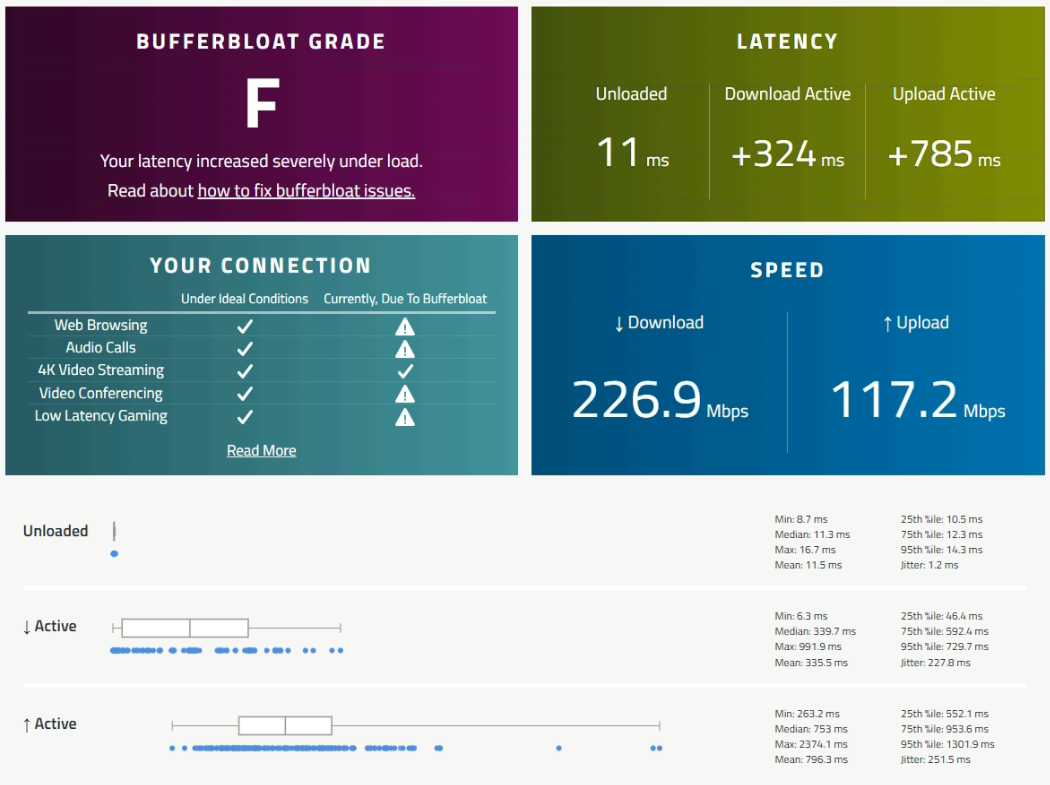
Here you go… I used to get 600+ Mbps on the same desktop with a Netgear A7000 adapter, with a link speed of 866.7 Mbps. Currently, although my Netgear still connects at 866.7 Mbps, it no longer goes above 260 Mbps on the same machine. On the same server, the latency used to be around 5–10 ms—now you can see the difference yourself.

- Copy Link
- Report Inappropriate Content
You can check the loaded latency on this website. I’ve noticed that the loaded latency in your connection is much higher than expected, and that could also be a problem with the TP-Link router: https://www.waveform
- Copy Link
- Report Inappropriate Content
- Copy Link
- Report Inappropriate Content
@BanglaShoppers F is the worst you can get bro when you upload or download some files and side by side you are playing 4k video and if you play games then you will notice that the ping is skyrocketing to 300 ms . And to solve this there is a setting called QOS which is also broken in tp link ax53
- Copy Link
- Report Inappropriate Content
Information
Helpful: 19
Views: 7065
Replies: 67
Voters 3

