
TP-link Archer AX53 Firmware Version 1.7.1 Build 20260213 rel.87654 (Wi-Fi 5 Device Speed Capped)

Hello,
This is to confirm that last night I updated the firmware to version 1.7.1 Build 20260213 rel.87654 on my Archer AX53 and since then I have been facing the following issues:
- Wi-Fi range has significantly decreased. At the same distance, I am now getting slower speeds on Wi-Fi 6 devices while using channel 149 and 80 MHz channel width on 5 GHz. Previously, I used to get 800 Mbps+, but now I am getting around 400 Mbps. However, when I move very close to the router, I can still get 700 Mbps+.
- Wi-Fi range has also decreased on Wi-Fi 5 devices, and the speed appears capped at about one-fourth of the previous performance while using the same channel settings. On my gigabit internet connection, the speed now rarely exceeds 250 Mbps in the same environment. Previously it was 500 Mbps+ on the same device.
- The 2.4 GHz band is also behaving similarly with reduced range and speed.
- The web interface has become very slow and less responsive after the update.
Solutions I have already tried are as follows:
- Factory reset and reconfigured everything, but no improvement.
- Enabled and disabled QoS, but no improvement.
We would really appreciate a quick fix for these issues.
Thank you for your attention,
TP-Link Support Team
- Copy Link
- Subscribe
- Bookmark
- Report Inappropriate Content
Pankajuuuuu wrote
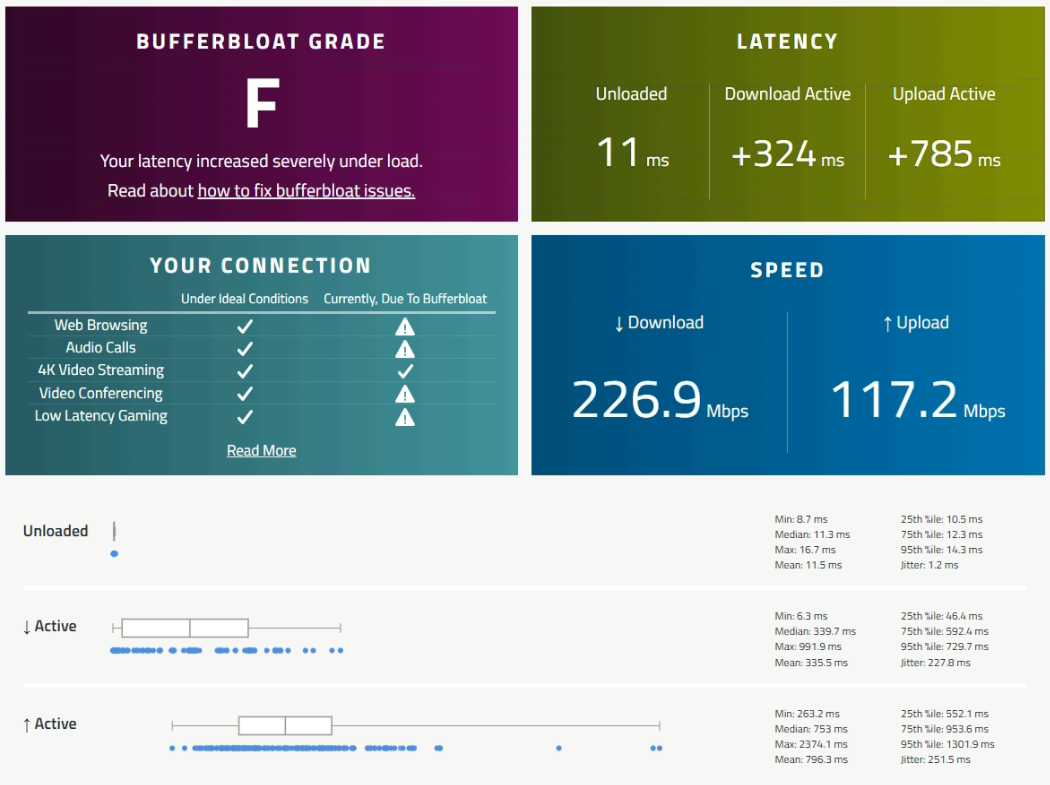
@BanglaShoppers F is the worst you can get bro when you upload or download some files and side by side you are playing 4k video and if you play games then you will notice that the ping is skyrocketing to 300 ms . And to solve this there is a setting called QOS which is also broken in tp link ax53
Before updating firmware it was not the case at all.
- Copy Link
- Report Inappropriate Content


Hi @BanglaShoppers ,
Is your test result based on firmware 1.7.1? If QoS is disabled, will the test result change to A?
BanglaShoppers wrote
- Copy Link
- Report Inappropriate Content
Hello @Pankajuuuuu ,
To avoid missing a response, we'd like to remind you that your case has been escalated to the engineer, and the case ID is TKID260432673.
Of course, we also welcome you to share progress and participate in discussions here at any time.
- Copy Link
- Report Inappropriate Content
It same my friend,
However your support team reached me and in a conversation with them for debugging. I will update here once we come to a solution.
Thank you so much!
- Copy Link
- Report Inappropriate Content

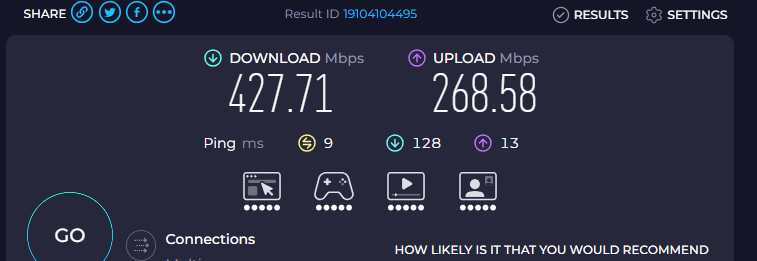
@Joseph-TP This is my wifi performance with this firmware. Despite having an internet plan of 1 gbps; despite having 866/866 transmission for wifi on the 5ghz band, the actual speed is just cut by a lot.
- Copy Link
- Report Inappropriate Content
Hello @Harutolist ,
Is this result from a speed test when only connected to the 5GHz band? Have you tested different 5GHz devices? Are the wireless speeds on other devices reasonable?
Also, did these anomalies begin with the 1.7.1 update?
If your Internet Service Provider (ISP) offers a 1000Mbps plan with a 5GHz band link speed of 866/866 Mbps, but your actual speed test results are 427.71/268.58 Mbps.
Please note that the 866 Mbps link speed refers to the maximum theoretical transmission rate of the wireless connection between your device and the router. Actual speeds may be lower than the link speed due to various factors.
Therefore, 427.71 Mbps is a reasonable figure. Regarding upload speed, you may need to consult your ISP to find out what upload speed is included in their plan.
If you experience unsatisfactory 5GHz speeds on different devices, you can try the following suggestions:
1. Log in to the router management interface (http://tplinkwifi.net), go to Advanced > Wireless Settings, and try changing the 5GHz Wi-Fi channel. Test different channels to find the best one for your environment.
2. Make sure QoS is disabled (Advanced > QoS).
3. Check Parental Controls in the Tether app and ensure no parental control profiles are configured.
4. When testing speed, place your test device next to the router to eliminate the impact of distance and obstacles.
5. Try using different speedtest servers on speedtest.net, as some servers may provide better speed results.
- Copy Link
- Report Inappropriate Content
Information
Helpful: 12
Views: 2883
Replies: 46
Voters 2
