
Dual SSID's with same name - one with not-exsisting mac address

Dual SSID's with same name - one with not-exsisting mac address

Dual SSID's with same name - one with not-exsisting mac address
Yesterday
Model: Deco XE75  
Hardware Version: V2
Firmware Version: 1.3.1 Build 20251023, rel. 43624

Hi !


I have an mesh system with three XE75. This set replaced a former set in the start of 2024. This has worked as it should - until now. In the recent periode, the wifi network has become unstable, and I have had to reboot my wifi clients to get online again. Since this simple "workaround" has fixed my problems, I have'nt research any further the root-cause why this has happend.


But now things has gotten worse, so now I would like to fix the problem once for all wink 


I have one (and only one) SSID - Bekkeberget_ISP, with both 2,4 GHz, 5 Ghz and 6 Ghz. The Deco system is pure wifi/access points, I have en pfsense acting as router, and DHCP server (using 192.168.86.1 /24 as def gw)


My three Deco's has the following mac-addresses (ends with):


Main Deco, 192.168.86.100, mac: ....1B-49

sec Deco, 192.168.86.117, mac....1B-C1

third Deco, 192.168.86.112, mac...1B-53


But in my Deco app - I have an option to "change network" :
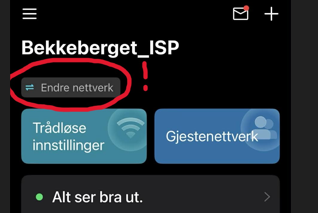
 

And - when I click on that option, it shows two networks - with the same SSID - but pointing at two different mac-addresses:
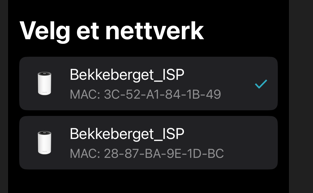


I'm pretty sure that this is the cause of my problems. My wifi-clients is trying to connect to an non-exsiting network, but with the correct SSID name...


The correct network is with the unit with the mac-address that ends with 1B-49. I do not have that other mac address (...1D-BC) in my network anywhere...And I will only have one SSID - with one network, and one main Deco, pointing at the correct mac-address...


So my questions are:

- How do I remove the second (and with wrong mac-address) network (with the same SSID) ? I cannot see any options how to remove just that one ? 

- Will a factory reset of my Deco's fix this ? 

- Could the second/wrong network, be from my first set of Decos ? And - if so - is this network in my "cloud account" - and not in my physical network/boxes ?


Appreciate your help and assistance smiley


Regards

Bjørn Myhre


  1      
  1      
#1
Options
3 Reply
Re:Dual SSID's with same name - one with not-exsisting mac address
14 hours ago

  @Myhre 

Hi, welcome to the community.

You could switch to the network with the non-existing MAC address (...1D-BC), then refer to this link to check whether you can remove this network:

How to delete a network on the Deco app


A factory reset of the hardware might delete the normal network(1B-49) as well.

The other SSID is very likely to be the old network. I saw before that users can reset the hardware when the network is offline in the Deco App. So this "reset and unbind" request hasn't been synced to the cloud, and the cloud server might still save the caches and think this network is still here, just temporarily offline.


Wait for your reply.

Best regards.

  1  
  1  
#2
Options
Re:Dual SSID's with same name - one with not-exsisting mac address
13 hours ago

  @Myhre @David-TP 


Never had this exact issue before but the last time I had to factory reset my decos it wiped the main network. What if (if the deco supports it) a backup then reset and restore? Maybe it wont back up the ghost network?

Need help with the Deco app, setup, Ethernet backhaul, network switch or rolling back firmware? Router or AP mode? https://community.tp-link.com/us/home/forum/topic/699816?page=1
  0  
  0  
#3
Options
Re:Dual SSID's with same name - one with not-exsisting mac address
8 hours ago

  @David-TP That solved my problem - the old "ghost network" is no gone from my app. So now I cross my fingers, and see if this solved my instability or not...

  0  
  0  
#4
Options