
"FTP(via Internet)" is picking "Access Address" to VoIP interface's IP address

I have a USB drive connected to my XX530V. However, under the USB sharing option, the USB storage cannot be accessed through FTP on port 21 from the intranet.
Furthermore, the FTP/HTTP/HTTPS services are not binding to the GPON's external WAN interface IP. Instead, they are picking up the VoIP interface's IP address, rendering the FTP/HTTP/HTTPS server entirely inaccessible.
I would greatly appreciate your assistance in resolving this problem.
Thanks in advance.
Dr. JD
- Copy Link
- Subscribe
- Bookmark
- Report Inappropriate Content


Hello @Jeyadheepan ,
Welcome to our community.
May I know if your XX530v was from your ISP? Who is your ISP?
Please try the following steps for the USB FTP access:
1. Enable USB Storage and FTP Service:
• Log in to the router's web management interface (Visit http://tplinkmodem.net or http://192.168.1.1)
• Go to Advanced > USB Sharing > Sharing Access > Sharing Settings.
• Enable the drive that you want to share on the network
• If you wish to access the drive from the intranet via FTP, make sure the FTP service is enabled
• If you wish to access remotely, enable Internet FTP as well
2. Check USB Drive Format:
• Ensure your USB drive is formatted in a compatible format (If you use a USB hard drive, make sure its file system is FAT32, exFat, NTFS or HFS+)
• NTFS is recommended for better compatibility and performance
3. Verify Write Access:
• Make sure you are using an account with read & write access to access the USB drive
• Only SMB/Samba and FTP access support writing to the USB drive
4. For Remote FTP Access (if applicable):
• Ensure Internet FTP is enabled
• Ensure the router WAN IP address is a public IP address
• Use DDNS if the router WAN IP address changes dynamically
Best Regards.
- Copy Link
- Report Inappropriate Content
Dear D@Joseph-TP ,
Thank you for your reply. I have double-checked and ensured that all the settings you mentioned are correctly configured.
My ISP is BSNL.
Under the WAN settings, I have created two profiles. The first is for the internet though EPON, named "BSNL Internet," which is a EPON PPPoE connection. (The public IP of this connection needs to be bound to the FTP service).
The second profile is for VoIP, named "BSNL VoIP," which is assigned a dynamic IP exclusively for voice services. (Currently, the public IP of this VoIP service is binding to the FTP service). Since the VoIP network won't allow FTP traffic, this makes it impossible to access files from outside the LAN.
I understand that I need to set the default gateway for my network to route through the "BSNL Internet" profile, but I cannot find this option in the router's settings. Could you please suggest if there are any routing configurations available to resolve this (i.e., a way to make "BSNL Internet" the default or active route)?
I suspect there might be a firmware bug causing the router to automatically assign the VoIP IP as the default for all "Outside LAN" services.
I hope this explanation is clear.
Thank you.
Dr. JD
- Copy Link
- Report Inappropriate Content
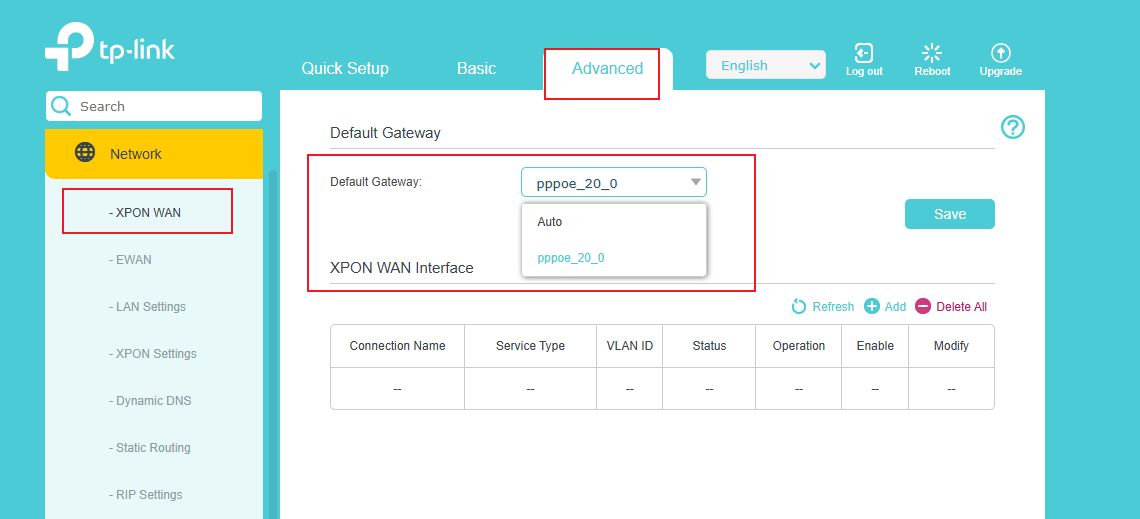
- Copy Link
- Report Inappropriate Content
Dear @Joseph-TP ,
Thank you for your reply and I appreciate the support from TPLINK.
Please refer the images below. Check the IP addresses of the WAN profiles. I have done it all correctly. Also I have set the default gateway as "BSNL XPON".
But the USB sharing is bind to the IP address of the BSNL voice, which is the IP of VoIP.
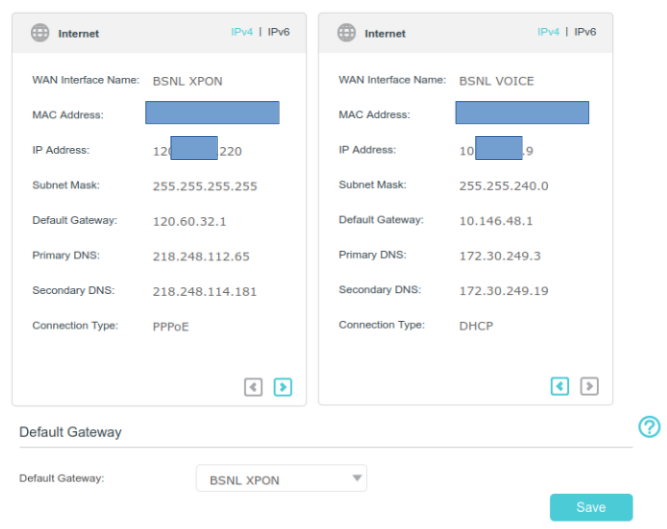
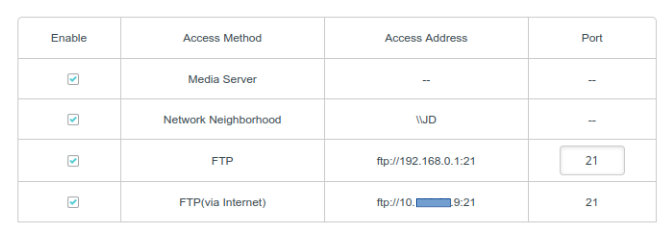
I have set, as you suggested and restarted the router too. Still no changes.
Please let me know how to proceed with this.
Thank you
Dr. JD.
- Copy Link
- Report Inappropriate Content
The tech team has been made aware of your case; they will likely reach out to you via email to continue troubleshooting. Please check your email inbox and confirm.
- Copy Link
- Report Inappropriate Content
Information
Helpful: 0
Views: 91
Replies: 5
Voters 0
No one has voted for it yet.