S2S Ipsec IKEv2 troubles

S2S Ipsec IKEv2 troubles

S2S Ipsec IKEv2 troubles
2026-04-09 15:50:06 - last edited 2026-05-17 08:35:02
Model: ER7412-M2  
Hardware Version: V1
Firmware Version: 1.1.0

Good day Everyone,


Maybe someone can shed some light on this and maybe i am not the only one that is facing this problem.


Setup:

Site A:

LAN: 192.168.0.0/24

No-IP: dyndns1

Bridged modem connected to a ER7412-M2


Site B:

LAN: 192.168.0.1/24

NO-IP: dyndns1

CG-NAT enabled modem

ER605 connected to port 1 of CG-Nat enabled modem, ip and device has been set in DMZ


I just need sites A and B to connect to each other very simple setup.

Both devices use DynDNS.


Wireguard worked without any hesitations(very difficult to configure) IMO.


But i know IPSEC is simpler and easier to setup.

My problems:

1: If i use autoconfigurator, ipsec tunnels doesnt work, no data is flowing through the tunnel.

2: If i use manual mode and setup IKEv2(which i want to use), Site B is the initiator and Site A is the responder, everything else defaulted doesn't work. i get Phase 1 could not be initiated. i get the following error:

2.5G WAN/LAN1: Phase 1 of IKE negotiation failed. (Peers=WANIP Site B<->WANIP site A, Error=NO_PROPOSAL_CHOSEN[14])


3: if i go all manual and also all customs, using AES 256, SHA256 en DH19 i get the same error.

When i open up terminal on the ER7412-M2 and run command to get ikev2 information i see the following:

ike policy name: ike_stage1_0th

ike_version: ikev2

hash-enc-dh: sha256-aes256-modp2048

lifetime: 28800

dpd_enable: enable

dpd_interval: 10

exchange_mode: aggressive


The exchange mode is set to aggressive( nowhere in ikev2 is there an option to change this)

4: i go all manual and use ikev1: tadaaaa everything works.


So to people using omada more than me(was very used to Unifi and other solutions). Are you using the gateways not connected/joined to an Omada controller, stand alone VPN Gateway and is this more beneficial to having more granular control compared to when its joined to the omada controller?

Is this normal that even tho i go all manual mode the exchange mode is incorrect? and if so am i only able to use IKEv1 mode due to this error?


Hope i am not the only one experiencing this type of error

  0      
0
#1
Options
1 Accepted Solution
Re:S2S Ipsec IKEv2 troubles-Solution
2026-04-30 07:15:58 - last edited 2026-05-17 08:35:02

Hi,  @cbrafu 

Hi,
Thank you very much for your reply.

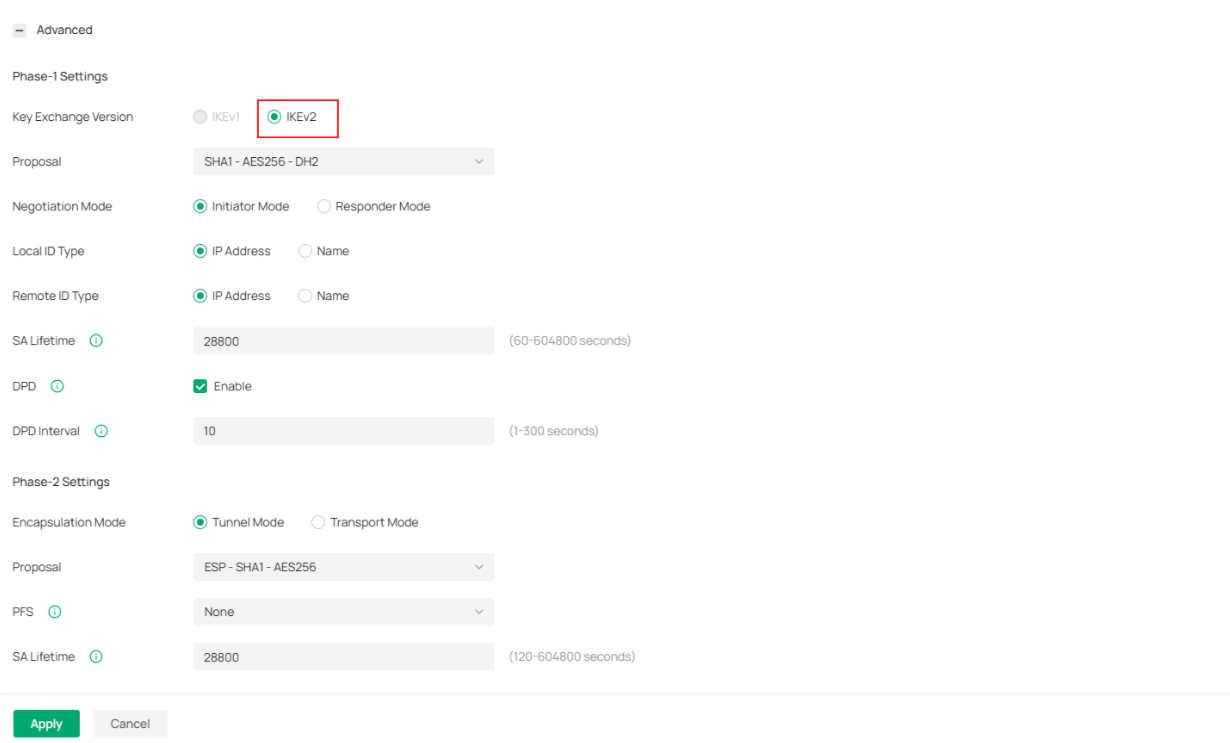
If you are working on a Controller, please navigate to the path below: Controller > Site View > Network Config > VPN > Site to Site VPN. After selecting IPSec, please set the Mode to Manual, and you will find the option to select IKEv2 under the Advanced section.


You may follow the same configuration steps to complete the setup for the peer site on the other end.

Recommended Solution
  0  
0
#6
Options
6 Reply
Re:S2S Ipsec IKEv2 troubles
2026-04-16 01:50:46


Hello,@cbrafu 

Thank you for posting on our business forum.
 

Could you please confirm whether your gateways are currently managed in Controller mode or Standalone mode?

For IPsec configuration, the available settings and control granularity are nearly identical between Controller mode and Standalone mode, so you will get roughly the same level of control over IPsec in both management modes.

For reference on IKEv2 configuration, please refer to the following guide:How to connect to Omada Router using IKEv2 VPN of Android/iOS | TP-Link

How to Configure IPsec IKEv2 VPN for Android 13/14 or iPhone (With Troubleshooting Included) - Business Community


  0  
0
#2
Options
Re:S2S Ipsec IKEv2 troubles
2026-04-16 02:41:04

  @Jeremy_12 


Thank you for the replies. I am currently running both of these gateways as Controller Mode.

They are both joined on to the same Omada controller(OC300) in my network.


I have looked at both post you have send me but they actually don't touch the actual configuration i am trying to create.


I am not actually looking to create a client to site VPN tunnel but rather i am trying to establish a Site-to-Site vpn Tunnel using IKEv2.


Both of the posts are focused on trying to create a site to client vpn for andriod and or smartphone configuration.

  0  
0
#3
Options
Re:S2S Ipsec IKEv2 troubles
2026-04-16 07:15:40 - last edited 2026-04-16 07:17:32

  @cbrafu 


Your local and remote subnets are the same - which wont work


For IPsec to work, each side of the tunnel MUST have different ip ranges otherwise the tunnel will fail


In your case both are 192.168.0.0/24


Change one side to something else like 192.168.100.0/24 (make sure to give yourself room for additional vlans at both ends), and set the local and remote networks in the VPN settings apropriately (remember local is the one that exists on that gateway, so the host and connecting site will be different ways around)

  0  
0
#4
Options
Re:S2S Ipsec IKEv2 troubles
2026-04-17 00:07:39

  @GRL 


My bad and sorry to cause confusion.


You are absolutely right and on the same subnet they will indeed not work.


They are on different subnets,


Site A is on 192.168.10.x

Site B is on 192.168.20.x

  0  
0
#5
Options
Re:S2S Ipsec IKEv2 troubles-Solution
2026-04-30 07:15:58 - last edited 2026-05-17 08:35:02

Hi,  @cbrafu 

Hi,
Thank you very much for your reply.

If you are working on a Controller, please navigate to the path below: Controller > Site View > Network Config > VPN > Site to Site VPN. After selecting IPSec, please set the Mode to Manual, and you will find the option to select IKEv2 under the Advanced section.


You may follow the same configuration steps to complete the setup for the peer site on the other end.

Recommended Solution
  0  
0
#6
Options
Re:S2S Ipsec IKEv2 troubles
2 weeks ago - last edited 2 weeks ago

  @Nathan-TP 


Thank you for replies but i am still confronting still the same problems and sorry it took me so long to reply back i had a lot on my plate at work.


The new remote site has a VDSL connection, using a very old modem(no bridging possible) therefor i have set my OMADA ER605 in a DMZ connection.


I have tried the following:


I have tested firstly the most easiest way to actually setup the IPSEC tunnel was by just accepting the auto mode to do its work and from the remote site this did not work. The problem is i don't know what omada uses as default when the auto configuration is chosen to setup a VPN tunnel.


From the remote site i could have chosen my Main site and the tunnel was created but no traffic was passing through.


Next i started to use IKEv2 in every way possible i could think of.

Main site: Responder mode

Branch Site: Initiator Mode

And Vice versa no success to what so ever.


It keeps failing and saying on both sides: 2.5G WAN/LAN1: Phase 1 of IKE negotiation failed. (Peers=IP Address <->IP Address, Error=NO_PROPOSAL_CHOSEN[14])


Still using No-IP DynDNS due to not having a static Public IP address on both sides.


The only way i got this working is switching from IKEv2 to IKEv1 with the identical Phase 1: Proposal set to SHA256 AES256 and DH19 SA lifetime set to the default and Phase 2 Proposal set to ESP SHA 256 AES256 and PFS set to DH 15. Exchange mode set to Main Mode. Worked immediately, without any extra changes, with the same encryption type and method and even without having to DMZ the Omada ER605 on the new remote site.

I even thought that the SDN was the problem therefor i removed the ER605 from Omada controller and made it like a standalone device.

The same errors, but also with the same success when switched from IKEv2 to IKEv1. 


The only thing i have left to try is using the device on a different remote site with a bridged network and if this don't go then i am pointing it and pinning it to device incompatibility.


The ER7412-m2 v1.0 on firmware 1.1.0 Build 20251015 Rel.63594 with ER605 on the latest firmware can't communicate with eachother using IKEv2 but only on IKEv1.


I barely have FW rules created, i do have IDS+IPS enabled on my GW. So if someone can elaborate of shed some light on this would be very helpfull.

  0  
0
#7
Options