RE705X and RE605X bugs

RE705X and RE605X bugs

RE705X and RE605X bugs
Friday - last edited Friday
Model: RE705X  
Hardware Version: V1
Firmware Version: 1.3.10 Build 20250817 Rel. 63070

Hi there. I just want to report some bugs.


For RE705X:

After enabling ofdma and mu-mimo with twt, the wifi connection speed drops significantly and all the devices conected to the extender report that the connection is wifi 5 not 6 anymore. A reboot fixes the issue until it randomly reappears. Disabling ofdma and mu-mimo fixes it.


For RE605X:

After updating to the latest firmware 1.3.17 Build 20260113 Rel. 37666 for V3 hardware, if i reset the extender and reconfigure it, at initial wifi discovery and connection phase with easymesh, the extender will try to copy the settings from the main router be230 which has easymesh active. It normally reboots but it gets stuck, so i have to unplug it then plug it back in to the power socket to continue it's process. 


Please fix. Thank you!

  0      
  0      
#1
Options
2 Reply
Re:RE705X and RE605X bugs
4 hours ago

Hello @qlfsa ,

Welcome to our community.


May I know if your network topology diagram is as follows:

ISP modem—BE230—RE605X)))((( client devices

                                  └──RE705X

(Note: — stands for wired connection,)))((( stands for wireless connection )

Did you set both Range Extenders to Satellite nodes? How did you configure the RE605X when you reconfigured it? Web scan?

What are the hardware and firmware versions of the BE230?


  0  
  0  
#2
Options
Re:RE705X and RE605X bugs
2 hours ago

  @Joseph-TP 


Hello,


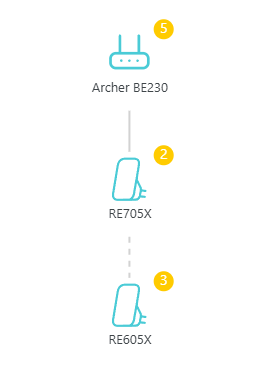
I have my ISP ONT/ROUTER, then BE230 in Access point mode with easymesh active and then what you see here:


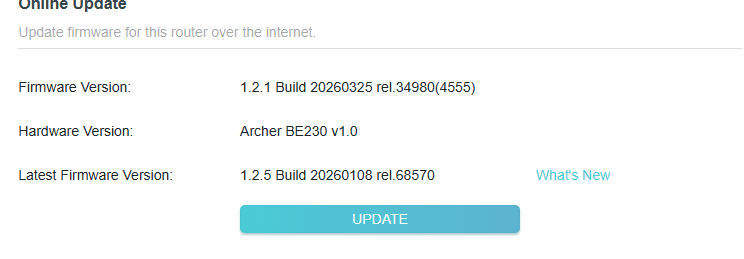
I am using the beta firmware to correct wifi issues on my BE230:


Yes, I configured my RE605X like I always do, by using the web interface, then web scan. I never used the tether app. I configure like this all of my internet equipment.


  0  
  0  
#3
Options