
External HDD's

Hello,
I've purchased TP Link BE9300 router. I do have 3 external HDD's. I've connected the 3 HDD's using TP Link UH720 USB 3.0 hub to the router. Unfortunately, I see only one from the three hdd's attached to the router. Why? With my previous TP Link archer AX11000 router I was seeing all 3 HDD's
Regards
- Copy Link
- Subscribe
- Bookmark
- Report Inappropriate Content


Hello @AlekoB ,
Thanks for getting back to us.
Regarding external hard drives, we generally don't recommend connecting multiple to the router simultaneously. It's a good thing that your new hub can recognize multiple hard drives.
Please note: if your hard drive contains many files, we do not recommend using the "Media Sharing" function. This function is based on the DLNA protocol, which consumes significant router memory. Forcing it to index a large number of files may exhaust the router's memory, thus affecting network stability.
For situations with a large number of files, we recommend using "Network Folders" (Samba) sharing, which is more resource-efficient.
Best Regards.
- Copy Link
- Report Inappropriate Content
Hello @AlekoB ,
Welcome to our community.
TP-Link routers are not designed to work with multiple storage devices connected through USB hubs or multi-bay enclosures. The USB ports on TP-Link routers are typically intended for connecting storage devices directly—such as a single USB flash drive or USB hard drive—rather than for connecting multiple drives through a hub.
Recommended solutions:
1. Connect drives directly: Try connecting each HDD directly to the router's USB port one at a time to verify they work individually.
2. Use one drive at a time: If you need to use multiple drives, you may need to switch between them by connecting only one at a time.
3. Consider alternative storage: If you need simultaneous access to multiple drives, consider using a NAS (Network Attached Storage) device on your network instead, which is specifically designed for multi-drive setups.
In addition, was your previous Archer AX11000 able to detect three drives simultaneously? Do you have any screenshots? Were you using the same drives?
- Copy Link
- Report Inappropriate Content
Hello Joseph,
I managed getting the 3 HDD working also on the BE9300 router by connecting them throug another hub.
Attached you will see a screenshot.
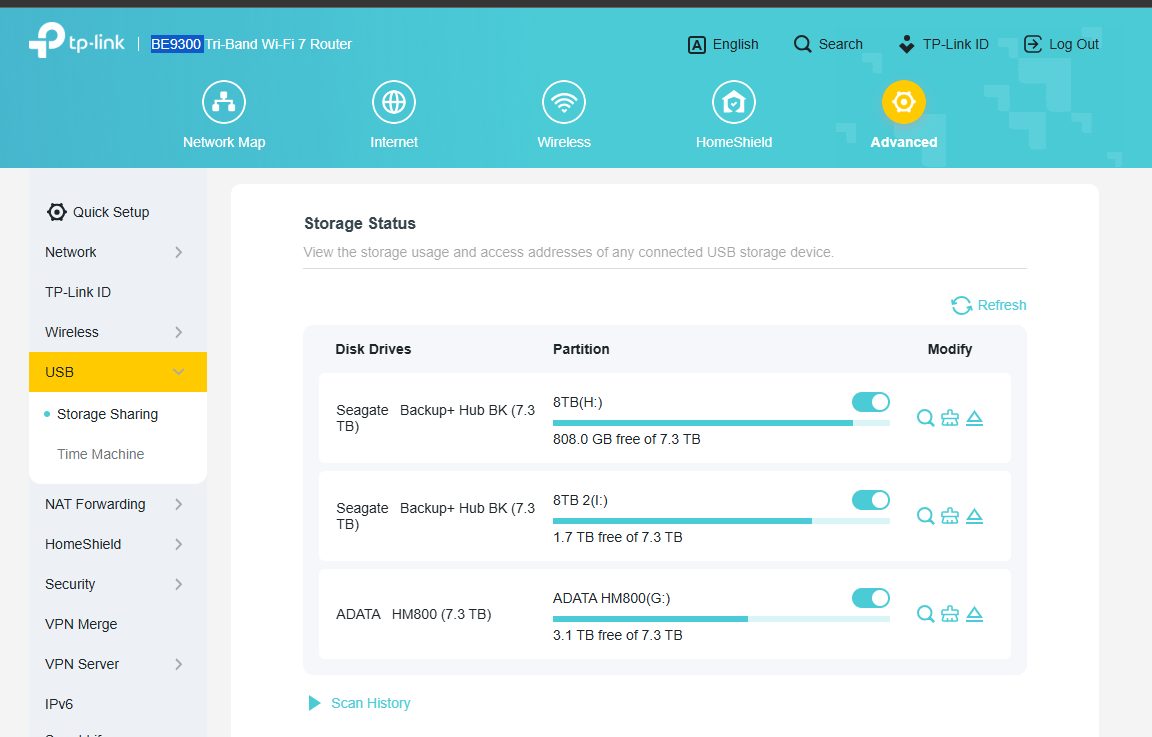
The only point which is not working correctly is the media sharing, because only partial of the contents are visible.
However, over network everything is accessible and working absolutely fine.
Kind Regards,
Aleko
- Copy Link
- Report Inappropriate Content
Hello @AlekoB ,
Thanks for getting back to us.
Regarding external hard drives, we generally don't recommend connecting multiple to the router simultaneously. It's a good thing that your new hub can recognize multiple hard drives.
Please note: if your hard drive contains many files, we do not recommend using the "Media Sharing" function. This function is based on the DLNA protocol, which consumes significant router memory. Forcing it to index a large number of files may exhaust the router's memory, thus affecting network stability.
For situations with a large number of files, we recommend using "Network Folders" (Samba) sharing, which is more resource-efficient.
Best Regards.
- Copy Link
- Report Inappropriate Content
Information
Helpful: 0
Views: 364
Replies: 3
Voters 0
No one has voted for it yet.