
How to set up QoS using TP-Link vr400 v3

How to set up QoS using TP-Link vr400 v3

How to set up QoS using TP-Link vr400 v3
Yesterday - last edited 18 hours ago
Model: Archer VR400  
Hardware Version: V4
Firmware Version: 1.6.0 0.9.1 v00a1.0 Build 250909 Rel.35514n
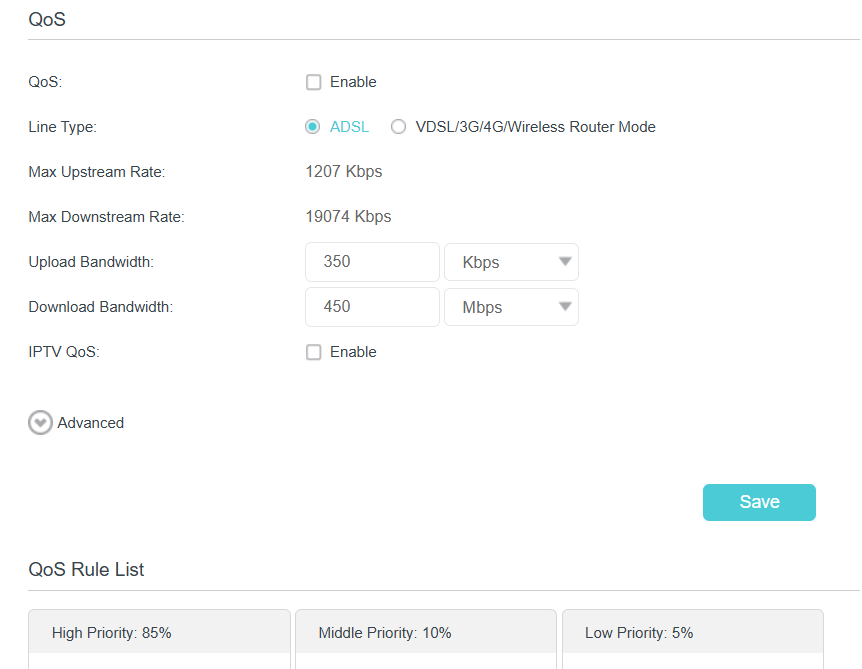
I'm subscribed to a up to 20 MBs download and1 MBs upload plan. I want to adjust the QOS settings.

on the bandwidth section only acceptable values 1 to 1000! is the modem doing it by percentage?

  0      
  0      
#1
Options
1 Accepted Solution
Re:How to set up QoS using TP-Link vr400 v3-Solution
19 hours ago - last edited 18 hours ago

  @AMIN_jr 


Upload/|Download Bandwidth fields should accept an absolute values.

If you can enter a values between 1 and 1000 only, try these in your case:


If this was helpful click on the arrow pointing upward to make it blue. If this solves your issue, click the star to make it blue as a "Recommended Solution". Tips:149wubkkfoLmNDjDbiTxx4ZU8mpcMA5CJt
Recommended Solution
  2  
  2  
#2
Options
1 Reply
Re:How to set up QoS using TP-Link vr400 v3-Solution
19 hours ago - last edited 18 hours ago

  @AMIN_jr 


Upload/|Download Bandwidth fields should accept an absolute values.

If you can enter a values between 1 and 1000 only, try these in your case:


If this was helpful click on the arrow pointing upward to make it blue. If this solves your issue, click the star to make it blue as a "Recommended Solution". Tips:149wubkkfoLmNDjDbiTxx4ZU8mpcMA5CJt
Recommended Solution
  2  
  2  
#2
Options
