
Wired backhaul

I have an m5 system with 6 nodes, three of them are on a wired backhaul with cat 6 cable to a tp link managed switch on a 500mb line
Last year I had a lot of problems wih the "abnormal WAN port speed error", which limited my download speed to around 90mb. After much discussion with TPlink I resolved it by replacing a cable, and swapping round the decos so a different unit was the main deco.
all worked fine until about 4 weeks ago the dreaded wan port speed error occurred.
I restarted the system and the error went, but now my three nodes that are wired back to the switch are not showing as connected via Ethernet in the app.
I have tried everything including replacement of all the Ethernet cables for brand new. One will work, and the then the other two will stop. I'll unplug restart and then another one will work and the others won't.
sometimes none work!
Anyone got any ideas what could be going on?
- Copy Link
- Subscribe
- Bookmark
- Report Inappropriate Content


Hi,
Please confirm the following information about the reported phenomenon for further analysis.
1. Is your network diagram ISP modem -- main Deco -- managed switch -- 3* wired Deco nodes, and 2* wireless Deco nodes? What's the model number of the managed switch? Are the two wireless Deco nodes connected to the main Deco directly?
2. Currently, are the wired satellite Deco nodes displayed online in the Deco app but do not indicate wired/wireless to the main Deco, or are the wired Deco nodes displayed offline in the Deco app?
3. Please disconnect an Ethernet cable from a wired satellite Deco node, move it close to the main Deco, and see if it displays online in the Deco app and indicates wireless to the main Deco.
4. Whether the client devices that connected to the wired satellite Deco nodes have the same download speed as before the reported phenomenon occurred?
5. What's the Deco M5's firmware and hardware version?
Best Regards
- Copy Link
- Report Inappropriate Content
hi. I have answered below
1. yes this is the network diagram. The managed switch is a to link 8 port LS108G. One wireless node is connecting direct to the main deco, the other is connected to the first wireless node
2. yes the three wires nodes are displayed as connected. Only one of them shows "Ethernet"
3. not sure what this achieves, they are connected, just not showing Ethernet
4. No, the download speed is much lower. Less than half
5. Firmware is 1.91 Build 20250909 Rel. 37570. Hardware is just model m5
very hard to understand why this has suddenly happened unless the switch is faulty?
- Copy Link
- Report Inappropriate Content

Usually. I've only seen that error occur when the link from the main deco to the ISP drops to 100Mb or lower, so its usually on the WAN port not the port that goes to the switch.
When you said that they are not showing as connected via ethernet, are they showing Wi-Fi connections?
Like this, I have one wired and the other wireless in this scenario, but you are saying your wired ones are only showing as wireless?:
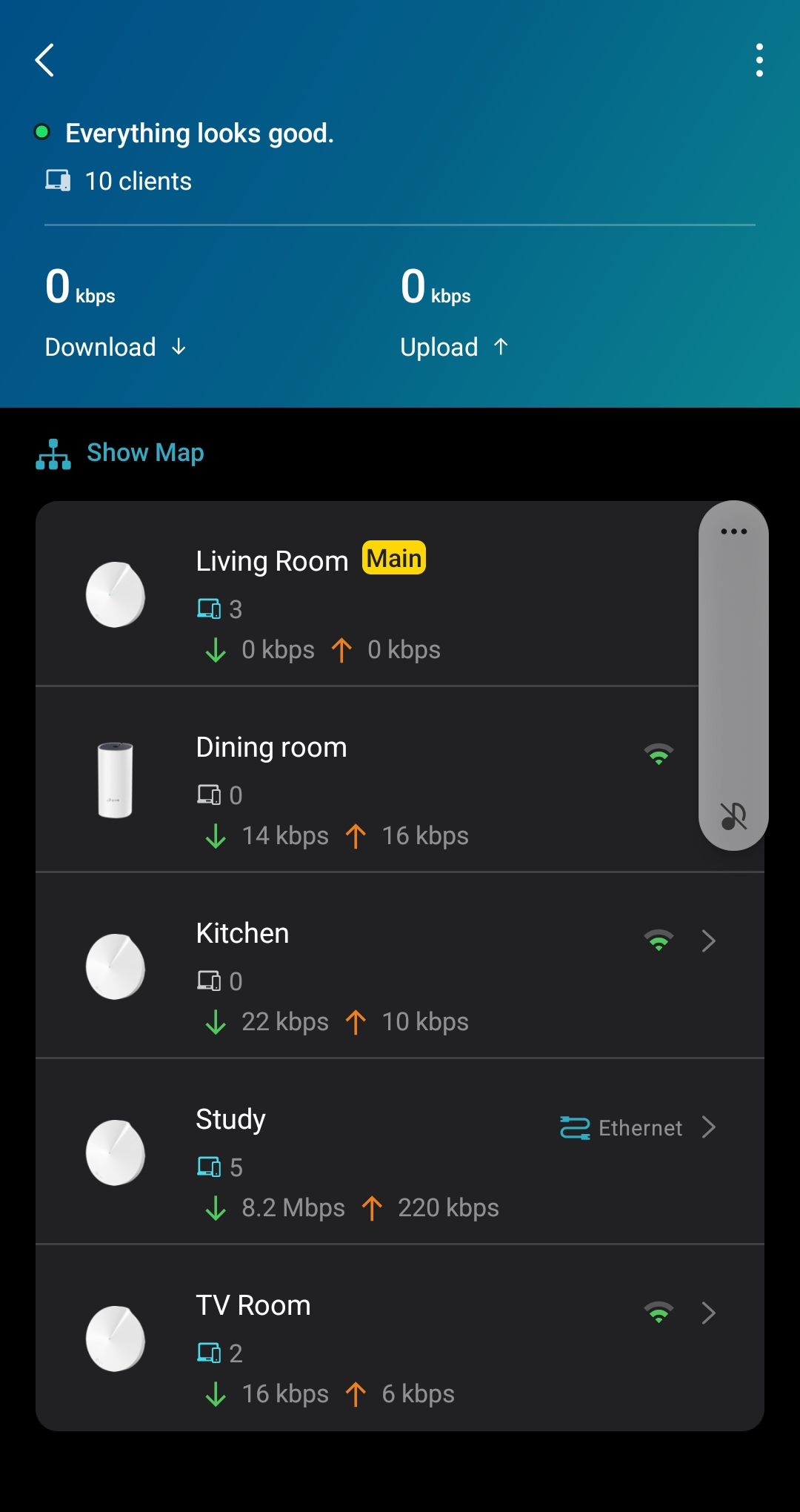
- Copy Link
- Report Inappropriate Content
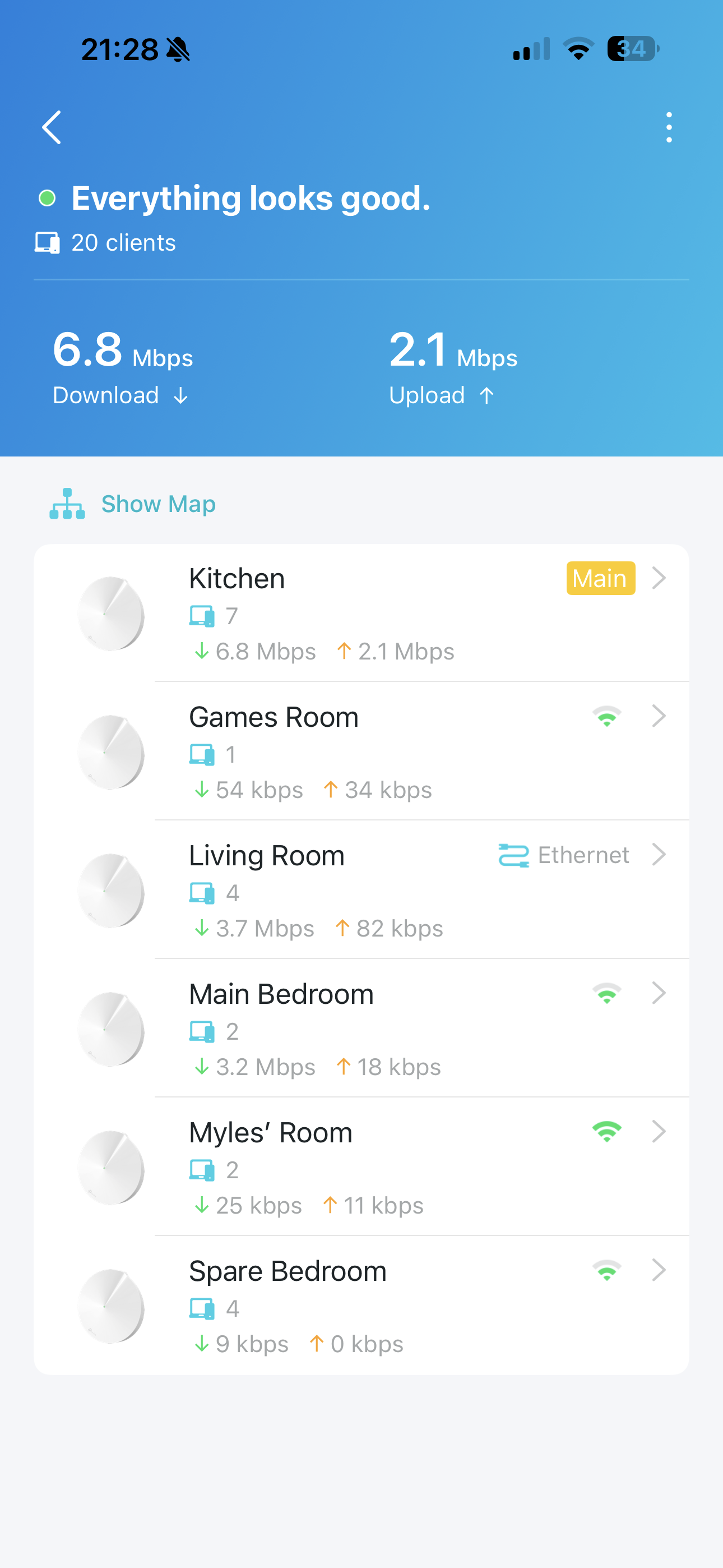
hi Adam. I am saying exactly that. My system shows this, except main bedroom and Myles' room are connected via Ethernet
- Copy Link
- Report Inappropriate Content

It's very possible it's the managed switch causing the issue. If you look at this FAQ under section "Compatible Switches" they only list one managed switch that is know to work with ethernet backhaul but this list may be out of date. While you wait for @solla-topee to get back to you try the steps under Case #2 in the following link
Thanks
- Copy Link
- Report Inappropriate Content

@Panman81 I think you are using an older version of Deco App because the signal bars color is now dark green. First of all update your Deco App because sometime app shows wrong icons and info.
- Copy Link
- Report Inappropriate Content
Hi,
The switch LS108G is not a managed switch; it's a plug-and-play desktop switch.
Based on the picture displayed in this post and the other provided information. Please confirm the following information for further analysis.
1. Usually, if the wired connection works, the satellite deco will display wired connected. If the 'Games Room' Deco and 'Spare Bedroom' Deco say Wi-Fi connected, please disconnect them from the switch, connect the same ethernet cable from the switch to a computer, then check if the computer has an internet connection (please ensure the Wi-Fi function is disabled on the computer).
2. Please connect the 'Games Room' Deco or 'Spare Bedroom' Deco to 'Living Room' Deco via an Ethernet cable, and then test if they will show wired connected in the Deco app.
3. Please refer to the instructions below to send us the app log. After that, please attach your reference number (such as email TKIDXXX) to this thread so we can find your app log, or let us know you have sent the log.
How to collect the system log of the Deco app
Best Regards
- Copy Link
- Report Inappropriate Content
games room and spare bedroom are not and have never been connected by Ethernet. There is no wiring to those rooms.
the three nodes connected by Ethernet are Myles' room, living room and main bedroom. Only living room is showing as Ethernet connected on the app currently.
the system has all worked perfectly for more than 2 years with everything showing correctly in the app until I had the recent wan port error and I rebooted the system.
I can't update the app it says up to date
- Copy Link
- Report Inappropriate Content
Interesting, if you click on Main Bedroom and Myles room what do they say they are connected to?
- Copy Link
- Report Inappropriate Content
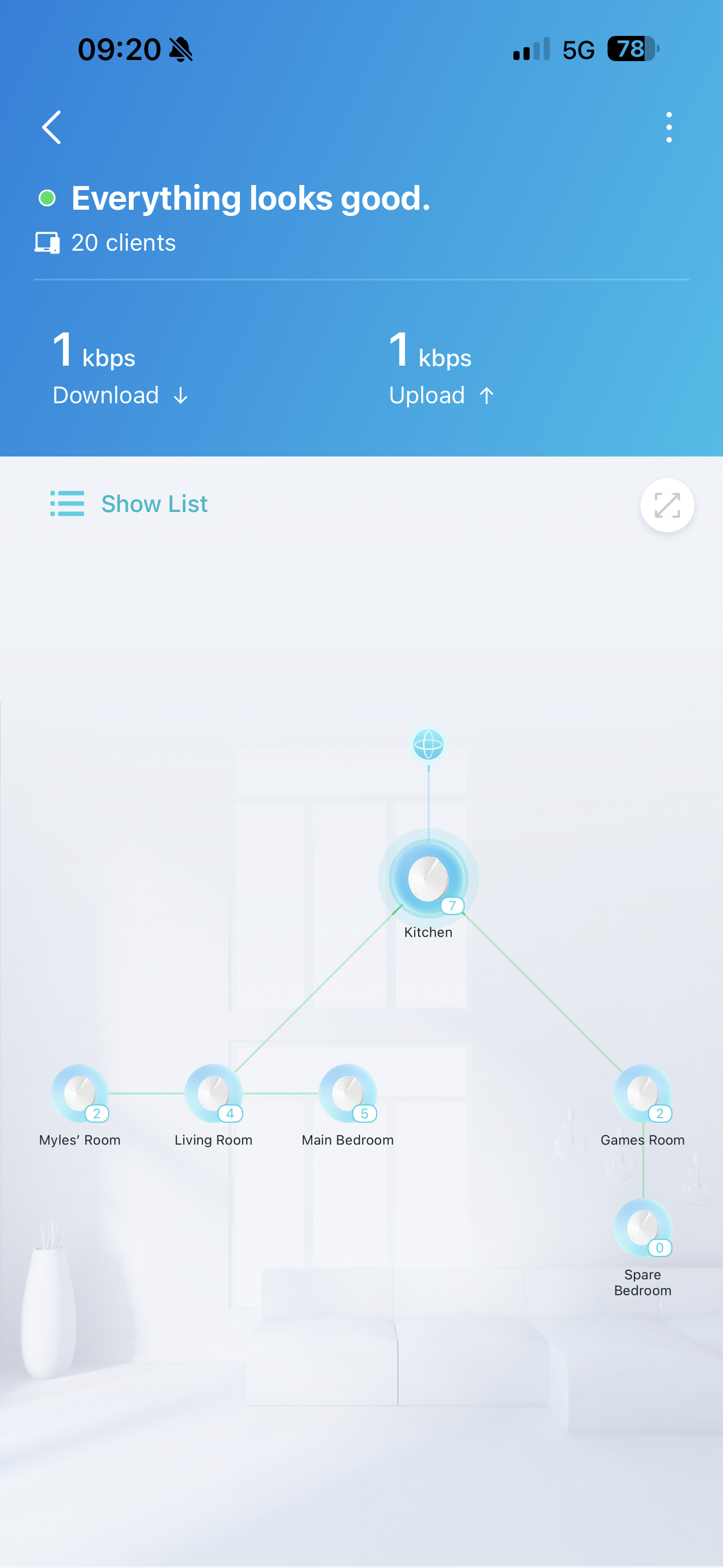
the diagram looks like this. They have both wirelessly connected themselves to living room
- Copy Link
- Report Inappropriate Content
Information
Helpful: 0
Views: 175
Replies: 10
Voters 0
No one has voted for it yet.