
Wired client not appearing in web management page or aginet app

I am currently using 2x TP Link HB710 that came with my Singapore MyRepublic as my ISP. It's currently operating in Router mode, where the main router 10G LAN Port is connected to DLink F206XT switch, the 2nd HB710 are connected to this switch through ethernet wired backhaul connection. I have added the 2nd HB710 as a easymesh agent, not controller via the aginet app and the ethernet cable was connected after.
I cannot see my PC which is connected via the switch, via ethernet 6e cable. If I disconnect the ethernet wired backhaul of the 2nd HB710, the wired client reappears.
Will this affect my PC internet connection in any way?
- Copy Link
- Subscribe
- Bookmark
- Report Inappropriate Content

- Copy Link
- Report Inappropriate Content


Hi, welcome to the community.
"I cannot see my PC which is connected via the switch, via ethernet 6e cable."
-When this happens, does the PC obtain an IP address? Can it access the internet? You can refer to the following FAQ to check the IP address info on the PC: How to find your IP address on Windows OS
If you connect the PC directly to the 2nd HB710, will it display correctly in the Aginet app or HB710's web management, and will it have internet access?
Best Regards
- Copy Link
- Report Inappropriate Content
@smgoh6 my pc is able to connect to the internet when connected through the switch using cat 6e cables, i am able to see the IP address for my PC. i have not tried to connect to the 2nd hb710 as the distance can be quite far and will need a long ethernet cable for connection.
previously i faced issues with "No DHCP server found" periodically for my PC connected through the switch using cat 6e cables but back then, my 2nd hb710 was also operating as a controller (router mode) so i figured this was the root cause of the "No DHCP server found" problem faced on my PC.
just want to make sure i dont run into "No DHCP server found" issue for my PC
- Copy Link
- Report Inappropriate Content
Hi,
I'm confused about your description. Please confirm if the following information is correct.
When the two HB710 nodes form a mesh network with the topology "internet--1st HB710 -- D-Link switch -- 2nd HB710", if the 2nd HB710 operates as a controller (router mode), the PC connected to the switch periodically encounters the "No DHCP server found" error. If the 2nd HB710 operates as an easymesh agent, the PC has an internet connection, but does not appear in the Aginet app.
Best Regards
- Copy Link
- Report Inappropriate Content
@Solla-topee yes that is correct. But I have found that even if the 2nd hb710 is a easy mesh agent, the wired ethernet connection to my pc from the switch still encounters no DHCP Server found error and I cannot see my pc in the aginet app. The setup is ont > modem > 1st hb710 > d link dms f206xt switch > 2nd hb710 and PC {both connected via ethernet cables)
I have since removed the 2nd hb710 and used a old deco x60 in access point mode via ethernet back haul from the switch. My pc is still connected to the switch using ethernet cable and Internet access is stable, I don't see "no DHCP Server found" error yet. I am able to see the PC and deco x60 as a wired connection in the aginet app. The setup is ont > modem > 1st hb710 > d link dms f206xt switch > deco x60 and PC {both connected via ethernet cables)
Still trying to figure out how to use the same 2nd hb710 instead of the deco x60 without encountering the "no DHCP Server found" error periodically. Anyone has any suggestions?
- Copy Link
- Report Inappropriate Content
Hi,
Please provide the following information about the reported phenomenon.
1. On the bottom label of your HB710, please check if the model number is HB710 SGMRP.
2. When the "no DHCP Server found" error appears on your PC, can it go to the internet? Can you send us a picture of this error?
Best Regards
- Copy Link
- Report Inappropriate Content
1. The model number of the 1st HB710 is HB710(SGMRP) Ver:1.0. 2nd HB710 is HB710(SGSH) Ver:1.0.
2. No internet access when "no DHCP Server found" error appears; picture of error as below
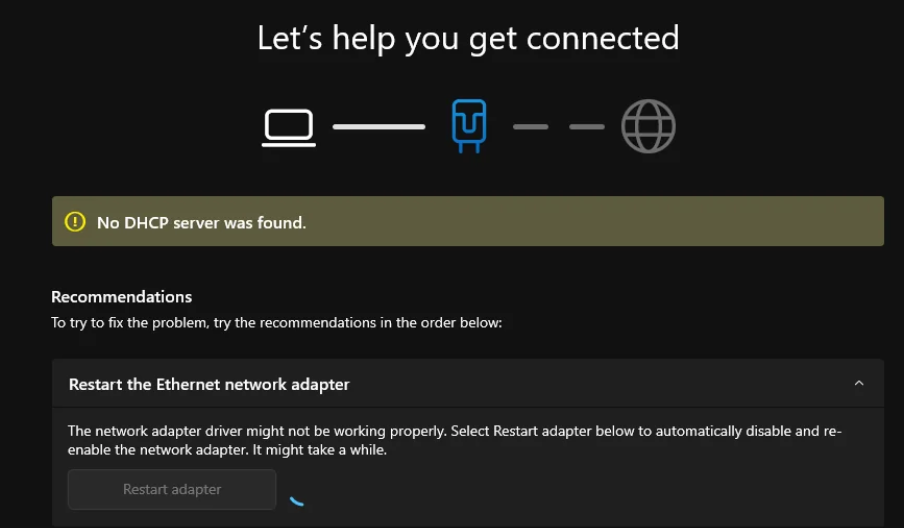
- Copy Link
- Report Inappropriate Content
While you wait for @Solla-topee to get back to you please try the following
Power Cycle Equipment: Unplug both the modem and your decos. Wait 60 seconds, plug the modem back in, and wait for all lights to stabilize before plugging in the router.
Verify Cables: Ensure the cable from the wall is securely in the ONT/Modem, and the ethernet cable connects the modem's LAN port to the router's WAN/Internet port.
Direct Modem Test: To check if the issue is the router, plug your computer directly into the modem via Ethernet and restart the modem.
Reset Router: If the connection works directly but not through the router, log in to your router app/web interface to reconfigure settings or perform a factory reset.
Update Network Drivers: On your PC, check if network adapter drivers are updated.
Potential Causes & Tips:
ISP Outage: A service disruption may exist, meaning the network is unreachable.
Modem Locked: Cable modems often require a hard reboot to allow a new device (like a new router) to acquire an IP address.
VPN/Security Software: Temporarily disable any VPN clients or firewall software, as they may block DHCP requests.
DHCP Service Check: Ensure the "DHCP Client" service is running in Windows by typing services.msc into the search box, ensuring it is set to automatic.
Power Cycle Equipment: Unplug both the modem and your decos. Wait 60 seconds, plug the modem back in, and wait for all lights to stabilize before plugging in the router.
Verify Cables: Ensure the cable from the wall is securely in the ONT/Modem, and the ethernet cable connects the modem's LAN port to the router's WAN/Internet port.
Direct Modem Test: To check if the issue is the router, plug your computer directly into the modem via Ethernet and restart the modem.
Reset Router: If the connection works directly but not through the router, log in to your router app/web interface to reconfigure settings or perform a factory reset.
Update Network Drivers: On your PC, check if network adapter drivers are updated.
Potential Causes & Tips:
ISP Outage: A service disruption may exist, meaning the network is unreachable.
Modem Locked: Cable modems often require a hard reboot to allow a new device (like a new router) to acquire an IP address.
VPN/Security Software: Temporarily disable any VPN clients or firewall software, as they may block DHCP requests.
DHCP Service Check: Ensure the "DHCP Client" service is running in Windows by typing services.msc into the search box, ensuring it is set to automatic.
- Copy Link
- Report Inappropriate Content
Hi,
I have escalated your case to the relevant team, and they will contact you via email to assist you further. Please wait patiently.
Best Regards
- Copy Link
- Report Inappropriate Content
Information
Helpful: 0
Views: 200
Replies: 9
Voters 0
No one has voted for it yet.