Using VLANs blocks ethernet connections

Using VLANs blocks ethernet connections

Using VLANs blocks ethernet connections
2 weeks ago - last edited 16 hours ago
Model: Archer AX53  
Hardware Version: V2
Firmware Version: 1.0.5 Build 20251225 rel.81769(4555)

Right so...


My fiber internet connection forces me to configure VLANs in order to work for both Internet and IPTV.


Technical details according to the ISP

  • PPPoE via VLAN 6 (802.1q).
  • PPPoE authentication PAP with username and password.


Now, I can go to Advanced -> Network --> Internet and configure the PPPoE connection but there is no VLAN setting there. Why Not?


I have managed to get everything working by doing the above (without the VLAN setting there) and then going to Advanced -> Network -> IPTV/VLAN and configuring the following:


IPTV/VLAN Enabled

Internet VLAN ID 6

VLAN Priority 0


IPTV VLAN ID 4

VLAN Priority 4


LAN1 Internet

LAN2 Internet

LAN3 Internet

LAN4 IPTV


IGPM Proxy Enabled

IGPM Snooping Enabled

IGPM Version V2


This setup has both my internet and tv working as intended.


HOWEVER


Because of these settings my internal devices (2 pcs and a laptop) that are connected to the AX53 by cable can no longer see or contact each other. All pings and other forms of connectivity between those various devices time out.

Devices that are on Wi-Fi from the same AX53 can see and contact each other and the cable connected devices.

Everything is running on the same subnet from a DHCP configuration on the AX53.


How can I enable the needed VLAN configuration without losing connections on my home Ethernet network devices.



0
0
#1
1 Accepted Solution
Re:Using VLANs blocks ethernet connections-Solution
16 hours ago - last edited 16 hours ago

Hello @Mivado ,

Have you contacted Local Support for assistance? 

Referring to How to configure IPTV function on TP-Link Wi-Fi router, you can see settings for ISPs requiring VLAN settings:

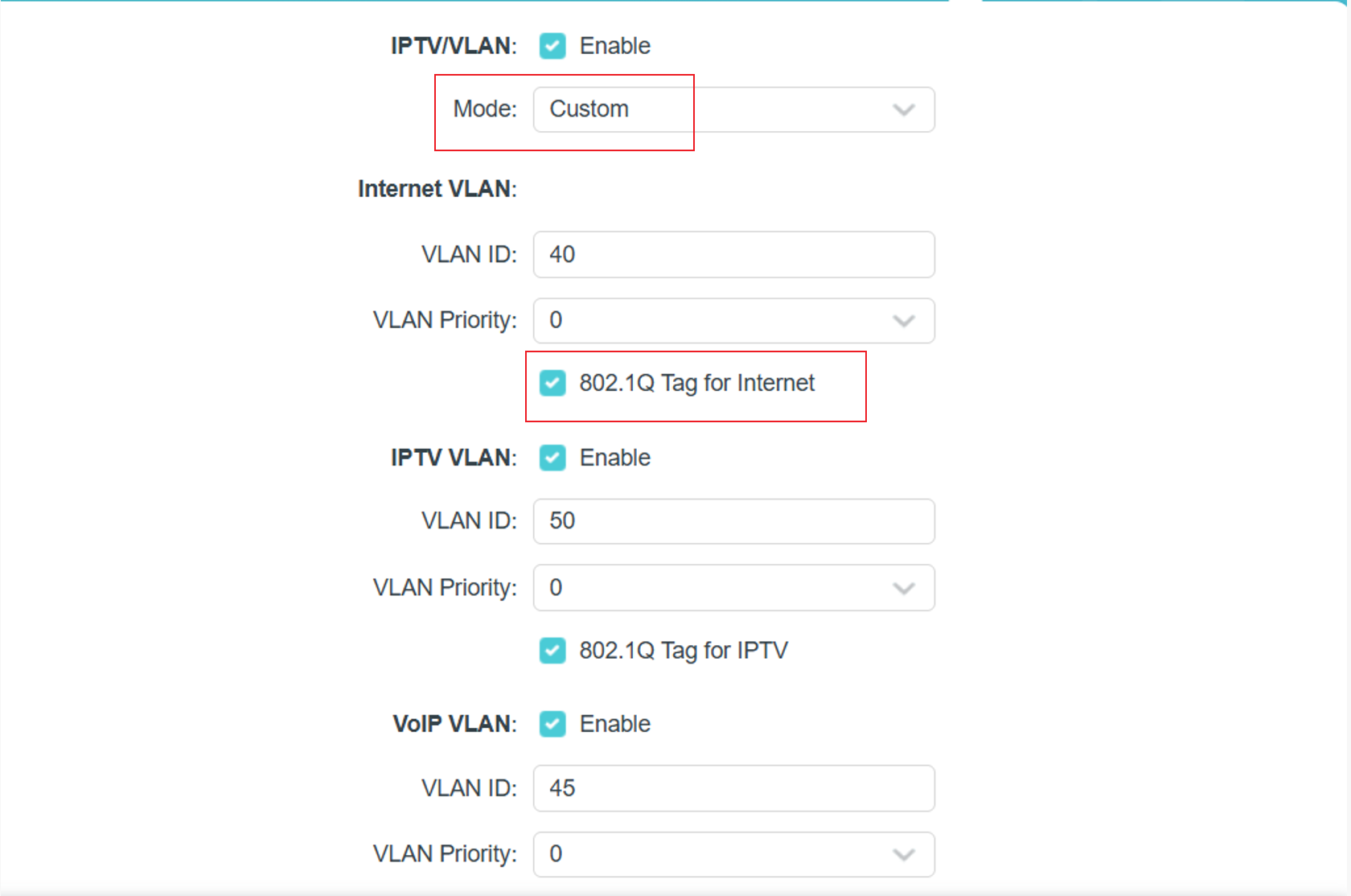
1) Select Custom mode.

2) Enter the VLAN IDs according to your ISP.

Example:

  • Internet: VLAN 40
  • VOIP: VLAN 45
  • IPTV: VLAN 50

3) 802.1Q Tag and IPTV Multicast VLAN ID should follow your ISP’s requirements.


In addition, please set all priority options to '0':

IPTV 设置页面

Welcome to Our Community! Get the latest posts: △New Firmware for Archer GE550/GE650 V1 Introduces AI-QoS, EasyMesh IoT Expansion, and More! △New Firmware Releases for Archer BE805 V1/BE450 V1 to Support VPN Merge, New ECO Mode, and More! More posts, please see: △ Get the Ongoing Pre-release Firmware for Wi-Fi Routers Here— Subscribe for Updates! Urgent problems with your Wi-Fi Router, Range Extender, or DSL Modem? Please reach out via private Messages or @Joesph-TP in your new thread directly. Click Or ☆Recommended Solution if the post/answer helps.
Recommended Solution
0
0
#5
4 Reply
Re:Using VLANs blocks ethernet connections
2 weeks ago

  @Mivado 


Do you have any specific VLAN requirement for the IPTV provided by your ISP.

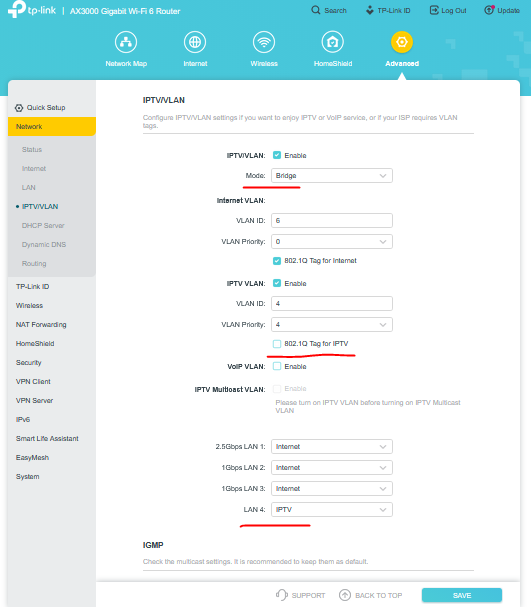
If not, you can try the bridge settings:


Then test how if you have access between your cabled devices.

If this was helpful click on the arrow pointing upward to make it blue. If this solves your issue, click the star to make it blue as a "Recommended Solution". BTC:149wubkkfoLmNDjDbiTxx4ZU8mpcMA5CJt
0
0
#2
Re:Using VLANs blocks ethernet connections
2 weeks ago
Unfortunately it says: ISP uses Routed IPTV-configuration. Traditional bridge method cannot be used
0
0
#3
Re:Using VLANs blocks ethernet connections
2 weeks ago

  @Mivado 


This is a rather strange issue. In general all devices (wired and wireless) are bridged and they should be able to communicate with each other.

Here's the official guide for configuring IPTV on a TP-Link router. I would suggest to contact your local support for further analysis and assistance.

If this was helpful click on the arrow pointing upward to make it blue. If this solves your issue, click the star to make it blue as a "Recommended Solution". BTC:149wubkkfoLmNDjDbiTxx4ZU8mpcMA5CJt
0
0
#4
Re:Using VLANs blocks ethernet connections-Solution
16 hours ago - last edited 16 hours ago

Hello @Mivado ,

Have you contacted Local Support for assistance? 

Referring to How to configure IPTV function on TP-Link Wi-Fi router, you can see settings for ISPs requiring VLAN settings:

1) Select Custom mode.

2) Enter the VLAN IDs according to your ISP.

Example:

  • Internet: VLAN 40
  • VOIP: VLAN 45
  • IPTV: VLAN 50

3) 802.1Q Tag and IPTV Multicast VLAN ID should follow your ISP’s requirements.


In addition, please set all priority options to '0':

IPTV 设置页面

Welcome to Our Community! Get the latest posts: △New Firmware for Archer GE550/GE650 V1 Introduces AI-QoS, EasyMesh IoT Expansion, and More! △New Firmware Releases for Archer BE805 V1/BE450 V1 to Support VPN Merge, New ECO Mode, and More! More posts, please see: △ Get the Ongoing Pre-release Firmware for Wi-Fi Routers Here— Subscribe for Updates! Urgent problems with your Wi-Fi Router, Range Extender, or DSL Modem? Please reach out via private Messages or @Joesph-TP in your new thread directly. Click Or ☆Recommended Solution if the post/answer helps.
Recommended Solution
0
0
#5