
Wireless sometimes doesn’t work
Wireless sometimes doesn’t work

The wireless works then every now and again it’ll stay connected but the internet just stops Only on wireless. Can still use the internet on devices plugged in.
- Copy Link
- Subscribe
- Bookmark
- Report Inappropriate Content

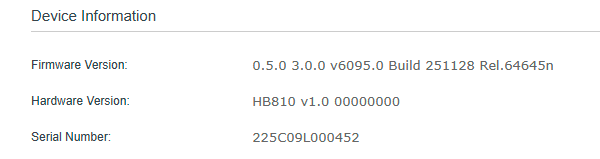
Can you please confirm your firmware and hardware version by using the directions below.
Have you tried checking with the web Ui?
1. Go to http://tplinkdeco.net/ and sign in - use the same password you use to log into the deco app
2. Once your logged in click on Advanced
3, Click on System from the menu on the left
4, Now click on Firmware Upgrade
Take a screenshot of the information on this page and reply back to this post with it
Thanks.
- Copy Link
- Report Inappropriate Content
- Copy Link
- Report Inappropriate Content
HB810 is a customized version for local internet service providers so its firmware hasn't been uploaded to the TP-Link official website or any official channels. Not sure we will be able to help with your issue but I will tag a member of the tp-link staff to see if there is anything they can do.
Any idea on this? If I remember correctly they wont be able to use any official tp-link firmware yes?
Please advise.
- Copy Link
- Report Inappropriate Content


Hi, welcome to the community.
Regarding the reported phenomenon, please provide more detailed information for analysis.
1. How many HB810 do you have? Are the HB810 nodes connected to each other wirelessly?
2. Who is your ISP? Is the HB810 provided by your ISP?
3. Do all wireless clients experience the internet drop phenomenon, or only specific wireless clients experience it? What are the wireless clients?
4. How do the wireless clients get back online? Do they have the internet drop phenomenon when connecting to a specific HB810 or all nodes?
Best Regards
- Copy Link
- Report Inappropriate Content
1. How many HB810 do you have? Are the HB810 nodes connected to each other wirelessly? Just 1.
2. Who is your ISP? Is the HB810 provided by your ISP? 2 degrees and they supplied it.
3. Do all wireless clients experience the internet drop phenomenon, or only specific wireless clients experience it? What are the wireless clients?
It seems to be all of them. Phones, Xbox and tv. But the phones do it more often.
4. How do the wireless clients get back online? Do they have the internet drop phenomenon when connecting to a specific HB810 or all nodes?
just wait a minute and it starts working again.
- Copy Link
- Report Inappropriate Content
Hi,
Please check if you can change the wireless channel and channel width in the Aginet app. If so, change the wireless settings for a try.
When did you get the HB810, and when did the reported phenomenon start? How often do your wireless client devices experience the issue, such as X times a day?
When the reported phenomenon occurs, do your wireless client devices have a good Wi-Fi signal?
Best Regards
- Copy Link
- Report Inappropriate Content
I can change them.
want do I change them to? Have never played around with that.
and have only had it for probably a month or just over and has been happening pretty much the whole time.
probably happens to each device once a hour maybe every 2 hours.
have paid more attention to it the last couple days.
it doesn't seem to affect the tv or Xbox. Or at least not that I've noticed.
seems to effect phones and iPads.
unsure of laptops as they normally aren't watching videos or changing pages all the time etc.
- Copy Link
- Report Inappropriate Content
Hi,
You can try to change the 2.4 GHz Wi-Fi channel to 1/6/11 and channel width to 20 MHz, change the 5 GHz channel to a different one and set the channel width to 40 MHz, and check if the phones and iPads work better.
You can also enable the guest network, connect the wireless devices to it, and check if it helps.
Best Regards
- Copy Link
- Report Inappropriate Content
hey this didn't change anything.
- Copy Link
- Report Inappropriate Content
Hi,
What are the detailed model numbers and OS versions of your phones and iPads? Are they connected to the 5 GHz Wi-Fi network? If so, please try setting the 5G channel to 157, the channel width to 80 MHz, and the wireless security type to WPA2-Only, and check if this helps.
Best Regards
- Copy Link
- Report Inappropriate Content
Information
Helpful: 0
Views: 310
Replies: 11
Voters 0
No one has voted for it yet.