
Xx530v XPON loop issue

Dear Team,
I am writing to bring two potential software-related issues to your attention that I believe warrant investigation and resolution.
1. **MAC Cloning and PPPoE Download Speed Limitation:** When utilizing MAC cloning for a PPPoE connection, I observed a consistent download speed limitation of 50 Mbps. This issue was resolved after my Internet Service Provider (ISP) released the MAC binding.
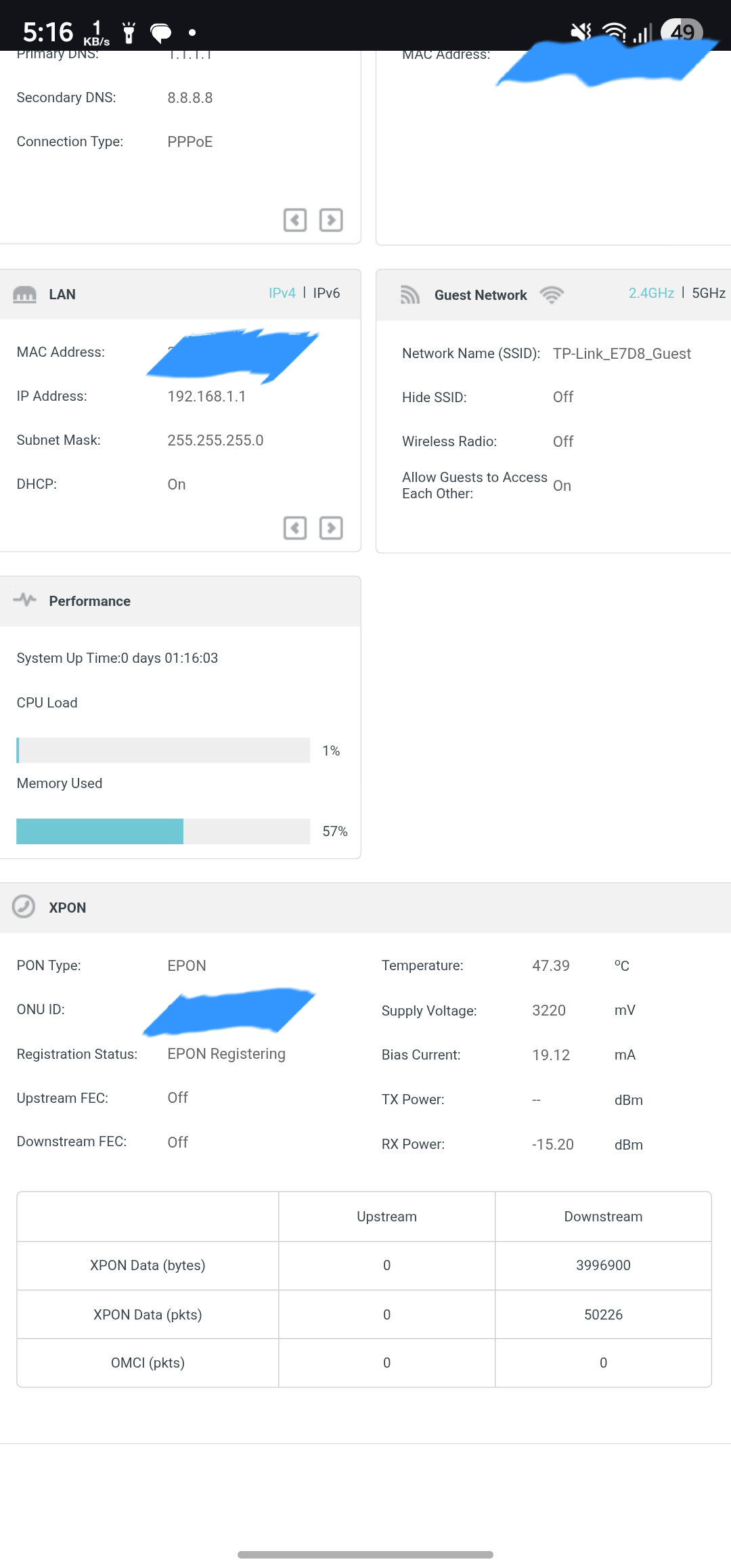
2. **Persistent EPON Registration Loop:** The router intermittently enters an EPON registration loop. This occurs daily, even after a scheduled nightly reboot. To resolve this, I must power down the device for two minutes, disconnect the optical cable, and then reconnect it once the router has fully initialized. I am uncertain if this behavior is linked to serial number spoofing and would appreciate any insights or assistance from the community or support team.
Furthermore, I would like to suggest the implementation of a dashboard feature that provides detailed data consumption statistics per device. Integrating this with cloud synchronization would be highly beneficial, ensuring data persistence even after system reboots.
Thank you for your time and consideration.
Sincerely,
Indrajit
- Copy Link
- Subscribe
- Bookmark
- Report Inappropriate Content

Kevin_Z wrote
Once click the Reply button, you will find 'Reply with quote' in the right corner of that dialog box as follows. Click it whenever you want to quote:

Thanks for the heads up.
Currently, I reverted to the earlier/stable FW version 0.7.0_3.0.0 Build 250606 and turned off the Reboot Scheduler completely to check whether this issue occurs w/out scheduling reboot or not.
Let me know if there's any way to downgrade to the original 0.6.0 3.0.0 v6096.0 Build 250422 Rel.46744n
Or is there any newer pre-release FW after 0.9.0 3.0.0 v6096.0 Build 251126 Rel.13993n.
- Copy Link
- Report Inappropriate Content
@Kevin_Z @Ram_Eswar it's been a long time. Did any progress happened on the diagnostic with Jimbo?
- Copy Link
- Report Inappropriate Content
@Kevin_Z @IndrajitIG Didn't received any update from tplink engineers until now, if i get any update ill inform you. Thanks.
- Copy Link
- Report Inappropriate Content
Ram_Eswar wrote
@Kevin_Z @IndrajitIG Didn't received any update from tplink engineers until now, if i get any update ill inform you. Thanks.
@Ram_Eswar @IndrajitIG
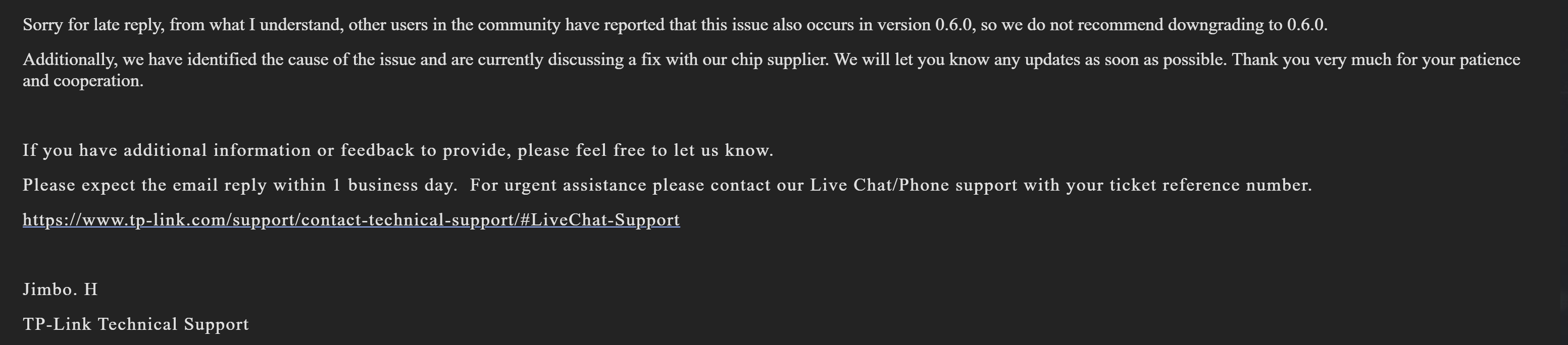
Jimbo's response from 29th May 2026
- Copy Link
- Report Inappropriate Content
Hello IndrajitIG & Ram_Eswar
Last Friday, on 12th June 2026, Jimbo (from TP-Link tech support) sent me an email for a new beta FW v1.64.0 3.0.0 v6096.0 Build 260612 Rel.40129n_Beta,, and said that this new beta FW was also shared with you too; therefore, I'm asking, have you guys tested it yet?
In my testing, it (probably) solved the issue as I turned on Reboot schedule again, and in the last two days (SAT & SUN), after the automatic schedule reboot, my XX530v didn't get stuck on the PON registering loop error (as it used to be in earlier FW versions).
Requesting to share your feedback here with us.
- Copy Link
- Report Inappropriate Content
Hi @SM-03 ,
I Installed it. I tried manually rebooting multiple time and rebooting schedule so far looks good it did not stuck to the loop. I just want observe few more days.
- Copy Link
- Report Inappropriate Content
IndrajitIG wrote
Hi @SM-03 ,
I Installed it. I tried manually rebooting multiple time and rebooting schedule so far looks good it did not stuck to the loop. I just want observe few more days.
Thanks for confirming.
I also reported today (via email) that after updating to this new beta FW, I didn't encounter the PON registering loop error. But since I updated to this new FW version, I am experiencing a new issue in my desktop's Wi-Fi only. I already shared this with Jimbo via email, sharing here as well, so that if you or anyone else is facing the same, they can highlight it here & share their opinion.
Problem:
The internet is not accessible in both 2.4 & 5 GHz SSIDs from the PC automatically, while tested from mobile, both SSIDs are ok and are being connected to the internet, video playback, browsing, etc.
Problem occurrence:
At least once every 24 hours (sometimes 2/3 times).
Problem Since:
Friday, 12th June 2026, since updated to this latest beta FW v1.64.0 3.0.0 v6096.0 Build 260612.
Problem in other devices:
So far, only encountered in my desktop PC WiFi connection, not in any other devices (smartphones, Smart TVs, and other smart IoTs)
Only way I found to resolve:
Reboot the router 1/2 times.
- Copy Link
- Report Inappropriate Content
@SM-03 @Kevin_Z @IndrajitIG Hi, after installing this beta firmware 1.64 for last three days its working without loop error after every power cycle.
** And related to WIFI, i used it with mobile and laptop for duration below 1 hour only, during that time i didn't faced any issues realated to internet.
- Copy Link
- Report Inappropriate Content


Ram_Eswar wrote
@SM-03 @Kevin_Z @IndrajitIG Hi, after installing this beta firmware 1.64 for last three days its working without loop error after every power cycle.
** And related to WIFI, i used it with mobile and laptop for duration below 1 hour only, during that time i didn't faced any issues realated to internet.
Thank you all for your quick update on the testing results with the provided beta firmware.
Please keep monitoring connectivity for a few more days and let me know how this beta firmware works.
- Copy Link
- Report Inappropriate Content

hey,could you pls share the beta firmware, i'm also facing the pon loop issue,TYIA.
- Copy Link
- Report Inappropriate Content
Information
Helpful: 4
Views: 2602
Replies: 45
Voters 2
