
Xx530v XPON loop issue

Dear Team,
I am writing to bring two potential software-related issues to your attention that I believe warrant investigation and resolution.
1. **MAC Cloning and PPPoE Download Speed Limitation:** When utilizing MAC cloning for a PPPoE connection, I observed a consistent download speed limitation of 50 Mbps. This issue was resolved after my Internet Service Provider (ISP) released the MAC binding.
2. **Persistent EPON Registration Loop:** The router intermittently enters an EPON registration loop. This occurs daily, even after a scheduled nightly reboot. To resolve this, I must power down the device for two minutes, disconnect the optical cable, and then reconnect it once the router has fully initialized. I am uncertain if this behavior is linked to serial number spoofing and would appreciate any insights or assistance from the community or support team.
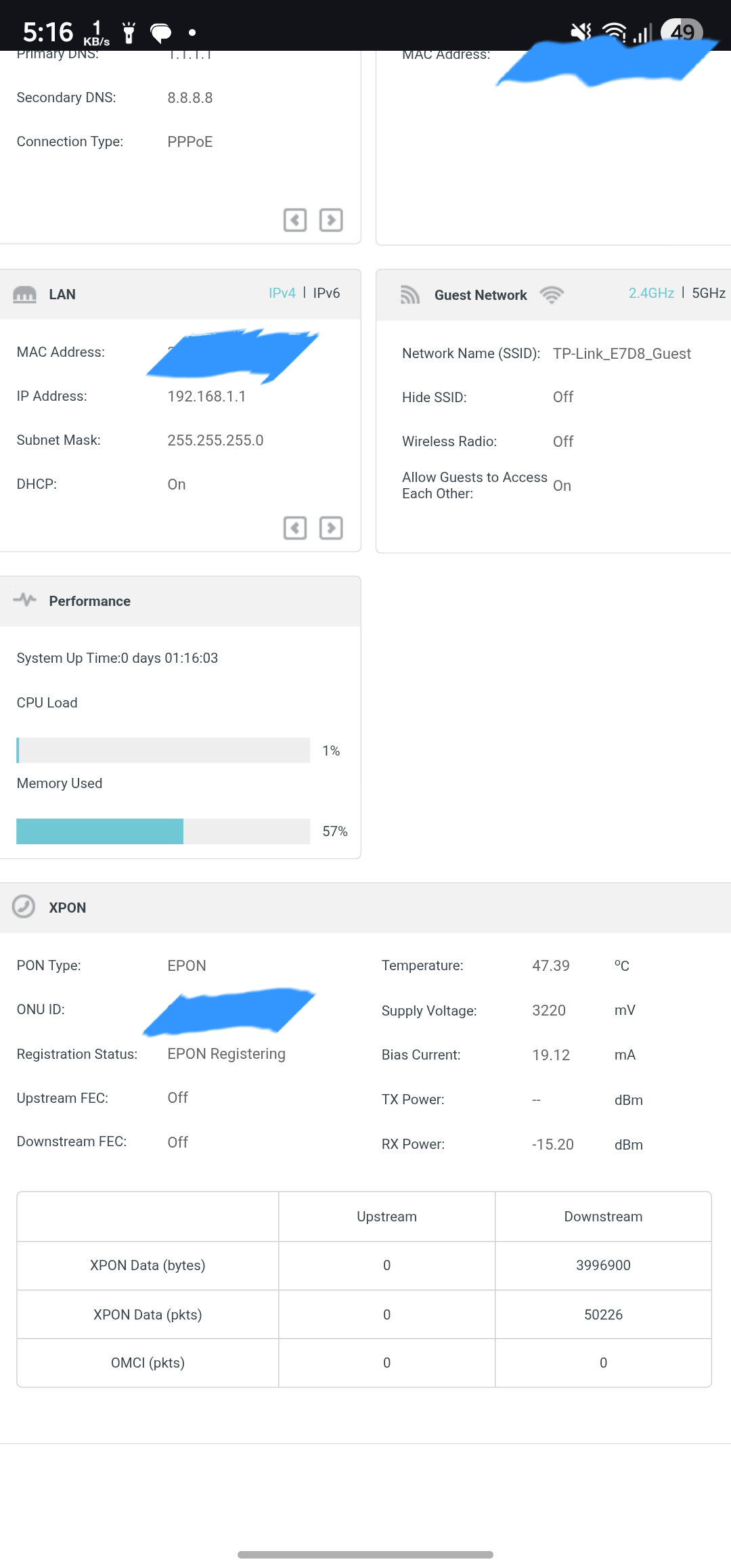
Furthermore, I would like to suggest the implementation of a dashboard feature that provides detailed data consumption statistics per device. Integrating this with cloud synchronization would be highly beneficial, ensuring data persistence even after system reboots.
Thank you for your time and consideration.
Sincerely,
Indrajit
- Copy Link
- Subscribe
- Bookmark
- Report Inappropriate Content


- Copy Link
- Report Inappropriate Content
Hi @Kevin_Z , For past ten days with this 1.64 fw xx530v working without any PON loop error.
**Now this Updated code to regular Firmware will fix loop error, Thanks
- Copy Link
- Report Inappropriate Content
@Kevin_Z I'm facing the same issue on my xx530v. Would it be possible to share the firmware with me?
- Copy Link
- Report Inappropriate Content
- Copy Link
- Report Inappropriate Content
SM-03 wrote
IndrajitIG wrote
Hi @SM-03 ,
I Installed it. I tried manually rebooting multiple time and rebooting schedule so far looks good it did not stuck to the loop. I just want observe few more days.
Thanks for confirming.
I also reported today (via email) that after updating to this new beta FW, I didn't encounter the PON registering loop error. But since I updated to this new FW version, I am experiencing a new issue in my desktop's Wi-Fi only. I already shared this with Jimbo via email, sharing here as well, so that if you or anyone else is facing the same, they can highlight it here & share their opinion.
Problem:
The internet is not accessible in both 2.4 & 5 GHz SSIDs from the PC automatically, while tested from mobile, both SSIDs are ok and are being connected to the internet, video playback, browsing, etc.
Problem occurrence:
At least once every 24 hours (sometimes 2/3 times).
Problem Since:
Friday, 12th June 2026, since updated to this latest beta FW v1.64.0 3.0.0 v6096.0 Build 260612.
Problem in other devices:
So far, only encountered in my desktop PC WiFi connection, not in any other devices (smartphones, Smart TVs, and other smart IoTs)
Only way I found to resolve:
Reboot the router 1/2 times.
Hi @SM-03 ,
Regarding your previous comment, I have been monitoring the situation and have made the following observations: I have noticed occasional performance degradation on the 2.4GHz band. Additionally, I am experiencing issues with seamless device switching within my mesh network, despite utilizing three TP-Link devices that support Easy Mesh. Manual disconnection and reconnection are frequently required. All my devices are MIMO-enabled, and this feature has been activated on the router. The mesh network is established using a TP-Link RE605X repeater in a wireless configuration.
Specifically, when I move to the ground floor, my device frequently remains connected to the upstairs router, resulting in a low signal, rather than seamlessly transitioning to the ground floor router.
- Copy Link
- Report Inappropriate Content

IndrajitIG wrote
Hi @SM-03 ,
Regarding your previous comment, I have been monitoring the situation and have made the following observations: I have noticed occasional performance degradation on the 2.4GHz band. Additionally, I am experiencing issues with seamless device switching within my mesh network, despite utilizing three TP-Link devices that support Easy Mesh. Manual disconnection and reconnection are frequently required. All my devices are MIMO-enabled, and this feature has been activated on the router. The mesh network is established using a TP-Link RE605X repeater in a wireless configuration.
Specifically, when I move to the ground floor, my device frequently remains connected to the upstairs router, resulting in a low signal, rather than seamlessly transitioning to the ground floor router.
Hi IndrajitIG
Am done with this XX530v XPON router, as since purchasing this in April 2026, I've been experiencing one issue after another over the last two months. First, this PON registering loop and then this, frequent NO INTERNET on my PC once/twice every 8-12 hours.
So to end this suffering, decided to go for RMA and changed this xx530v with another AX3000 class router, i.e. AX53.
- Copy Link
- Report Inappropriate Content
@SM-03 @IndrajitIG @Kevin_Z Hi, this beta 1.64 firmware is just to fix PON loop error and to check its effectiveness against loop error. Beta FW will have many bugs with uncompleted features for testing.
** I am thinking in with this loop fix code update to existing firmware 0.9.0 xxxx it'll perform normal i hope.
- Copy Link
- Report Inappropriate Content
Information
Helpful: 4
Views: 2693
Replies: 47
Voters 2
