
Ethernet Port Speed problems on Archer AX73 v2.0

Ethernet Port Speed problems on Archer AX73 v2.0

Ethernet Port Speed problems on Archer AX73 v2.0
Yesterday
Model: Archer AX73  
Hardware Version: V2
Firmware Version: 1.2.1 Build 20250717 rel.40826(4555)

Hello,

I'm currently using Archer AX73 v2.0, running US firmware. One night, it auto update to 1.2.1 Build 20250717 rel.40826(4555) and I can not roll back.


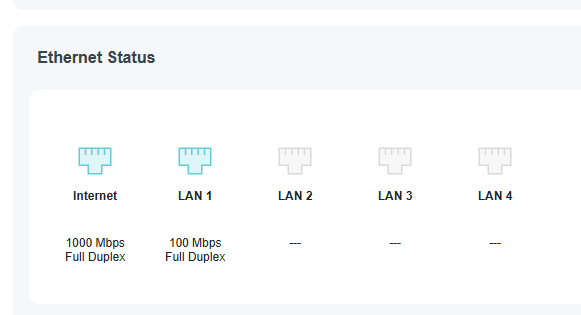
This firmware bring me a lot of problems, like wifi connection is not stable, and 1 big problem is some how my connection from my pc to router was dropped to 100mbs and sometime it randomly dropped to 10mbs, although I am using a CAT6 cable. I tried to change the cable, reinstall the driver,... but nothing work. What should I do? Throw aways this router?


1
1
#1
3 Reply
Re:Ethernet Port Speed problems on Archer AX73 v2.0
18 hours ago

  @Annnekkk 


Have you tried to use a different LAN port - for exapmpe LAN 2-4 and check if the issue presists.

Best approach would be to use your CAT5e cable which comes with the AX73 router kit.

If this was helpful click on the arrow pointing upward to make it blue. If this solves your issue, click the star to make it blue as a "Recommended Solution". BTC:149wubkkfoLmNDjDbiTxx4ZU8mpcMA5CJt
1
1
#2
Re:Ethernet Port Speed problems on Archer AX73 v2.0
2 hours ago

  @terziyski 


Thank you for replying me. I tried all my lan port, from 1-4, all ports give me 100mbps, sometime it randomly dropped to 10mbps, and my pc showing unidentified network. When I plug that cable directly to my moden, or using that cable to plug from moden to AX73, its connection is 1000mbps. idk what happened here. 


And one more thing, after the update, my router sometime randomly really hot.

0
0
#3
Re:Ethernet Port Speed problems on Archer AX73 v2.0
2 hours ago

  @Annnekkk 


Did you try with your CAT5e cable, which comes with the AX73 router kit ? (between the AX73 and the PC).

If this was helpful click on the arrow pointing upward to make it blue. If this solves your issue, click the star to make it blue as a "Recommended Solution". BTC:149wubkkfoLmNDjDbiTxx4ZU8mpcMA5CJt
0
0
#4