Invalid VLAN ID

Invalid VLAN ID

Invalid VLAN ID
Invalid VLAN ID
2026-04-28 07:31:09 - last edited 3 weeks ago
Model: Archer A5  
Hardware Version:
Firmware Version:

I just moved to another place and trying to connect my Archer A5 to my Modem. Everytime I try to enter my VLAN ID, it says "Invalid VLAN ID, please enter a number between 2 and 4094". However, my VLAN ID is definitely in that range. Everytime I click save, I get this error and the settings for VLAN ID go back to 0. 

0
0
#1
1 Accepted Solution
Re:Invalid VLAN ID-Solution
2026-04-29 03:59:57 - last edited 3 weeks ago

Hello @Chris28 ,

Welcome to our community.


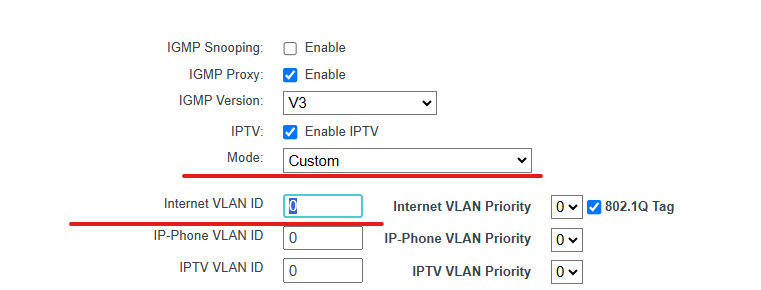
If your ISP is not in the Mode list, please select custom and input the VLAN ID manually:


For details, please refer to How to configure IPTV function on TP-Link Wi-Fi router

Welcome to Our Community! Get the latest posts: △New Firmware for Archer GE550/GE650 V1 Introduces AI-QoS, EasyMesh IoT Expansion, and More! △New Firmware Releases for Archer BE805 V1/BE450 V1 to Support VPN Merge, New ECO Mode, and More! More posts, please see: △ Get the Ongoing Pre-release Firmware for Wi-Fi Routers Here— Subscribe for Updates! Urgent problems with your Wi-Fi Router, Range Extender, or DSL Modem? Please reach out via private Messages or @Joesph-TP in your new thread directly. Click Or ☆Recommended Solution if the post/answer helps.
Recommended Solution
0
0
#2
1 Reply
Re:Invalid VLAN ID-Solution
2026-04-29 03:59:57 - last edited 3 weeks ago

Hello @Chris28 ,

Welcome to our community.


If your ISP is not in the Mode list, please select custom and input the VLAN ID manually:


For details, please refer to How to configure IPTV function on TP-Link Wi-Fi router

Welcome to Our Community! Get the latest posts: △New Firmware for Archer GE550/GE650 V1 Introduces AI-QoS, EasyMesh IoT Expansion, and More! △New Firmware Releases for Archer BE805 V1/BE450 V1 to Support VPN Merge, New ECO Mode, and More! More posts, please see: △ Get the Ongoing Pre-release Firmware for Wi-Fi Routers Here— Subscribe for Updates! Urgent problems with your Wi-Fi Router, Range Extender, or DSL Modem? Please reach out via private Messages or @Joesph-TP in your new thread directly. Click Or ☆Recommended Solution if the post/answer helps.
Recommended Solution
0
0
#2