
ER605 failed to establish a TSL connection with PfSense with OpenVPN

ER605 failed to establish a TSL connection with PfSense with OpenVPN

ER605 failed to establish a TSL connection with PfSense with OpenVPN
a week ago - last edited Saturday
Model: ER605 (TL-R605)  
Hardware Version: V2
Firmware Version: 2.3.2

Hi,


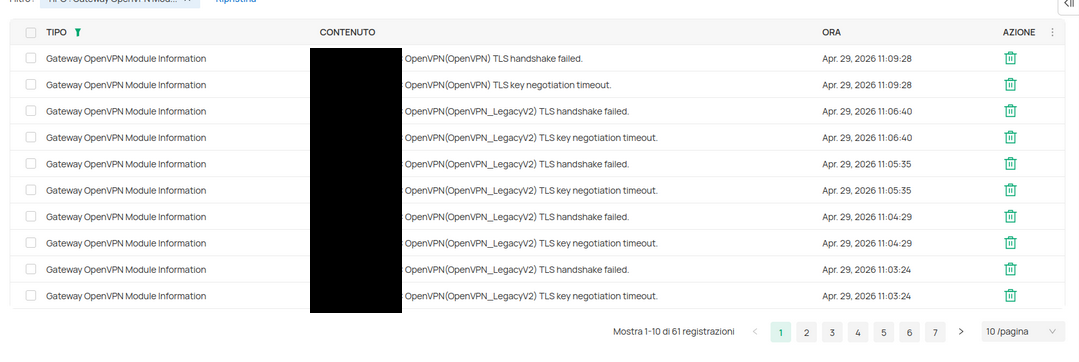
I'm having a problem setting up this gateway. I used omadacloud with a standard license. I've set up a Remote OVPN Server to connect to with the standard wizard and exported the file with the standard client export. After uploading the ovpn file to the device and setup everything needed, remote ip, port, username and password, the status logs say that they cannot establish a TSL handshake. After trying many times to lower the TSL version, use the legacy version from the pfsense exporter and many other tries, I cannot let the device connect to the server. From my pc and other devices the connection establishes.


0
0
#1
1 Accepted Solution
Re:ER605 failed to establish a TSL connection with PfSense with OpenVPN-Solution
a week ago - last edited Saturday

Hi @Alaex 

Thanks for reaching out to TP-Link Business Forums.


To better assist in your case, please help confirm the following:

1. What's the exact model of your gateway (TL-R605 or ER605)?

2. What's the version of the Cloud Controller you are now using?

3. What's the entire network topology, e.g., ISP modem - - ER605 - - PC, etc.?

4. Please help upload the VPN settings here so that we could help check it. (Please erase sensitive information.)

Make sure the VPN port configured on the controller matches the Server's port (usually 1194).

5. Please make sure the NTP server matches VPN Server's.

6. Please check your ACL rules so there's no rule to block the service port.

Recommended Solution
0
0
#2
1 Reply
Re:ER605 failed to establish a TSL connection with PfSense with OpenVPN-Solution
a week ago - last edited Saturday

Hi @Alaex 

Thanks for reaching out to TP-Link Business Forums.


To better assist in your case, please help confirm the following:

1. What's the exact model of your gateway (TL-R605 or ER605)?

2. What's the version of the Cloud Controller you are now using?

3. What's the entire network topology, e.g., ISP modem - - ER605 - - PC, etc.?

4. Please help upload the VPN settings here so that we could help check it. (Please erase sensitive information.)

Make sure the VPN port configured on the controller matches the Server's port (usually 1194).

5. Please make sure the NTP server matches VPN Server's.

6. Please check your ACL rules so there's no rule to block the service port.

Recommended Solution
0
0
#2
