
Deco P9s - Satellites all showing offline but working

I've just bought 6 P9s in the past 2 months.
They're working OK though all satellites are showing offline in the app. I've searched on here and it seems a common problem though I've not seen a fix.
Any ideas?
Also, while reading the comments here, a fair few from up to five years ago say the P9s are discontinued. If this is the case, I want my money back and advice on what to get. I've just spent 400 euro on these things and it seems I've been misled. All advice appreciated!
- Copy Link
- Subscribe
- Bookmark
- Report Inappropriate Content

As for your 1st question see if the steps in this FAQ help. As for your 2nd question I will have a member of the staff answer that one.
The EOL list shows the P9 with a EOS date of 01-26-2023 so EOM would have been 01-26-2026. I'm not sure what the return policy is for a EOM product.
Please advise
- Copy Link
- Report Inappropriate Content
@HelpFixDecoApp I spent a long time in the FAQs before posting. I did not find the answer.
@Solla-topee if they were obsolete in January 2026, I am disgusted. I bought 3 in February and 3 in March. How can any warranty be valid if they are no longer supported?
- Copy Link
- Report Inappropriate Content
Just an example here if you purchased your Deco device on January 1, 2022, and it has a 3-year warranty, your warranty coverage would extend until January 1, 2025.
So rest assured, your warranty coverage remains intact regardless of the EOL (EOM) status, as long as you're still within the warranty period but you need to register your product. I have included the instructions on how to do so at the bottom of this post.
They don't use the term End Of Life they use End of Maintenance
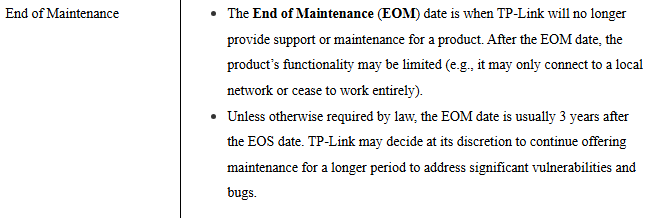
So if you just bought it, it's still under warranty, but because it's reached EOM status they won't provide support and maintenance, including security updates. You can read the full policy here
You can access the TP-Link Product Registration System here: https://myproducts.tp-link.com/
Here are the steps to get started:
1. Visit https://myproducts.tp-link.com/
2. Make sure you have selected the correct country at the top right corner of the page
3. Sign up or log in with your TP-Link ID (if you don't have one, you can create it during the registration process)
4. Once logged in, click on "Register a Product" or "+Register a Product"
5. Enter your device's Serial Number (S/N), place of purchase, and optionally upload your proof of purchase
Important notes:
• The proof of purchase is optional during initial registration but can be uploaded later
• Once you upload proof of purchase, you'll also be able to enter the purchase date
• After registration, you can view the status of your registered products under the "My Products" page
This registration is required for warranty replacement requests if you're located in the US, Canada, United Kingdom, or Germany (US/CA/UK/DE).
- Copy Link
- Report Inappropriate Content
Thanks for the comprehensive feedback. My concern is the statement ("...or may cease to work entirely"). Also, in a time of security concerns and with a company that prides itself on security, I've no trust in a product which is obsolete.
I'll wait to hear back from the company. Ultimately the products are faulty anyway (constantly needing reboots or re-adding to the network which is a time sink and frustration), I would like my money back and I would like to replace them with a reliable product which is supported - any suggestions?
- Copy Link
- Report Inappropriate Content
I would definitely wait for a member of the staff to get back to you I am going by the info I was able to find online I have no way if knowing if they keep it up to date or not. As for which model to switch to your pretty limited if you require the Powerline option on the new deco. The only other deco that supports it is the Deco PX50 and even that is at EOL but you can still use moca adapters though.
They have a really good comparison tool where you can compare up to three decos at a time. Below please find a link to the comparison i did between the Deco P9 and the Deco XE75 Pro (the model i use)
https://www.tp-link.com/us/compare/?typeId=5757&productIds=35371%2C73804
Here is a link to the tool without any options selected so you can use it.
https://www.tp-link.com/us/deco-mesh-wifi/product-family/?page=1
To be honest the P9 is so old that no matter what you replace it with your going to notice the difference. I would use the above tool to find a deco with the options you want and in the price range your willing to pay and then make sure it's not on the end of life list. The list is searchable and if the model your thinking of buying is on just look all the way over to the right at the last date you see.
Here is a link to the list for your review.
That date is the end of sale date and the end of life date (End of Maintenance date) is three years after the end of date sale. If it's not on the list at all that means they haven't decided on an EOS or EOM date yet so might want to go with one of those.
- Copy Link
- Report Inappropriate Content


Hi, welcome to the community.
This behavior is often related to memory management under certain network configurations, especially when there are multiple satellite units(≥5).
To restore stable operation as quickly as possible, it is recommended to temporarily roll back to the official firmware 1.1.5, which has proven to be a reliable version for multi-unit setups.
You can do this by installing the following intermediate firmware file via the Deco web UI:
Manually upgrade to the intermediate firmware version 1.3.0:1.3.0_build_20251229_rel.72520_Beta
Then downgrade to the official firmware version 1.1.5:1.1.5_build 20231229_rel.36756_Official
Go to Deco App>More>System>Backup>Configuration Backup and save a copy of the basic network settings.
Hardware reset the Deco by pressing the reset pinhole for about 1 second until the LED turns solid yellow. Wait 1–2 minutes until the LED starts flashing blue, indicating a successful reset.
Reconfigure your network: After resetting, reconfigure using the same Wi-Fi credentials so previously connected devices can reconnect automatically.
By the way, please check the hardware version of your Deco P9. If it's V2, it's not an EOS model.
Best regards.
- Copy Link
- Report Inappropriate Content
Information
Helpful: 0
Views: 225
Replies: 6
Voters 0
No one has voted for it yet.