
Archer T4U (T4UV32) and Miracast

Hello, I bought USB Dongle Archer T4U EU/3.20, and wanted to use it for MiraCast with TV that located in same room as my Desctop PC, but for some reason it doesn't work.
While on another PC I have motherboard with wifi module and it it is works, but when I cannoct TP-Link dongle and disable buildinadapter it is also not working.
Is it issue with firmware or I need to buy an another adapter?
- Copy Link
- Subscribe
- Bookmark
- Report Inappropriate Content

Can you please check the Wi-Fi band (i.e. 2.4 GHz or 5 GHz) and channel settings of the Wi-Fi Direct AP on your TV?
In case you happen to have an Archer T4U made for the EU regulations (letters "EU" printed on the serial number label), then it won't be able to see channels 149 and higher in the 5 GHz band and you would have to make sure your TV doesn't use these Wi-Fi channels.
- Copy Link
- Report Inappropriate Content
Thank you I solved issue.
TV was connected to home 5GHz network which uses channel 149 :D
I connected tv to 2.4Ghz network and I was easily find it.
I will also fix my home 5GHz network, to use one of the standard channels, need to find which ones are not occupied by neighbours.
Now I got why I put channel 149 and it wasn't occupied by neighbors :D
- Copy Link
- Report Inappropriate Content
Hi,
How exactly does it not work?
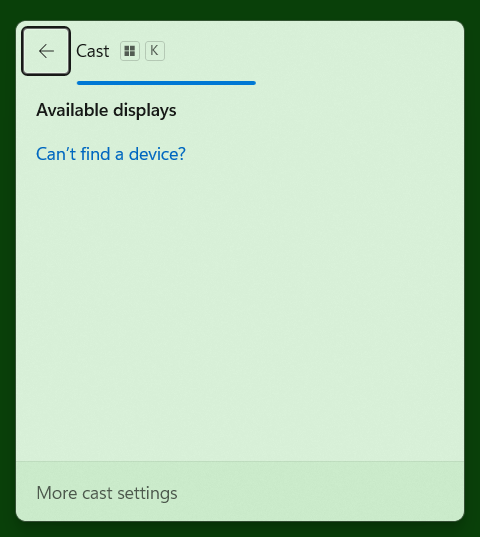
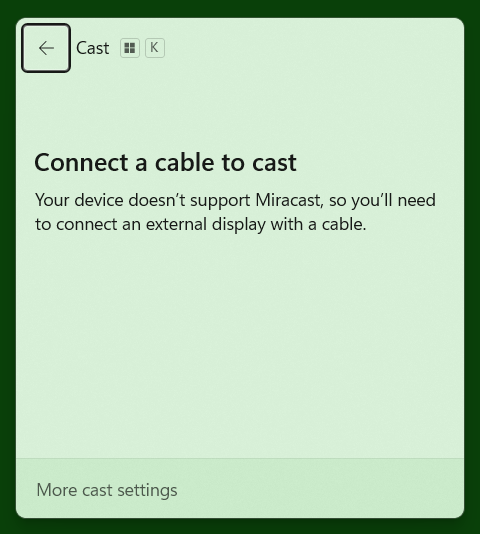
If you press [ Win key ] + [ k ] on the PC keyboard, does the window that pops up show it searching for nearby devices or does it say something about not supporting Miracast?
- Copy Link
- Report Inappropriate Content
Hello, it is just cannot search any devices.
- Copy Link
- Report Inappropriate Content
Does it not search at all or does it search, but not find any devices?
After you press [ Win key ] + [ k ] does the pop up window look like A (blue horizontal bar is moving) or like B?
A B
- Copy Link
- Report Inappropriate Content
Yes, it is searching, but cannot find any devices.
When I search from notebook, then it can find my this TV.
It looks like that issue only with this USB dongle, not sure how to check why it is cannot find maybe something needs to be configured manually for TP dongle
- Copy Link
- Report Inappropriate Content
Can you please check the Wi-Fi band (i.e. 2.4 GHz or 5 GHz) and channel settings of the Wi-Fi Direct AP on your TV?
In case you happen to have an Archer T4U made for the EU regulations (letters "EU" printed on the serial number label), then it won't be able to see channels 149 and higher in the 5 GHz band and you would have to make sure your TV doesn't use these Wi-Fi channels.
- Copy Link
- Report Inappropriate Content
Thank you I solved issue.
TV was connected to home 5GHz network which uses channel 149 :D
I connected tv to 2.4Ghz network and I was easily find it.
I will also fix my home 5GHz network, to use one of the standard channels, need to find which ones are not occupied by neighbours.
Now I got why I put channel 149 and it wasn't occupied by neighbors :D
- Copy Link
- Report Inappropriate Content
I also think that this USB Dongle is not good and I will try to find a good one which offers to use same range Wifi 5GHz channels range as my router offers :)
I do not like that this receiver self restricted to not work in normal conditions.
- Copy Link
- Report Inappropriate Content
Information
Helpful: 0
Views: 332
Replies: 7
Voters 0
No one has voted for it yet.