
Hidden 2.4GHz broadcasts on Deco X50 despite "5GHz Only" and Wired Backhaul
Hidden 2.4GHz broadcasts on Deco X50 despite "5GHz Only" and Wired Backhaul

Hi TP-Link Community,
I am currently optimizing my home network and I’ve encountered a persistent behavior with my Deco X50 (4-unit setup) that I would like to clarify.
My Configuration:
-
Backhaul: All 4 units are connected via Ethernet Backhaul.
-
Main Network: Configured to 5GHz only (using 160MHz bandwidth).
-
Guest Network: Disabled.
-
IoT Network: Disabled (temporarily, for reorganization).
-
Around 60 devices connecting spread on all Decos
The Observation: When performing an environment scan using a Wi-Fi analyzer, I noticed that despite the configurations above, hidden 2.4GHz networks remain active on every Deco unit. These hidden SSIDs are directly tied to the MAC addresses of my Deco devices.
Questions:
-
Is this behavior intended? Since all units are wired and no 2.4GHz SSID is active, I expected the 2.4GHz radios to stop broadcasting.
-
Redundancy: Are these hidden signals kept active for wireless backhaul failover? If so, is there any way to disable this redundancy whn Ethernet is confirmed as stable?
-
Access Point Mode: If I switch my Deco system to Access Point Mode, using a another device as a router, does the firmware allow for manual channel selection and channel width for each unit?
Thanks!
Andre
- Copy Link
- Subscribe
- Bookmark
- Report Inappropriate Content

- Copy Link
- Report Inappropriate Content


Hi,
The hidden 2.4 GHz Wi-Fi for backhaul won't be disabled when the 2.4 GHz Wi-Fi is disabled in the Deco app and when the Ethernet backhaul takes effect. When the Ethernet backhaul works, the Wi-Fi backhaul will disconnect automatically; however, the hidden 2.4 GHz Wi-Fi for backhaul is always active, so Deco nodes can connect via Wi-Fi backhaul if the Ethernet backhaul is not working.
When Deco X50 operates in AP mode, the channel selection and channel width options are available; however, Deco nodes on the same network use the same Wi-Fi channel and channel width.
Best Regards
- Copy Link
- Report Inappropriate Content
Hi,
Thank you for the clarification. I now understand that the hidden 2.4 GHz backhaul remains active.
Regarding the AP mode settings: while it’s helpful that channel selection is available for the network as a whole, it is a significant limitation for my environment if I use AP mode. I specifically need the ability to select different channels for each individual access point to minimize interference based on the specific RF conditions at each node's location.
Is there any plan in the product roadmap to allow independent channel selection per node in AP mode, rather than forcing the entire mesh to share the same channel?
Thanks!
- Copy Link
- Report Inappropriate Content
Hi,
To ensure Deco network performance and roaming experience, there are currently no plans to set different channels and channel widths for different APs within the same Deco network.
I understand that APs in different locations may require different channels and channel widths. In this case, please describe your network topology in detail so we can check whether you can set up separate Deco networks, each containing one Deco X50. This way, you can configure the channel and channel width individually for each Deco X50.
Best regards
- Copy Link
- Report Inappropriate Content
Sure:
- 3 Deco X50 using 1.8.2 Build 20260421 Rel 45251
- 1 Deco X50 Outdoor using 1.3.1 Build 20251030 Rel 41614
- Backhaul on all Decos
Main network (5ghz only, 160mhz CH 36, no other networks in this channel):
- 4 laptops
- 2 Smart Tvs
- 3 Amazon Echos
- 4 iPhones
- 1 iPad
- 1 Android tablet
- 1 Android phone
- 1 Tv box
- 1 Apple Tv
- 1 Android TV stick
- 3 Apple Watches
- 1 PS5
- 1 PS4
- 1 Car infotainement
- 1 Android car box
IOT network (2.4ghz only, 20mhz, channel 11)
- 10 wifi cameras (8 with h265, 2 with H264)
- 30+ iot (wall switches, smart lights, sensors, 2.4ghz)
- 2 chromecasts
- 1 Ecoflow
Wired:
- 1 raspeberyy Pi3
- 2 Nas
- 1 NVR
- 1 Nuc
- 1 hue bridge
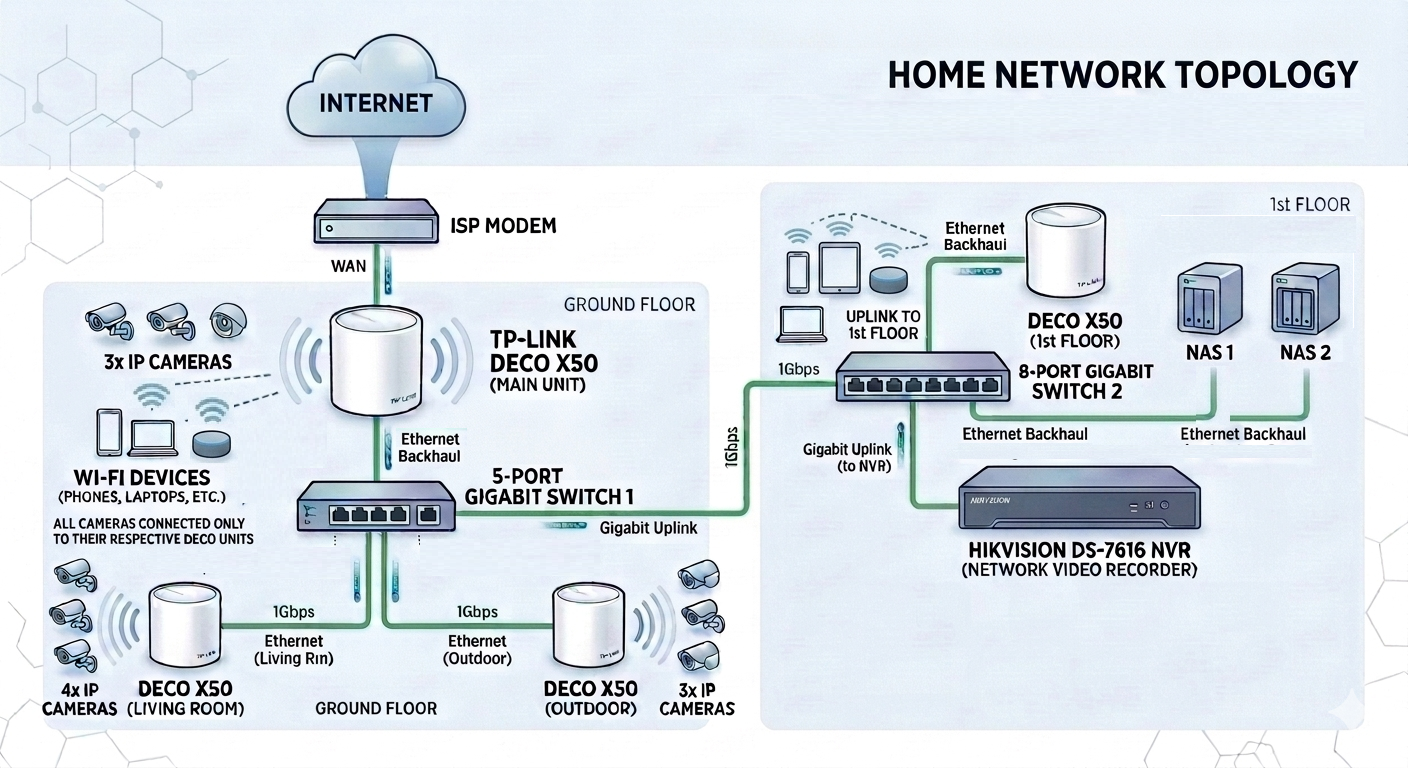
I have some neighboors that have some overlap on the 2.4 channels, specially on the outdoor X50.
On thing that I have noticed, my main deco is allways using 80+% memory, and processor almost all the time that I saw is top in 100%. Her some screenshots:
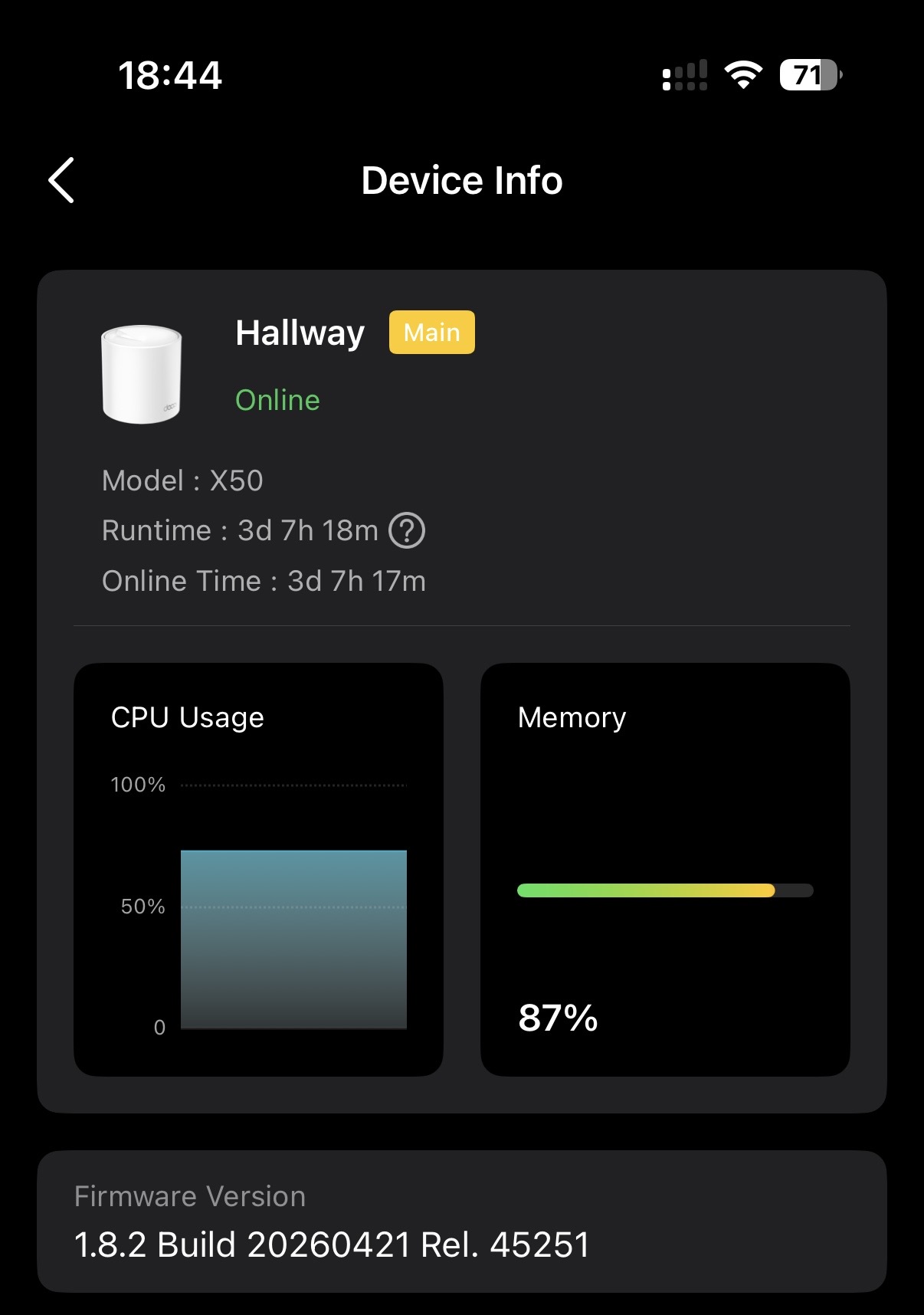
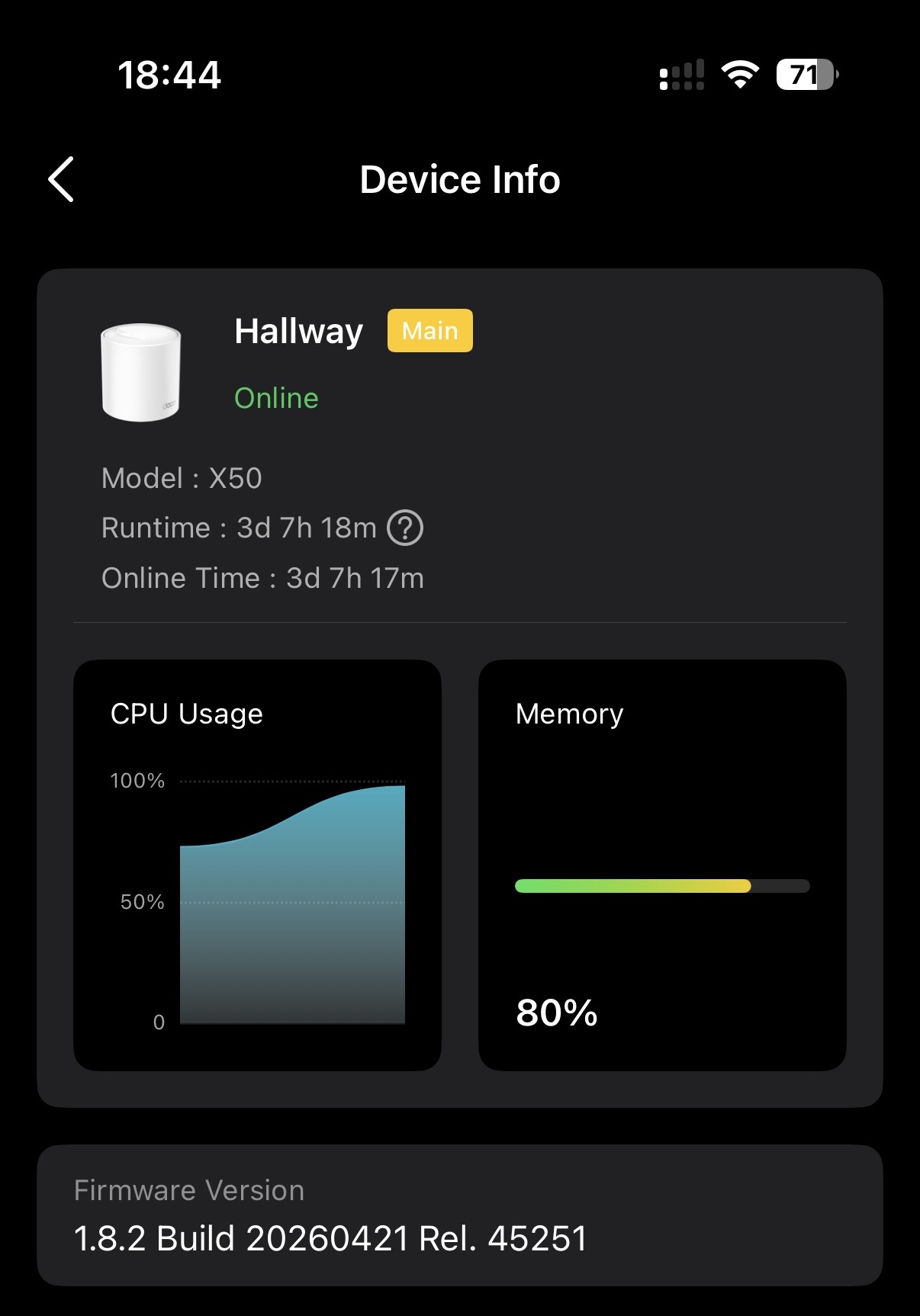
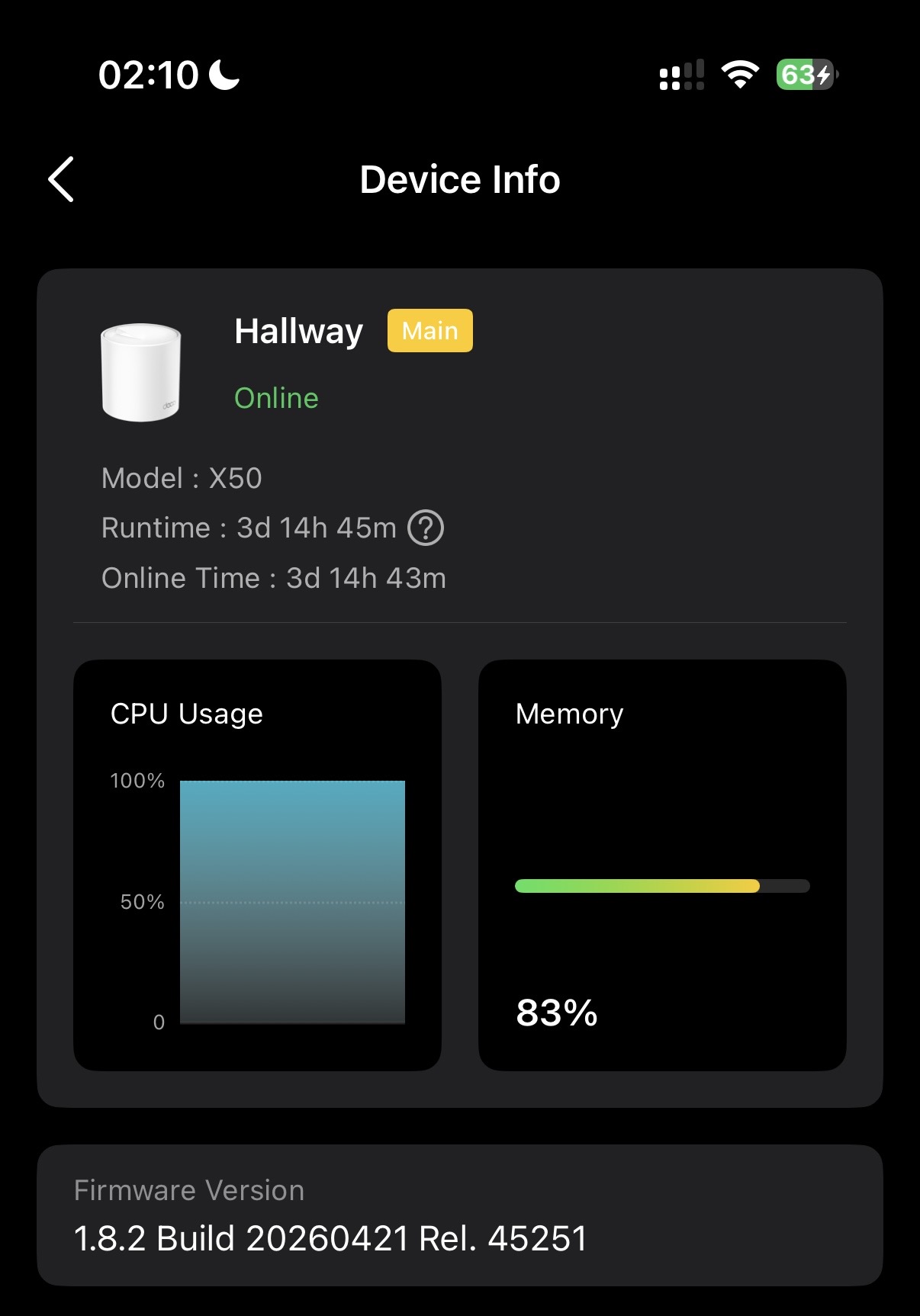
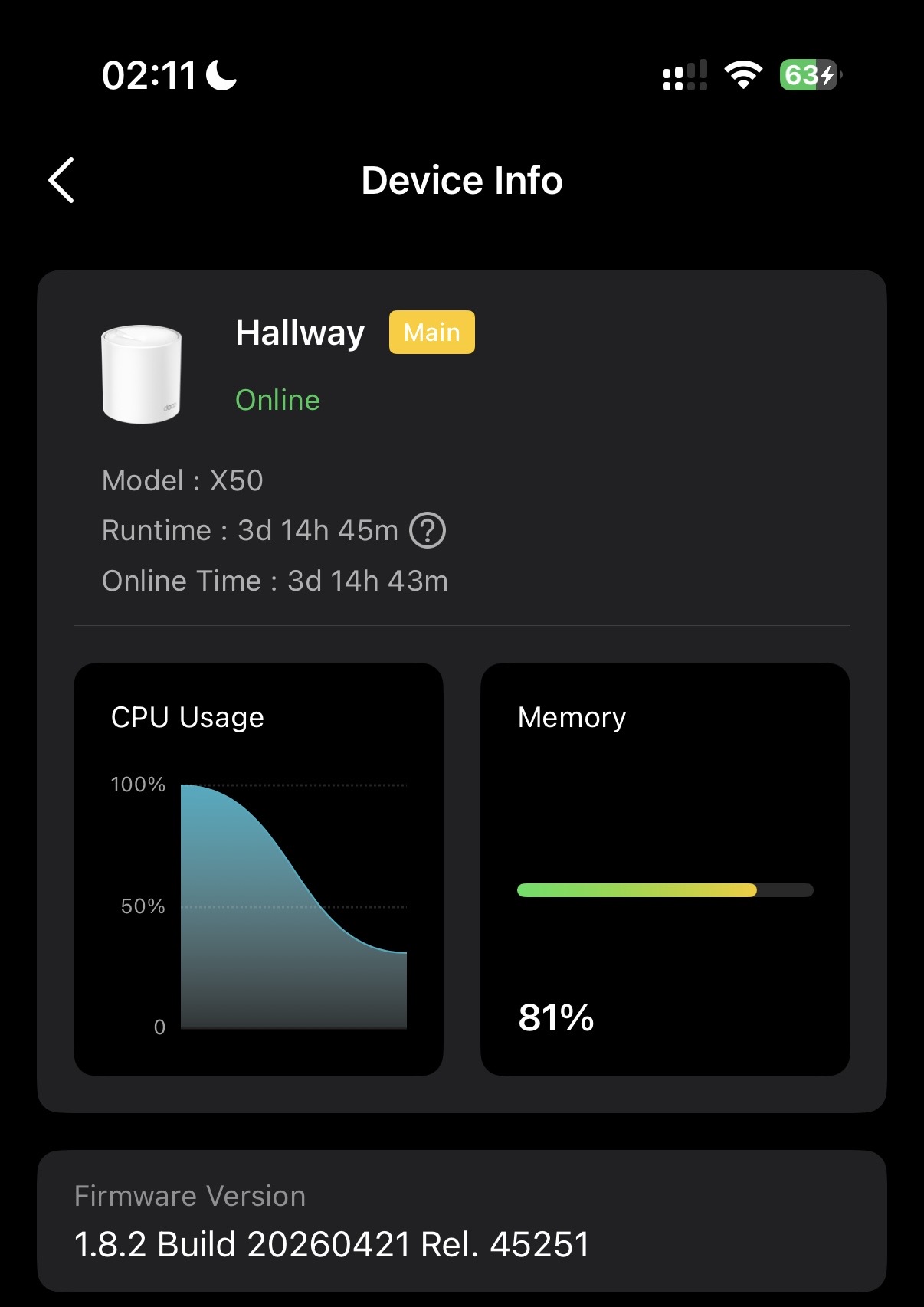
My main pain today is the cameras instability (droping or image delays). Other think that I noticed, is that from time to time, even my 5ghz devices got some packt drop (example: Microsoft Teams meeting freezing for around 2 to 5 seconds). If I ping the main Deco, 4 succesfull responses, one timeout, another 10 ok, 1 timed out.
I'm not using any parental control, not using block list, no static routing, no iptv/vlan, no nat fowarding, no upnp, no speed limit.
I'm using High capacity Wireless Network mode, address reservation only for the cams, laptops, and wired devices. Also lowered the net mask from 252 to 255. Using OpenVPN server for when I'm away home.
Fast roaming disabled, beamforming disabled, no guest netowork enabled.
Iot clients are configured to stick to an AP, set the 2.4ghz preference, mesh off.
Wifi Cameras are configured to stick to an AP, set the 2.4ghz preference, mesh off, high priotity and device isolation. NVR is also set to device isolation.I'm not using any of the camera funcionalities on tha Deco app (actually it disapear from the Deco app, I suspect because I recently added the X50 outdoor).
The wired backhaul is Cat6 cooper. My previous setup was working fine (all AC wifi, 1 DDWRT Asus RT68, and 2 ZTE A196a and a AV600 TP-Link TL-WPA4020 Kit for the outdoor). I suspect that I was able to miminize interference, setting the correct channels on these devices.
Please let me know if you need any other info.
Thanks!
Andre
- Copy Link
- Report Inappropriate Content
Hi,
1. In the network diagram you provide, it is unable to set different channels and channel widths for each Deco node. Take the outdoor Deco X50 as an example: if you connect it to your ISP modem router directly, you can reset it, set up a new Deco network in the Deco app for it, and then set a different channel and channel width.
2. "I'm not using any of the camera funcionalities on tha Deco app (actually it disapear from the Deco app, I suspect because I recently added the X50 outdoor)."
-- Do you mean you can't control the camera in the Deco app, but it displays online in the Deco app? If so, it's normal, and we suggest controlling your camera (e.g., stream its live feed or remotely control it) in the app designed for it.
3. You can try to disable the high priority and device isolation options on the Deco app for your camera and NVR, then check if this helps. Does the camera's dropping mean it disconnects from the Deco's Wi-Fi?
Please try rebooting the Deco nodes and your camera to see whether this helps.
Best Regards
- Copy Link
- Report Inappropriate Content
Thanks for the answers.
Regarding the cameras, what I meant was that the Deco app had a place on to set the camera traffice to not go to the internet, or to allow it in certain period o f time of the day. (now it's not avaliable when I have de Deco X5o outdoor on the same network, I just removed it and now I can see the oprion back) . I do not use any camera inside the Deco app for sure, as it's not intende for that.
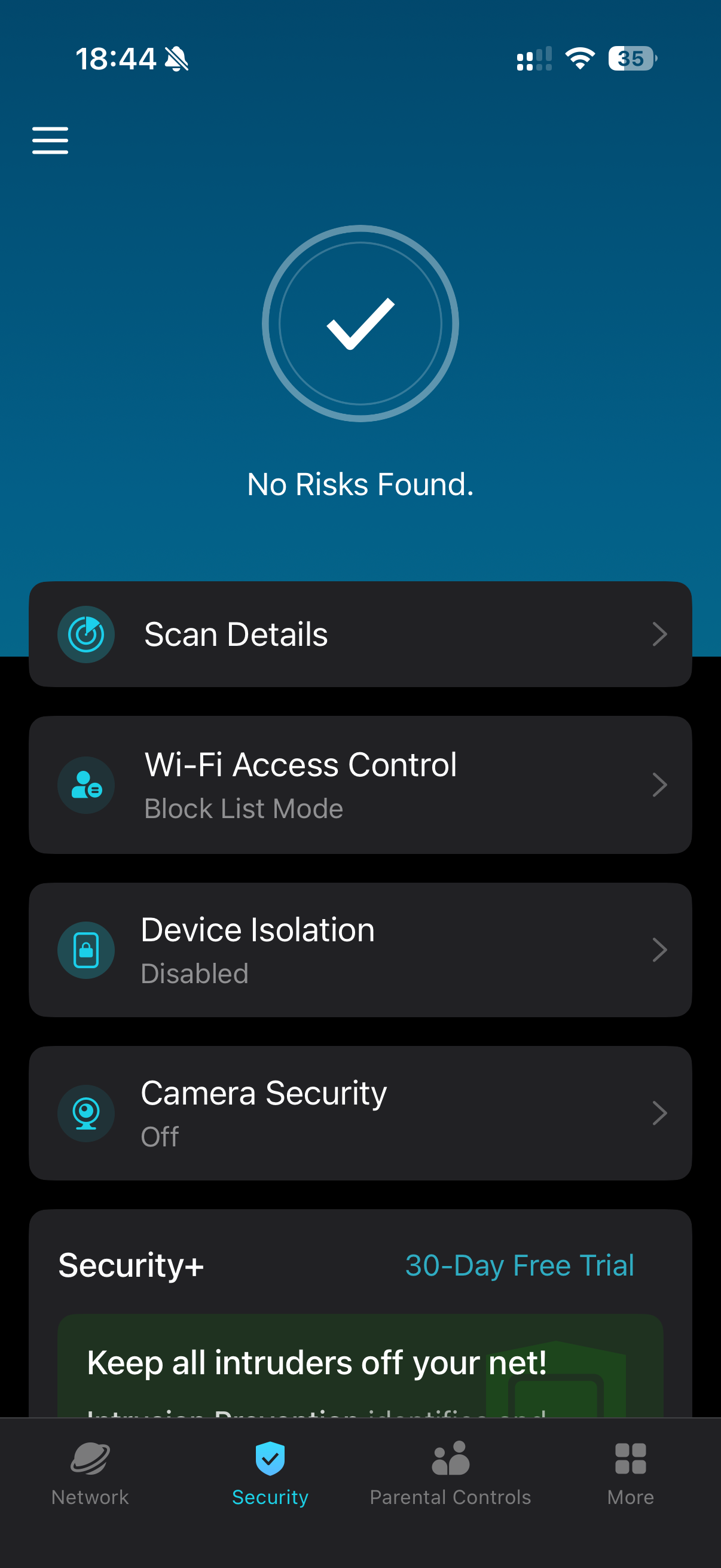
I have a NVR just to control and record the cameras. My issue is the connectivity between them.
I have tried disable both priority and isolation, with no success. Cameras still droping the video stream.
Is there any logs on the webapp that I can share here to see what is going on?
Mixing the Deco X50 and Deco X50 outdoor (with different firmware versions) maybe is the culprit. Found many other configurations that were hidden with DECO X50 outdoor in the network.
One thing that just came to my mind is to factory reset all Deco X50, and start over again. Maybe in the upgrade something still there that is causing my issues.
You did not commented on the processor and memory usage, is this what is expected?
But I will wait your feedback before that.
Best regards
- Copy Link
- Report Inappropriate Content
Hi,
The Deco X50 and X50-Outdoor are different Deco products, and the Deco X50-Outdoor does not support some features that the X50 supports, so when they are used together, you will see some features that disappear in the Deco app.
For the camera drop issue, you can try to reboot the Deco nodes and see if that helps. If the same phenomenon persists, please confirm the following information for analysis.
1. If you can ping the camera's IP address from the NVR, please test if you can ping the camera constantly.
2. Do you have the drop issue when streaming all cameras or specific cameras?
3. You can test whether factory resetting the Deco nodes and reconfiguring them helps.
If the CPU usage is at 100% all the time, it's abnormal. You can try setting another Deco as the main one, or turn off the satellite Deco nodes to see if CPU usage or memory usage drops.
Best Regards
- Copy Link
- Report Inappropriate Content
Played this weekend with all 4 Deco X50.
1. Cpu still high even when reset all Deco and started from scratch.
2. Camera drops is much better now as I started the "fresh" configuration. Suspect that some 'garbage' configuration sticked from the previous firmware upgrade.
3. Tried to use the access point mode, to see if there is any better performance but it remains similar.
I'm considering drop this Decos and migrate to another solution that can give more control and visibility on what is happening.
But if you say that in the near future we gonna have Vlans per SSID (ap and router mode), advanced wifi control (ap and router mode), I may change my mind :)
- Copy Link
- Report Inappropriate Content
High-priority remaining steps
- Continuous ping testing for cameras
From the NVR (or a wired PC on the same LAN), run continuous pings to the camera IPs (e.g., ping -t cameraIP on Windows or ping -c 1000 cameraIP on Linux/Mac).
Note patterns: Do drops correlate with stream issues? All cameras or specific ones? This is the key diagnostic Solla-topee asked for.
2. Test isolating the outdoor unit as a separate Deco network (strongly recommended for your interference situation)
- Reset the X50-Outdoor.
- Connect it directly to your ISP modem/router (or a separate port/switch if possible).
- Set it up as its own independent Deco network.
- Configure its 2.4 GHz channel/width independently for the outdoor cameras/IoT.
This gives you the per-node channel control you want and reduces load/interference on the main mesh
3. Further CPU/memory troubleshooting
- Systematically turn off satellite Decos one by one (while monitoring the main unit) to see which (if any) is driving the high usage.
- Try promoting a different Deco as the main unit and monitor for a day.
Since high CPU persists even after the clean reset, provide updated screenshots + ping results + which specific cameras drop in your next reply to Solla-topee.
Quick additional checks (if not already done post-reset)
- Test camera/NVR stability with OpenVPN server turned off.
- Confirm if packet loss on 5 GHz (Teams freezes) still occurs after the fresh setup.
- Run a Wi-Fi analyzer again post-reset to check current interference on the outdoor unit’s 2.4 GHz.
The camera drops have already improved after the factory reset + clean config, which is positive. The persistent high CPU on the main unit and occasional 5 GHz packet loss are the bigger remaining issues.Reply in the thread with the continuous ping results and updated CPU behavior.
- Copy Link
- Report Inappropriate Content
Information
Helpful: 0
Views: 577
Replies: 12
Voters 0
No one has voted for it yet.