TP Link UB500 Doesn't detect my Bluetooth Headphone's Microphone on Windows 11

TP Link UB500 Doesn't detect my Bluetooth Headphone's Microphone on Windows 11

TP Link UB500 Doesn't detect my Bluetooth Headphone's Microphone on Windows 11
3 weeks ago - last edited 2 weeks ago
Model: UB500  
Hardware Version: V1
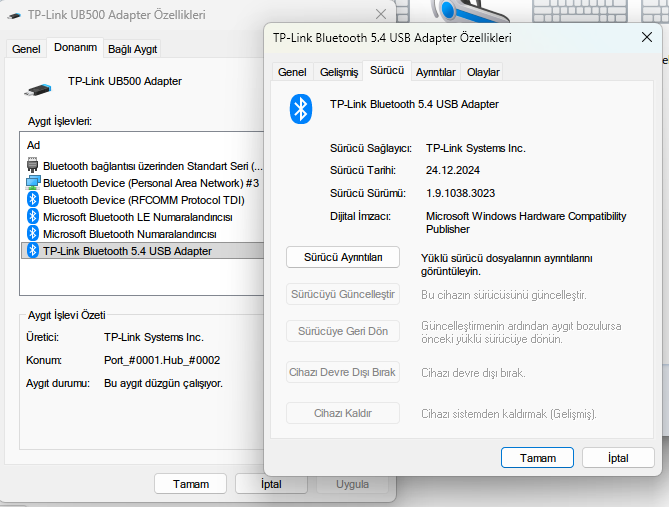
Firmware Version: 1.9.1038.3023

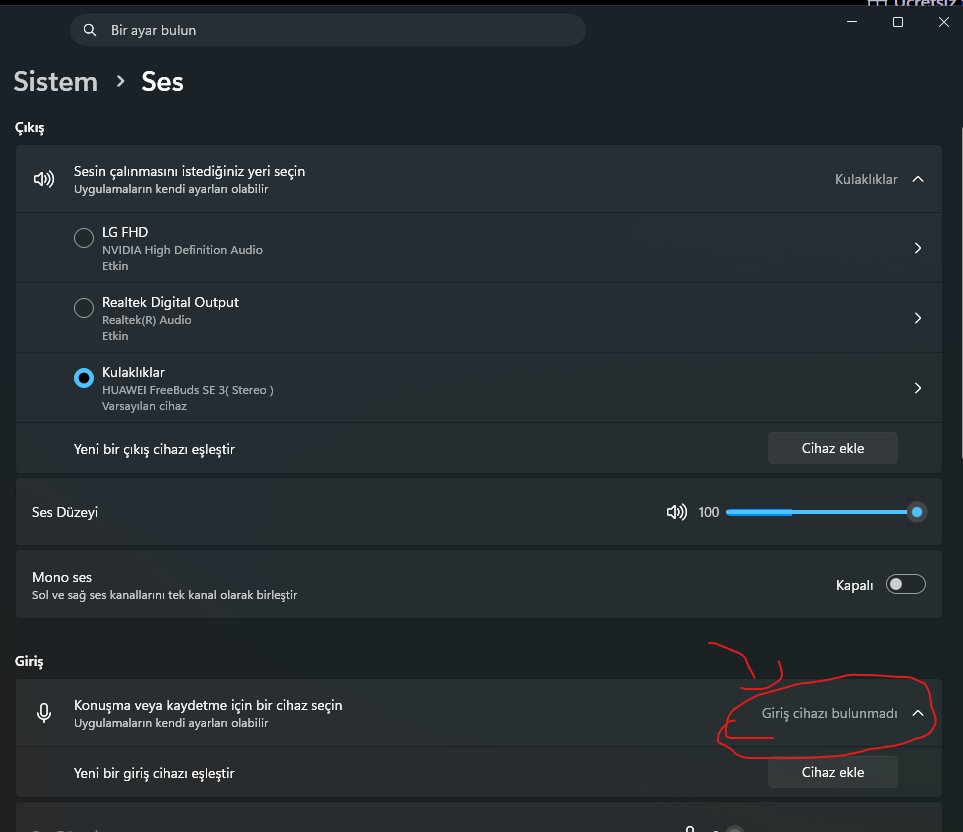
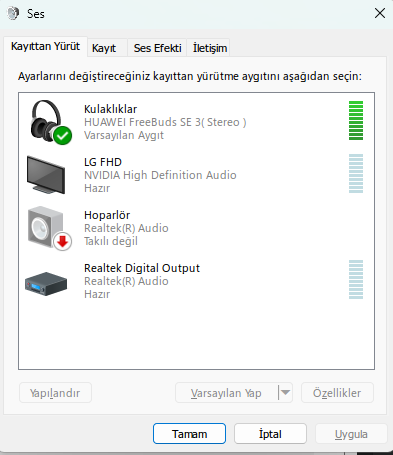
Problem: When I pair my HUAWEI FreeBuds SE 3 with the UB500 on Windows 11, only the Stereo (A2DP) profile appears in the Windows Sound panel.


The Hands-Free (HFP) profile is completely missing — meaning Windows cannot detect the microphone of my Bluetooth headphone at all.


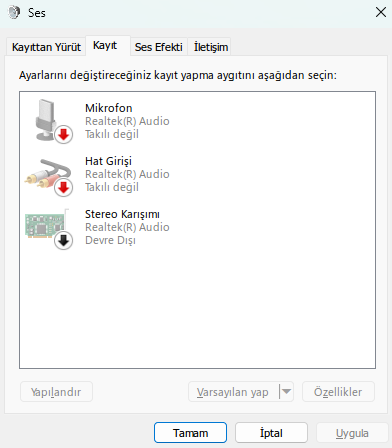
The UB500 simply does not register the microphone, it is invisible to Windows.


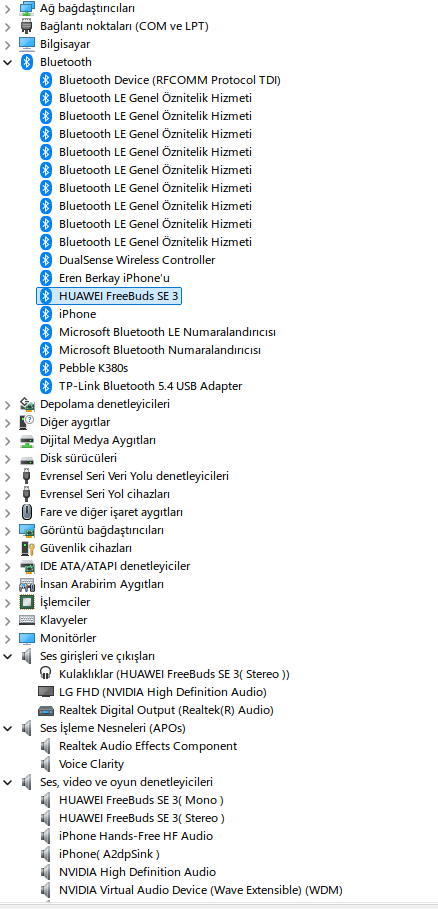
Interestingly, in Device Manager under "Sound, video and game controllers", both "HUAWEI FreeBuds SE 3 (Mono)" and "HUAWEI FreeBuds SE 3 (Stereo)" entries are visible — so the HFP profile seems partially recognized at the driver level.


But it never shows up in mmsys.cpl (Windows Sound settings) under Playback or Recording tabs, even with "Show Disabled Devices" and "Show Disconnected Devices" enabled. (See attached screenshots)


Important: This is NOT a headset issue. The same headset works perfectly with full microphone support on:

  • My other laptop running Windows 10 ( Intel bluetooth chip included ) 
  • iPhone
  • macOS

The problem only occurs on Windows 11 with the UB500 adapter.


What I already tried:

  1. Uninstalled TP-Link driver completely (with driver files) → Rebooted → Windows installed generic Microsoft Bluetooth driver → Same issue
  2. Fully reset and re-paired the headset from scratch → No change
  3. Enabled "Show Disabled/Disconnected Devices" in Sound panel → HFP profile never appears
  4. Checked Windows Update optional updates → No new driver available


Expected: Both Stereo (A2DP) and Hands-Free (HFP) profiles appear, microphone works. Actual: Only Stereo profile appears, microphone of the Bluetooth headphone is completely undetectable by Windows.


Is this a known issue with UB500 on Windows 11? Is a driver fix planned? Any official workaround would be appreciated.


System Info:

  • OS: Windows 11 Pro, Version 25H2, Build 26200.8246
  • Motherboard: ASUS PRIME B650M-R
  • Bluetooth Adapter: TP-Link UB500 Bluetooth 5.4 USB Adapter
  • Driver Version: 1.9.1038.3023
  • Headset: HUAWEI FreeBuds SE 3


Here are some screenshots of the adapter settings;


0
0
#1
1 Accepted Solution
Re:TP Link UB500 Doesn't detect my Bluetooth Headphone's Microphone on Windows 11-Solution
2 weeks ago - last edited 2 weeks ago

  @Joseph-TP 

I finally solved the issue. A solution from someone who had the exact same problem worked for me.

What I did:

  • Removed all paired Bluetooth devices from the computer.

  • Opened Device Manager.

  • Went to the “Audio inputs and outputs” section.

  • Uninstalled all Bluetooth audio devices listed there (including the TP-Link UB500, but I removed it last — don’t uninstall it first, remove it only after all other Bluetooth audio devices are gone).

  • Unplugged the TP-Link UB500 from the computer.

  • Restarted the PC.

  • Plugged the TP-Link UB500 dongle back in.

  • Put the headset into pairing mode and connected it again.

After restarting, my Bluetooth headset finally:

  • Showed up as “Connected mic, audio”

  • Had the microphone working properly again

  • Restored the “Hands-Free / AG Audio” profile

So the problem was most likely caused by a Windows 11 bug that corrupted the old Bluetooth audio profiles.

Recommended Solution
1
1
#3
3 Reply
Re:TP Link UB500 Doesn't detect my Bluetooth Headphone's Microphone on Windows 11
2 weeks ago

Hello @ErenBerkay ,

Thanks for contacting our community.

We would like to escalate your case to the support engineers, and they will follow up on it. If you are willing to conduct further analysis, please check your inbox and respond.    

Welcome to Our Community! Get the latest posts: △New Firmware for Archer GE550/GE650 V1 Introduces AI-QoS, EasyMesh IoT Expansion, and More! △New Firmware Releases for Archer BE805 V1/BE450 V1 to Support VPN Merge, New ECO Mode, and More! More posts, please see: △ Get the Ongoing Pre-release Firmware for Wi-Fi Routers Here— Subscribe for Updates! Urgent problems with your Wi-Fi Router, Range Extender, or DSL Modem? Please reach out via private Messages or @Joesph-TP in your new thread directly. Click Or ☆Recommended Solution if the post/answer helps.
0
0
#2
Re:TP Link UB500 Doesn't detect my Bluetooth Headphone's Microphone on Windows 11-Solution
2 weeks ago - last edited 2 weeks ago

  @Joseph-TP 

I finally solved the issue. A solution from someone who had the exact same problem worked for me.

What I did:

  • Removed all paired Bluetooth devices from the computer.

  • Opened Device Manager.

  • Went to the “Audio inputs and outputs” section.

  • Uninstalled all Bluetooth audio devices listed there (including the TP-Link UB500, but I removed it last — don’t uninstall it first, remove it only after all other Bluetooth audio devices are gone).

  • Unplugged the TP-Link UB500 from the computer.

  • Restarted the PC.

  • Plugged the TP-Link UB500 dongle back in.

  • Put the headset into pairing mode and connected it again.

After restarting, my Bluetooth headset finally:

  • Showed up as “Connected mic, audio”

  • Had the microphone working properly again

  • Restored the “Hands-Free / AG Audio” profile

So the problem was most likely caused by a Windows 11 bug that corrupted the old Bluetooth audio profiles.

Recommended Solution
1
1
#3
Re:TP Link UB500 Doesn't detect my Bluetooth Headphone's Microphone on Windows 11
2 weeks ago

Hi @ErenBerkay ,

Thanks for sharing your solution. I believe this will be very helpful to other users with the same problem.yes


Welcome to Our Community! Get the latest posts: △New Firmware for Archer GE550/GE650 V1 Introduces AI-QoS, EasyMesh IoT Expansion, and More! △New Firmware Releases for Archer BE805 V1/BE450 V1 to Support VPN Merge, New ECO Mode, and More! More posts, please see: △ Get the Ongoing Pre-release Firmware for Wi-Fi Routers Here— Subscribe for Updates! Urgent problems with your Wi-Fi Router, Range Extender, or DSL Modem? Please reach out via private Messages or @Joesph-TP in your new thread directly. Click Or ☆Recommended Solution if the post/answer helps.
0
0
#4