
MAC binding doesn't work

Hello. There is a problem with the TP-Link Archer C80 router. MAC binding is not working correctly. I tried to configure WoL and came to the conclusion that the router deletes the MAC address from its ARP table after a while and ignores the MAC binding. Everything works fine with a router from another manufacturer. Unfortunately, I have the latest firmware and I can't fix the problem with an update. Has anyone encountered the same problem?
- Copy Link
- Subscribe
- Bookmark
- Report Inappropriate Content
Hello and thank you for your reply. Of course, I know the difference between MAC binding and DHCP reservation. Anyway, there is a bug, but I found a solution in my case.
MAC binding + DHCP reservation - doesn't work for some reason, if the computer is turned off for a long time.
MAC binding + Static IP for the computer to wake up - always works fine, no matter how long the computer is turned off.
Also, thanks for the link to the firmware. I have successfully updated my router. Before that, I was trying to update from the web interface, but I was getting a message that the firmware is up to date, so I thought that no new firmware versions had been released.
- Copy Link
- Report Inappropriate Content


Hello @Vitaliy152 ,
Welcome to our community.
Here are a few things you can check:
1. Verify the configuration is correct: Log in to the router's web interface at http://tplinkwifi.net, go to Advanced > Security > IP & MAC Binding, and make sure the MAC address and IP address entries are correctly entered and enabled.
2. Check if you need DHCP Address Reservation instead: It's important to note that IP & MAC Binding is different from DHCP Address Reservation. If your goal is simply to assign a fixed IP address to a device based on its MAC address, you should use the DHCP Address Reservation feature instead (found at Advanced > Network > DHCP Server > Address Reservation). IP & MAC Binding is specifically an anti-ARP spoofing security feature.
3. Check for randomized/private MAC addresses: Some devices (especially mobile phones) use randomized MAC addresses by default. Make sure the MAC address you've entered in the binding matches the actual current MAC address the device is using on your network. Disable the randomized MAC address setting on the client device if needed.
4. Review the detailed configuration guide: For step-by-step instructions, you can refer to: How to configure IP&MAC Binding Wi-Fi Routers (new logo)
The latest firmware for Archer C80(EU)_V1 is Archer C80(EU)_V1_1.15.0 Build 250729. You can install it manually and see if it helps.
- Copy Link
- Report Inappropriate Content
Hello and thank you for your reply. Of course, I know the difference between MAC binding and DHCP reservation. Anyway, there is a bug, but I found a solution in my case.
MAC binding + DHCP reservation - doesn't work for some reason, if the computer is turned off for a long time.
MAC binding + Static IP for the computer to wake up - always works fine, no matter how long the computer is turned off.
Also, thanks for the link to the firmware. I have successfully updated my router. Before that, I was trying to update from the web interface, but I was getting a message that the firmware is up to date, so I thought that no new firmware versions had been released.
- Copy Link
- Report Inappropriate Content

In general, when using a TP-Link router for WoL you shouldn't use the DHCP Addess Reservation, but only the IP&MAC Binding.
I am waking my PC even without assigning a Static IP address on PC LAN adapter.
Actually, in the IP&MAC Binding, I am using a fictitious IP address, which is in the same subnet, i.e.the IP v4 (TCP/IPv4) is disabled (keep in mind that it's all about a wired network interface):
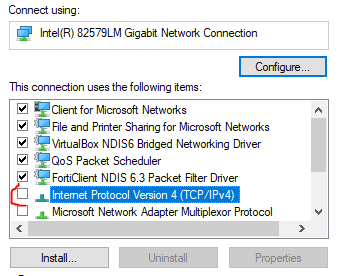
When the PC wakes up, it uses another LAN interface with a real IP address for communication.
- Copy Link
- Report Inappropriate Content
Information
Helpful: 0
Views: 133
Replies: 3
Voters 0
No one has voted for it yet.