
Using the Archer BE9300 with a landline?

I previously owned a Netgear D7800 router with which I managed to access my VOIP landline using a Grandstream HT801 ATA. In this way I was able to obtain the benefits of the higher spec router compared to the basic one bundled by Vodafone.
I have just needed to replace the D7800, which died, and I have chosen the Archer BE9300. I was rather hoping that plugging the Grandstream into an RJ45 port on the new router would restore my landline - but it has not.
Has anyone managed to access a Vodafone (or other ISP) landline using a seperate analog digital adapter? If so, would you be prepared to share some advice?
- Copy Link
- Subscribe
- Bookmark
- Report Inappropriate Content


Hello @MACH1 ,
Thanks for contacting our community.
As Woozle mentioned, you should determine whether the D7800's network access is via an Ethernet port or a DSL/phone port. The Archer BE9300 is a standard WiFi router and does not have a DSL/phone port.
- Copy Link
- Report Inappropriate Content

Hi,
I see that the Netgear D7800 is a VDSL/ADSL modem router. Were you using the D7800's VDSL/ADSL modem (i.e. a cable plugged into the grey "VDSL" port) or was the D7800 connected via its red "Internet" port?
Was the setup of the Grandstream HT801 ATA purely plug&play when you connected it to the D7800 for the first time or did you go through a manual configuration process back then?
- Copy Link
- Report Inappropriate Content
Hello @MACH1 ,
Thanks for contacting our community.
As Woozle mentioned, you should determine whether the D7800's network access is via an Ethernet port or a DSL/phone port. The Archer BE9300 is a standard WiFi router and does not have a DSL/phone port.
- Copy Link
- Report Inappropriate Content

I would suggest to contact your ISP. They may have a special VoIP VLAN that you have to configure in the BE9300 WebGUI:
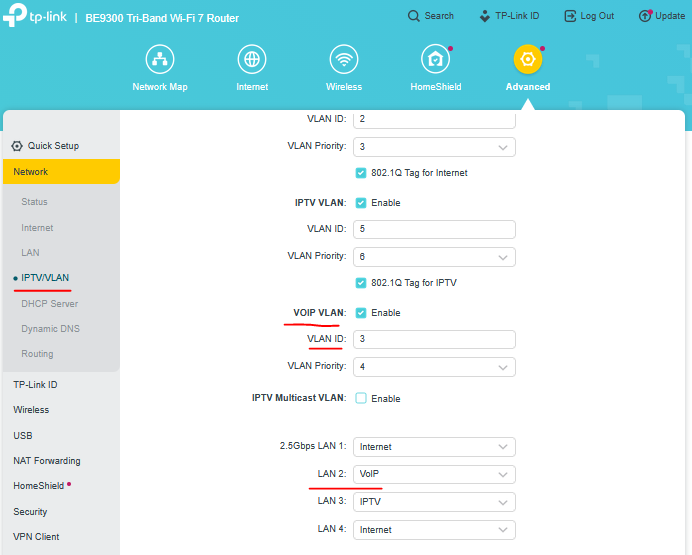
Once configured, connect the ATA device to BE9300 port LAN2 (as seen from the screenshot above) and you should be able to have your VoIP service back.
- Copy Link
- Report Inappropriate Content
Information
Helpful: 0
Views: 114
Replies: 3
Voters 0
No one has voted for it yet.