
Deco App Inaccessible from outside my home network

Hi. I just want to know if this is a normal behavior of the Deco app that it is only accessible on the same wifi. If mobile data or other network. I get an error as shown. Thank you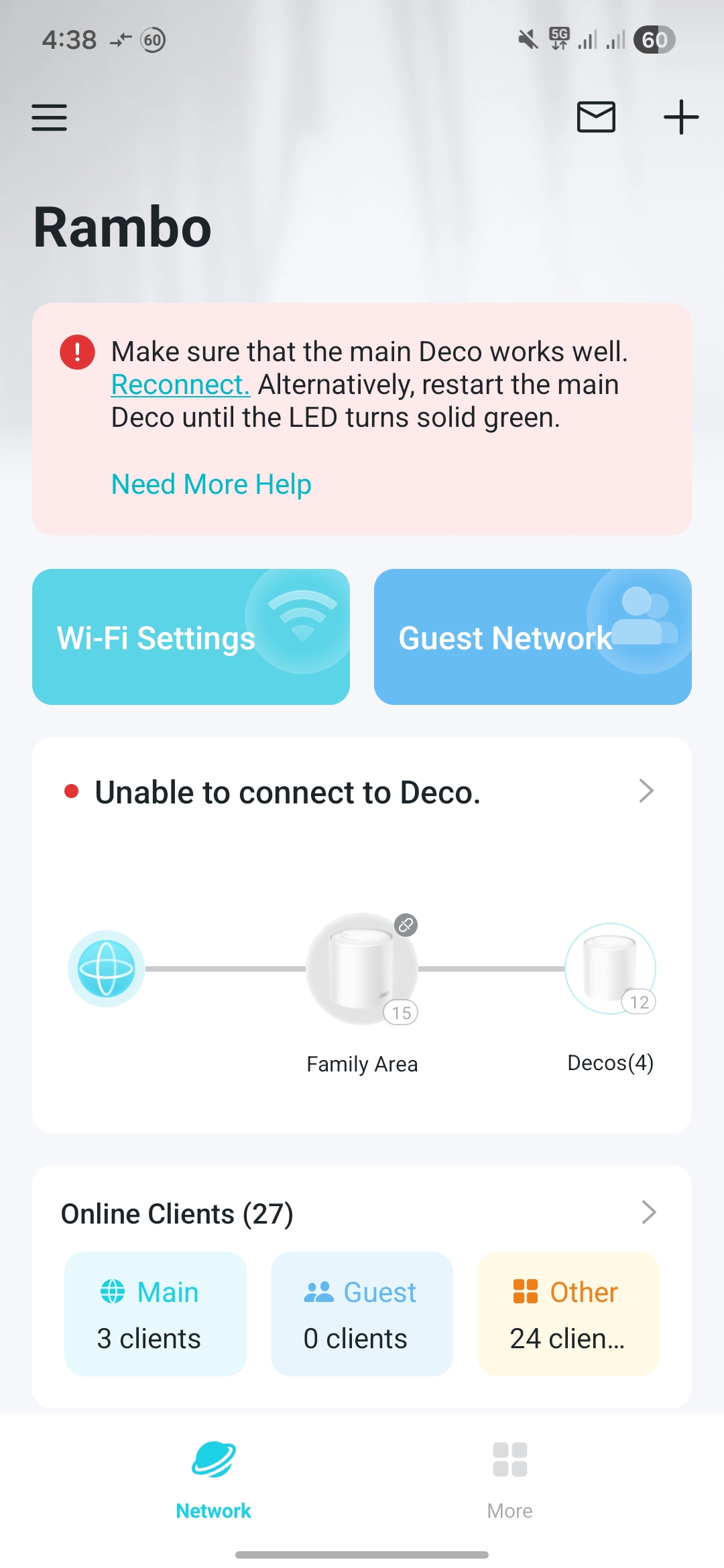
- Copy Link
- Subscribe
- Bookmark
- Report Inappropriate Content


Hi,
Usually, if the Deco has an internet connection and is bound to the TP-Link account, you can control it remotely in the Deco app.
Regarding the reported phenomenon, please confirm the following information for further analysis.
1. What's the LED status on the main Deco and satellite Deco? Do you have internet on your client devices when connecting to the Deco network?
2. If you have internet when connecting to the Deco network but the Deco nodes display offline in the Deco app, please turn off the main Deco, wait for one minute, turn on the main Deco, and see if it's online.
3. If you have no internet when connecting to the Deco network, please confirm if your front modem is working. When your phone connects to the Deco's Wi-Fi, please go to the Deco app > More > Internet page to check whether the Deco has an internet IP address.
Best Regards
- Copy Link
- Report Inappropriate Content
Hi, @Solla-topee.
Thank you for attending to my concern. Please see below answers.
1. What's the LED status on the main Deco and satellite Deco? Do you have internet on your client devices when connecting to the Deco network?
- LED status for the Main Deco X50 is green and white for the m4r's. Based on the manuals, it means they are online. Yes, I have internet. And I don't have issues connecting.
2. If you have internet when connecting to the Deco network but the Deco nodes display offline in the Deco app, please turn off the main Deco, wait for one minute, turn on the main Deco, and see if it's online.
- all nodes are showing online and I see some devices connected to them. However, on my own troubleshooting, I've tried this but I still can't access the app using mobile data
3. If you have no internet when connecting to the Deco network, please confirm if your front modem is working. When your phone connects to the Deco's Wi-Fi, please go to the Deco app > More > Internet page to check whether the Deco has an internet IP address.
- Not applicable. I always have internet.
It's just that ever since I set this up years ago, I never had access to the app using mobile data.
- Copy Link
- Report Inappropriate Content
Hi,
If your Deco app still reports the message "unable to connect to Deco" when controlling the Deco nodes remotely, please refer to the instructions below to send us the Deco app log for further analysis.
How to Get and Send Deco App Log to TP-Link Support
After you send the app log, please reply with the email reference number (ticket ID, such as TKIDXXXX) or let us know you have sent the log file.
Best Regards
- Copy Link
- Report Inappropriate Content
@Solla-topee hello. I didn't receive any message containing a ticket id or reference. But I have followed the instruction and checked the "add system logs" option
- Copy Link
- Report Inappropriate Content
Hi,
Thank you for your attempt to send us the app log. In your case, is the main Deco connected to a modem router? Please check if there are firewall/access control rules on the modem router for the main Deco. If so, remove the rules, try changing the DNS server on the modem router, and check whether you can control the Deco network remotely in the Deco app.
By the way, do you have any other TP-Link devices connected to the Deco network that can be controlled remotely?
Best Regards
- Copy Link
- Report Inappropriate Content
Yes, I am using an Omada ER605 router. I removed DNS settings but it still has the same error. I don't have any ACL's that could potentially block cloud connection.
I also don't have other devices that can be controlled remotely.
What I remembered is that even when I first use Deco, the time when I don't have router or even set any DNS config yet, it never really worked.
- Copy Link
- Report Inappropriate Content
Hi,
I have escalated your case to our tech team, and they will contact you via email to assist you further. Please wait patiently.
Best Regards
- Copy Link
- Report Inappropriate Content
Information
Helpful: 0
Views: 131
Replies: 7
Voters 0
No one has voted for it yet.