How to set up Archer C24 as an access point⁠

How to set up Archer C24 as an access point⁠

How to set up Archer C24 as an access point⁠
13 hours ago - last edited 5 hours ago
Model: Archer C24  
Hardware Version: V9
Firmware Version:

I am facing an issue with my TP-Link Archer C24 router. It is unable to connect to the internet. The Wi-Fi network appears on my devices, but there is no internet access when connected.

I have already tried restarting the router, but the issue still persists. Could you please help me troubleshoot and fix this configuration problem?

 

  0      
0
#1
Options
1 Reply
Re:How to set up Archer C24 as an access point⁠
10 hours ago - last edited 5 hours ago

  @N_905 


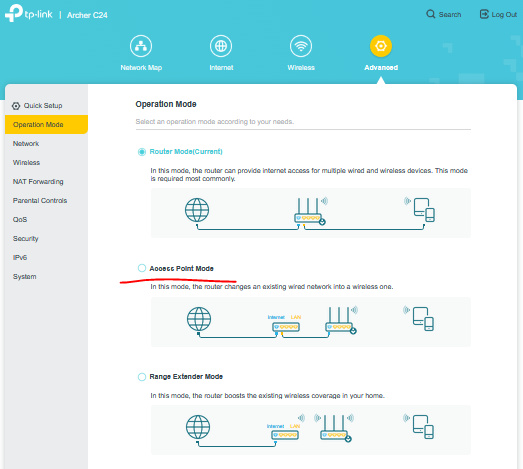
That's easy enough. Go to the advanced tab and change the operation mode of teh C24 like so:


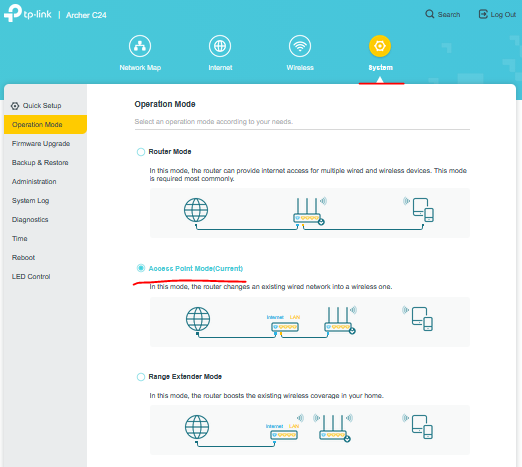
After you switch the operation mode to AP mode, your C24 WebGUI should look like this:


Here's a user guide on that matter.

If this was helpful click on the arrow pointing upward to make it blue. If this solves your issue, click the star to make it blue as a "Recommended Solution". BTC:149wubkkfoLmNDjDbiTxx4ZU8mpcMA5CJt
  1  
1
#2
Options