
EasyMesh with router keeps showing Internet IP

Hi,
Due to the ethernet port location limitations, I am trying to set up wired EasyMesh using the following setup:
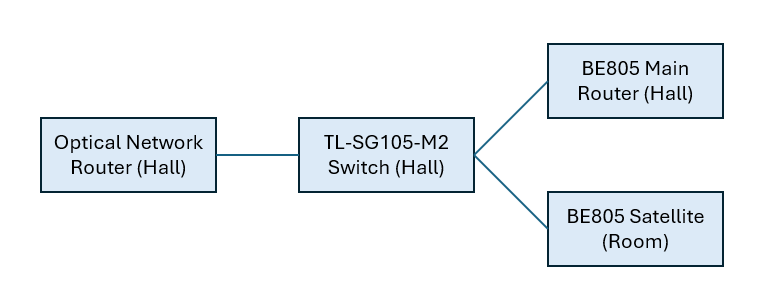
The satellite unit is not detecting the wired connection. The IP is also showing the Internet IP, instead of local IP of 192.168.x.x.
Is this set up possible? Or I should just keep to Wireless EasyMesh set up?
Your replies are most appreciated. Thank you.
- Copy Link
- Subscribe
- Bookmark
- Report Inappropriate Content

I believe so, since BE400 has a DHCP server in AP mode. I would assume that BE805 has one too.
The important thing here is that your need your Optical Network Router to be in router mode (with its DHCP server active):
Despite the fact that BE805 can have a DHCP server in AP mode, you still need a router in front of the TL-SG105-M2 switch.
The other option is to move the main BE805 (as it is - in router mode) in front of the TL-SG105-M2 switch, i..e. you need a router with its DHCP server active, in front of the TL-SG105-M2 switch.
- Copy Link
- Report Inappropriate Content
Is your optical network router in bridge mode or in normal router mode ?
If it's in normal router mode, use this Easymesh feature of the BE805.
If it's in bridge mode, your main BE805 should be in front of the TL-SG105-M2 or satellite BE805 directly connected to the main BE805.
- Copy Link
- Report Inappropriate Content
@terziyski Hi, my BE805 is in router mode. After reading the link you gave, if I use the main router in AP mode, can I still use it as a DHCP server?
- Copy Link
- Report Inappropriate Content
I believe so, since BE400 has a DHCP server in AP mode. I would assume that BE805 has one too.
The important thing here is that your need your Optical Network Router to be in router mode (with its DHCP server active):
Despite the fact that BE805 can have a DHCP server in AP mode, you still need a router in front of the TL-SG105-M2 switch.
The other option is to move the main BE805 (as it is - in router mode) in front of the TL-SG105-M2 switch, i..e. you need a router with its DHCP server active, in front of the TL-SG105-M2 switch.
- Copy Link
- Report Inappropriate Content
Information
Helpful: 0
Views: 105
Replies: 3
Voters 0
No one has voted for it yet.