Setting up event notification schedules

Setting up event notification schedules

Setting up event notification schedules
Yesterday
Hardware Version:
Firmware Version:

In the VIGI app settings, when I turn on event notifications, I can't create multiple custom notification schedules. Is there a good solution? I want to receive notifications all day on weekends, but only at specific times from Monday to Friday.

  0      
0
#1
Options
2 Reply
Re:Setting up event notification schedules
18 hours ago

Hi, @hirata 

Thank you for posting on our business forum.

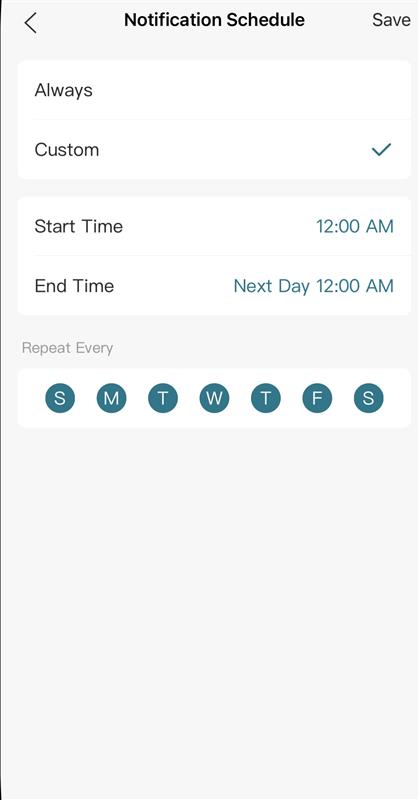
The VIGI app supports custom Notification Schedule functionality. Please follow the steps below to adjust your settings:
Go to the path VIGI APP > Devices > Click on your camera > Settings > Notifications > Notification Schedule, change the mode to Custom, set your preferred time periods when you wish to receive notifications, and click Save to confirm your changes.



  0  
0
#2
Options
Re:Setting up event notification schedules
14 hours ago

  @Nathan-TP 

Thank you for your reply.

Unfortunately, what I'm looking for is multiple notification settings.

For example, I want to receive notifications all day on Saturdays and Sundays, but from Monday to Friday, I want to receive notifications at specific times.

Nathan-TP wrote

Hi, @hirata 

Thank you for posting on our business forum.

The VIGI app supports custom Notification Schedule functionality. Please follow the steps below to adjust your settings:
Go to the path VIGI APP > Devices > Click on your camera > Settings > Notifications > Notification Schedule, change the mode to Custom, set your preferred time periods when you wish to receive notifications, and click Save to confirm your changes.



  0  
0
#3
Options