How can I force an RE200 extender to connect to a specific EasyMesh node?

How can I force an RE200 extender to connect to a specific EasyMesh node?

How can I force an RE200 extender to connect to a specific EasyMesh node?
a week ago - last edited a week ago
Model: RE200  
Hardware Version: V5
Firmware Version: 1.0.50 Build 250821 Rel.58303n

Hi,


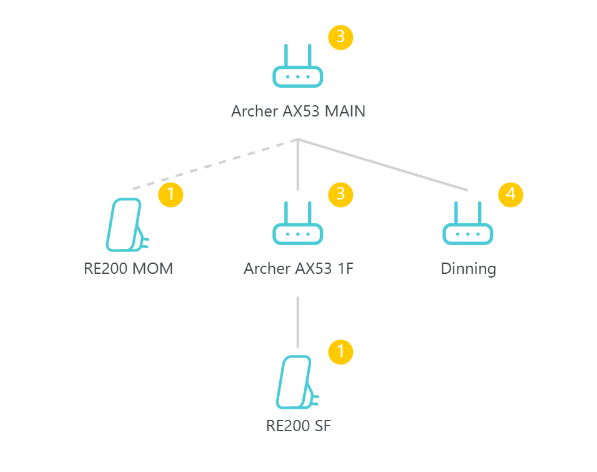
Mesh topo
 

I have the following EasyMesh setup:


  • Archer AX53 (Main Router)
  • Archer AX53 1F (Mesh Node)
  • Archer AX10 Dinning (Mesh Node)
  • RE200 MOM (Range Extender)
  • RE200 SF (Range Extender)
     

Currently, the network topology shows that RE200 MOM is connected directly to the Main AX53 router. I would like RE200 MOM to connect through the "Dinning" AX10 node instead, as it is physically closer and would provide better coverage in that area. AX10 and AX53 are in the same floor.


Is there any way to manually select or prioritize the uplink/parent node for an RE200 extender in an EasyMesh network? If not, are there any recommended steps to encourage the RE200 to connect to the Dinning node rather than the Main router?


I've already tried relocating the extender and rebooting the devices, but the topology still shows the RE200 connected to the Main router.


Any suggestions would be appreciated.


Thank you.

  0      
0
#1
Options
1 Reply
Re:How can I force an RE200 extender to connect to a specific EasyMesh node?
a week ago

Hello  @manjtb350 ,

Please note that in EasyMesh (and mesh networking in general), the uplink/parent node selection is handled automatically by the system based on signal strength and connection quality. This means the RE200 will connect to whichever node it determines provides the strongest and most stable signal — and if the main AX53 router's signal is stronger at the RE200's location (even if the AX10 is physically closer), it will prefer the main router. There is currently no standard EasyMesh feature that allows manually forcing RE200 to connect to a specific node .


If you'd like to encourage the RE200 to connect via the AX10, you could try:
• Positioning the RE200 in a spot where the AX10's signal is noticeably stronger than the AX53's (e.g., further away from the main router and closer to the AX10, possibly with some physical obstruction between the RE200 and the main router).
• Temporarily powering off the main AX53 router, resetting the RE200, and letting it pair while only the AX10 is active, then powering the main router back on — though there's no guarantee this will persist.

Welcome to Our Community! Get the latest posts: △New Firmware for Archer GE550/GE650 V1 Introduces AI-QoS, EasyMesh IoT Expansion, and More! △New Firmware Releases for Archer BE805 V1/BE450 V1 to Support VPN Merge, New ECO Mode, and More! More posts, please see: △ Get the Ongoing Pre-release Firmware for Wi-Fi Routers Here— Subscribe for Updates! Urgent problems with your Wi-Fi Router, Range Extender, or DSL Modem? Please reach out via private Messages or @Joesph-TP in your new thread directly. Click Or ☆Recommended Solution if the post/answer helps.
  0  
0
#2
Options