
Speed capped at 250 mbps with my AC1300 - T3U

Hi,
I recently purchased a AC 1300 Archer T3U.
I installed the drivers and it worked right away. The issue is that I am capped at 250MBPS.
- Copy Link
- Subscribe
- Bookmark
- Report Inappropriate Content


Hello @braincox ,
Here are some steps to help improve your speed:
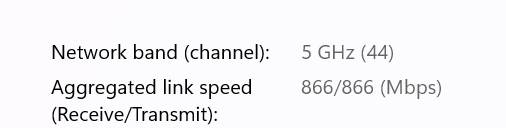
1. Check your link speed and expected download speed: Download speed is typically 30–50% of the link speed shown on your adapter. To find out if 250Mbps is actually within the expected range for your current setup, you can check your adapter's link speed using this guide: What Is Wi-Fi Link Speed and How to Check It on Windows, Mac, and Android
2. Move closer to the router: Place the adapter within 10–15 feet of the router, clear any obstacles in between, and position the router antennas at 45° or vertically to the floor.
3. Switch to 5GHz: The Archer T3U supports both 2.4GHz and 5GHz. 2.4GHz speeds are generally slower than 5GHz. If your router supports 5GHz, connect to that band to see if speed improves.
4. Test with another device: Run a speed test on another device at the same location to verify whether the speed limitation is coming from the router or your internet plan. If the other device is also slow, the issue may be on the router/ISP side.
5. Adjust your router's wireless channel settings: Crowded wireless channels can reduce speeds. Try these recommended settings on your router:
• 2.4GHz: Channels 1, 6, or 11 — 40MHz width
• 5GHz: Channels 36, 40, 44, or 48 — 80/160MHz width
6. Update to the latest driver: Make sure you have the most up-to-date driver installed from the TP-Link Download Center.
- Copy Link
- Report Inappropriate Content
Information
Helpful: 0
Views: 54
Replies: 1
Voters 0
No one has voted for it yet.