
unable to login EB810v after reset router

cant login to router even after factory default reset
- Copy Link
- Subscribe
- Bookmark
- Report Inappropriate Content


Hello@leesg123 ,
Welcome to our community.
Please note that EB810v is a customized device specifically designed for local Service Providers. You can refer to FAQ for login password.
What's the login/device password for TP-Link Customized Modem/Router?
Due to the specialized nature of the firmware on your device, our ability to provide troubleshooting may be limited. We recommend contacting the technical support of your Service Provider who supplied the device, as they are best suited to provide the necessary assistance for your device.
- Copy Link
- Report Inappropriate Content
- Copy Link
- Report Inappropriate Content

If this device is provided to you by your ISP it's best to contact them, because there's a high probability its firmware and login password have been customized.
- Copy Link
- Report Inappropriate Content
Hello@leesg123 ,
Welcome to our community.
Please note that EB810v is a customized device specifically designed for local Service Providers. You can refer to FAQ for login password.
What's the login/device password for TP-Link Customized Modem/Router?
Due to the specialized nature of the firmware on your device, our ability to provide troubleshooting may be limited. We recommend contacting the technical support of your Service Provider who supplied the device, as they are best suited to provide the necessary assistance for your device.
- Copy Link
- Report Inappropriate Content

unsecure wifi is not conn
- Copy Link
- Report Inappropriate Content
Khan123-_ wrote
unsecure wifi is not conn
wifi has 2 options one is Username other is pa
- Copy Link
- Report Inappropriate Content
Hello@Khan123-_ ,
Welcome to our community.
Have you reset the router as below: Press and hold the reset button until all LEDs turn on to reset the router to its factory default settings.
- Then you will find the SSID (Network Name) and Wireless Password printed on the label at the bottom of the router.
- Click the network icon of your computer or go to Wi-Fi Settings of your smart device, and then select the SSID to join the network.
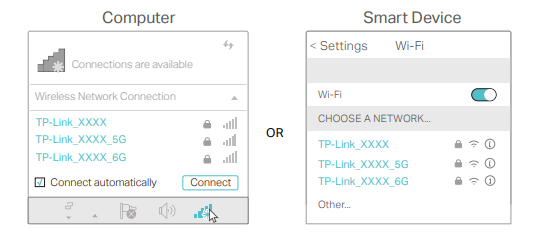
For how to log in to EB810v, please refer to Page 11 of EB810v_User Guide.
- Copy Link
- Report Inappropriate Content
Information
Helpful: 0
Views: 246
Replies: 6
Voters 0
No one has voted for it yet.