
Help me God please help

This thread has been locked for further replies. You can start a new thread to share your ideas or ask questions.

Help me God please help

This thread has been locked for further replies. You can start a new thread to share your ideas or ask questions.

Help me God please help
2023-04-19 13:15:01 - last edited 2023-04-20 12:30:33

Look, I have no idea what my model number is or anything. But I just got a new link thing for my birthday (today). Says it's TL-WPA7517.


The whole wireless part of it works, which I didn't even know was part of it until I got it. However, the main reason why I got it, the Ethernet, isn't working. Well, sort of. It keeps connecting, Powerline on, then works for about four to five seconds, then switches itself off for a good twenty seconds. 


See, it's telling me the issue is with the Powerline. And i was like "ok" and then changed the plug socket it was in. Both the one connected to my router AND the one connected to my PC. That didn't work. Retried the first socket i had in: didn't work. Waited 10 minutes before plugging in and re-pairing it: didn't work. I'm scared it's something wrong with the mains but the previous model I was using (TL-PA4010) worked perfectly fine 98% of the time. Though 2% of the time it also had the Powerline issue. 


Please tell me how on earth to fix this because I'm extremely fed up, like a kid throwing a tantrum.

  0      
  0      
#1
Options
1 Reply
Re:Help me God please help
2023-04-19 19:30:12 - last edited 2023-04-20 12:30:33

  @Zero_Cloud 


Hi,


Is your TL-WPA751 the "KIT" version that includes one TL-PA7017 that connects to the router and one TL-WPA7517 that acts an extender? (I guess each device should have a small white label with the information printed on it)


So, do I understand it right that, when the TL-WPA7517 "extender" Powerline adapter is running without any client devices connected or when you connect client devices to it via wireless, then the Powerline connection is stable (as indicated by the "Powerline" LED = steady On), but as soon as you connect your PC to the TL-WPA7517 Powerline adapter via Ethernet cable, then the Powerline connection goes bad ("Powerline" LED alternating between On and Off) ?


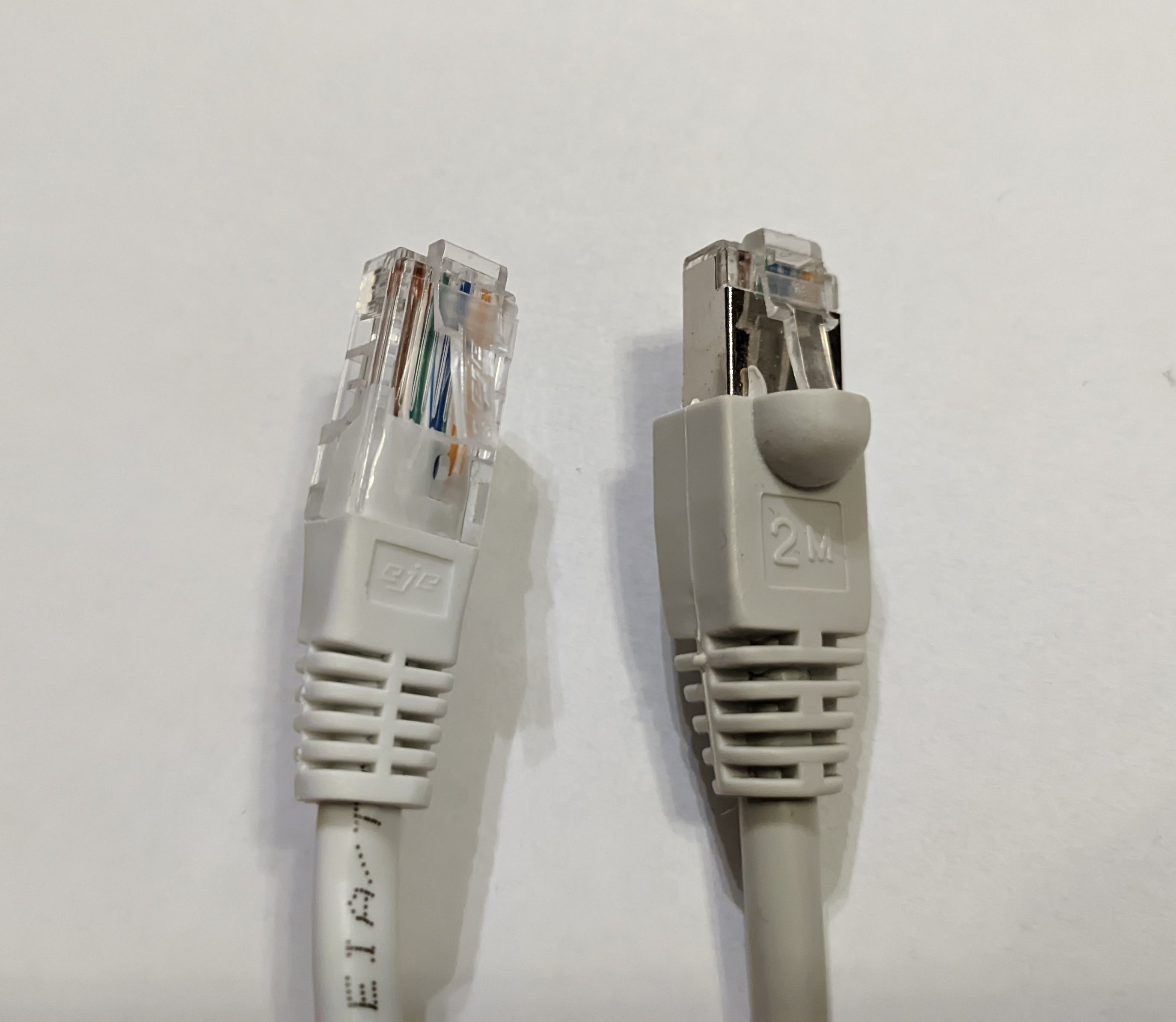
Have you currently connected the PC via a shielded Ethernet cable or an unshielded one? (the RJ45 connectors of a shielded cable will look the right one in the picture below, with some metal folded around it)


Whichever it is, if you have a cable of the opposite type available, then try with that one.


Normally, using a shielded Ethernet cable has advantages, but in certain scenarios it can also cause problems if the two connected devices are electrically interconnected via the shielding. 


  0  
  0  
#2
Options