
Schedule day/night (IR) mode

I'd like to be able to set a schedule for the day/night (IR) mode on my cameras.
As of today I can only choose between AUTO, DAY or NIGHT in the Tapo app.
Under some conditions the cameras don't switch to NIGHT mode because there is a bright light somewhere in the frame. Although the picture is good in DAY
mode even in dim conditions, I've noticed that the image quality increases substantially when forced to NIGHT mode.
Im running the latest updates for the app and the cameras.
- Copy Link
- Subscribe
- Bookmark
- Report Inappropriate Content
@Kelmi I agree... with all the suggestions and requests posted on here, they will surely just apply these ideas to their new units rather than a fix for the existing ones
Kelmi wrote
Check the date of this threat - two years old. TP-link is not going to implement this kind of simple features as they want to sell yet another generation of their HW with a little bit better "starlight" capabilities. And yet another and yet another generation. Scheduled IR would decrease their HW sales. So, not going to happen and users, which have e.g some background lights in the garden are going to suffer.
K
- Copy Link
- Report Inappropriate Content
- Copy Link
- Report Inappropriate Content
I voted for this too as I also have this issue.
- Copy Link
- Report Inappropriate Content
- Copy Link
- Report Inappropriate Content
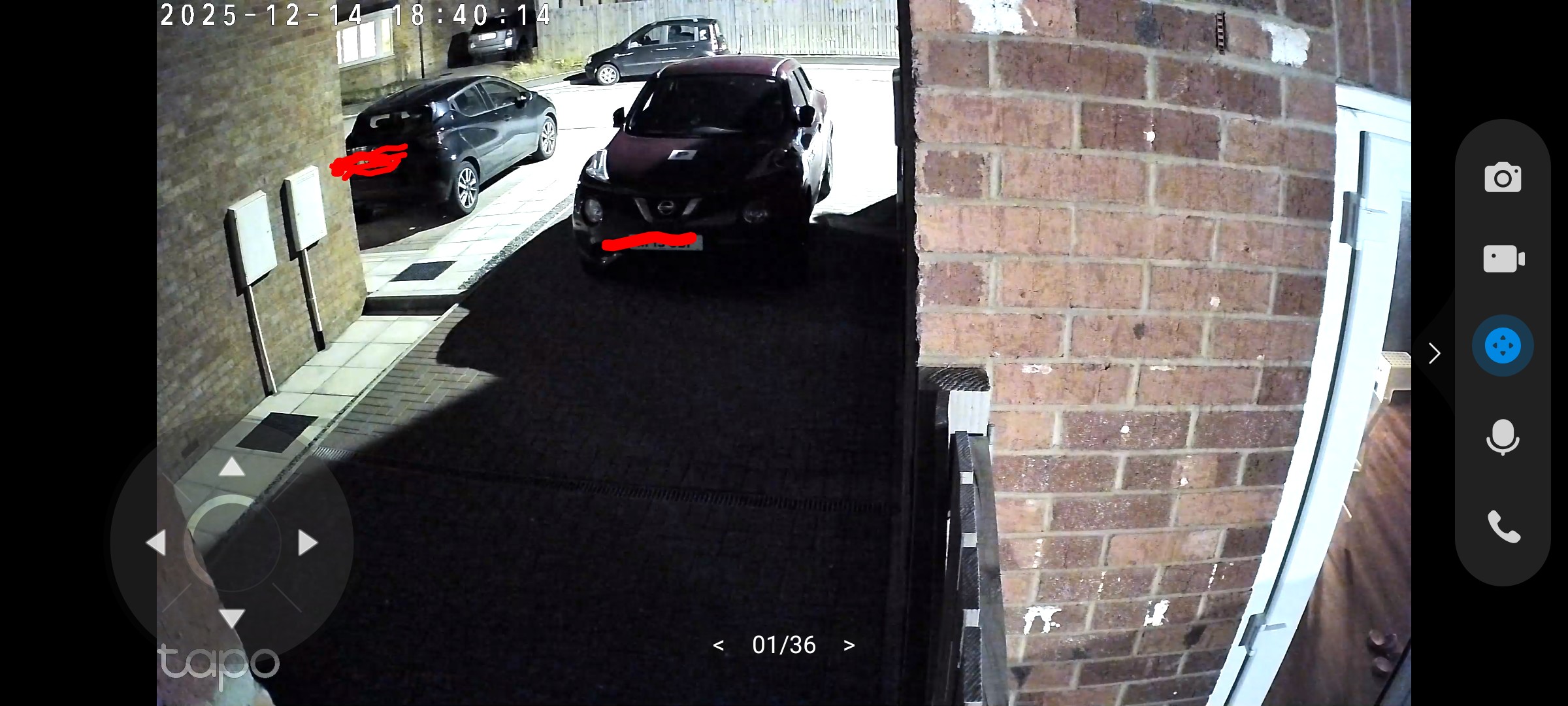
Sadly the auto mode didn't work well for my case. As you can see my drive way is completely covered in the shadow, but the night mode is not engaged.
- Copy Link
- Report Inappropriate Content
I completely agree. The streetlights reflecting on the screen prevent it from automatically switching to night mode. I currently switch it manually every day.
- Copy Link
- Report Inappropriate Content
Yes I am having to set night mode manually when it gets dark. There should definitely be an option for it to be set automatically according to the times of dusk and dawn (with appropriate consideration given to exactly when at these times the ambient light falls below daytime tolerances), Alternatively, it should be a schedulable option like the alarm is. My camera is Tapo C520WS and it doesn't pick up person detection properly in low evening light when it has stayed on daytime mode because of the street light opposite my house.
Is adding this comment how one votes for something?
- Copy Link
- Report Inappropriate Content
- Copy Link
- Report Inappropriate Content
- Copy Link
- Report Inappropriate Content
@JFan Using common sense, this feature should be implemented. But as TP-Link wants to sell all the time new camera HW to thir installed base customers making HW updates just because of better Starlight or color night features , this feature would decrease their sales. TP-link actively shortens the lifecycle of their cameras via forcing the users to update for yet another new generation of color night vision.
And this feature is never going to be implemented.
K
- Copy Link
- Report Inappropriate Content
Information
Helpful: 50
Views: 18324
Replies: 71
Voters 50

























