Firmware V1.1.3 is unstable

This thread has been locked for further replies. You can start a new thread to share your ideas or ask questions.

Firmware V1.1.3 is unstable

This thread has been locked for further replies. You can start a new thread to share your ideas or ask questions.

Firmware V1.1.3 is unstable
2023-11-29 07:24:53 - last edited 2023-11-30 07:08:23
Model: Archer GX90  
Hardware Version: V1
Firmware Version: V1.1.3

I upgraded the firmware via the online method (auto upgrade) and suddenly the router became highly unstable. Wi-Fi devices would struggle to connect, internet would drop out randomly throughout the day, and even the management portal would struggle to load some of the option pages or require me to re-login once or twice.


When I downgraded back to Firmware V1.1.2, all of the issues went away. I turned off auto-update and it's been stable since, until today when the issues reappeared. I checked the firmware version, and even though auto-update has been turned off, suddenly it's back to V1.1.3??? I have downgraded again while I wait for a more stable release.


Please look into this issue, hardware V1 has major issues with this firmware.


P.S. made a mistake, initially I said it was the AX90. This is actually the GX90

  1      
  1      
#1
Options
3 Reply
Re:Firmware V1.1.3 is unstable
2023-11-30 03:31:09

  @Indubitably 


Hi, could you please double check the model no., hardware and firmware version of your TP-Link router? for the firmware version, please provide the complete version including build numbers etc..


I've checked 1.1.3 firmware of Archer AX90 V1, it is actually an old firmware published in year 2021, and the latest firmware now is 1.1.12.

Nice to Meet You in Our TP-Link Community. Check Out the Latest Posts: Archer GE550 - BE9300 Tri-Band Wi-Fi 7 Gaming Router EasyMesh Is Available When Wi-Fi Routers Work in AP Mode as A Controller. Archer BE550 New Software Enhances System Stability and Optimizes MLO Network Stability. TL-WA3001 Supports EasyMesh, Speed Limit, Guest Network in AP Mode and/or Multi-SSID Mode. If you found the post or response helpful, please click Helpful. If an answer solves your problem, click "Recommended Solution" so that others can benefit from it.
  0  
  0  
#2
Options
Re:Firmware V1.1.3 is unstable
2023-11-30 06:56:44

  @Sunshine 


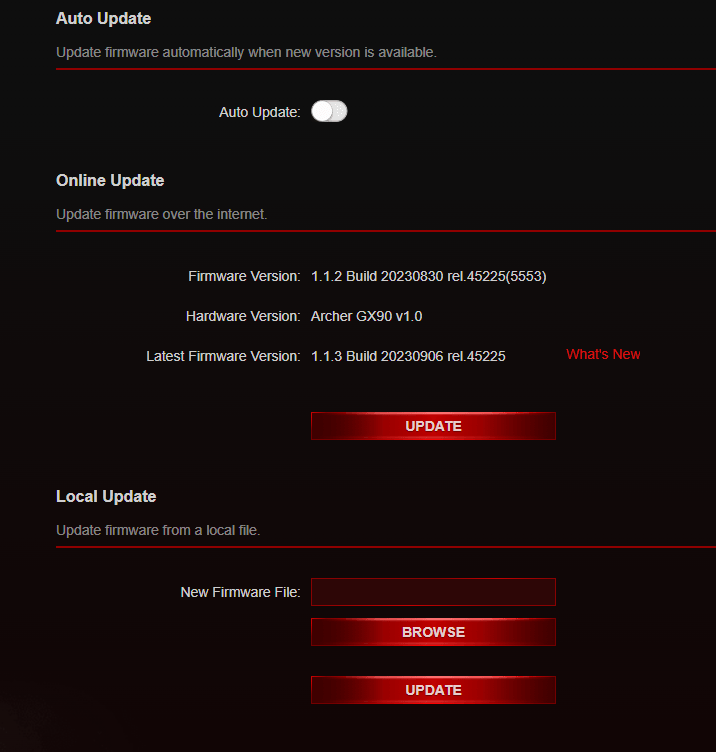
Hi, please see screenshot below:


The latest version that I can find (AU region) is 1.1.3 but it's highly unstable. Even with the 1.1.2 version now, the router keeps randomly rebooting itself. It isn't getting too hot, standard power plug it's always had, it's connected to a Belkin surge protector and everything else connected is running fine. I know there was an issue recently where TP-Link routers were vulnerable to spoofed firmware?

  0  
  0  
#3
Options
Re:Firmware V1.1.3 is unstable
2023-11-30 07:03:45
The hardware itself was purchased new 26th April this year. It had been stable until recently but seems to restart every 15-30 minutes now
  0  
  0  
#4
Options