
KE100 Batteries

Put the supplied batteries in the new thermostat correctly.
Within 6 hours I get a low battery indication.
Any idea what is wrong ?
TIA
- Copy Link
- Subscribe
- Bookmark
- Report Inappropriate Content

@Necessiter thank you. I followed this. Fixed one and improved battery level on another. I have reached out to support via form in the app
- Copy Link
- Report Inappropriate Content
- Copy Link
- Report Inappropriate Content

Are you referring to the KE100 heads firmware? All mine are showing 2.8.0. There isn't any option for a manual firmware upgrade on the app
- Copy Link
- Report Inappropriate Content
No not the heads firmware.
That is the hub firmware.
I was sent a link to update it by support on here.
- Copy Link
- Report Inappropriate Content
Weird... I've been sent that too, but my hubs (KH100) are showing 1.5.23 (no build info)
- Copy Link
- Report Inappropriate Content


As we've not yet known what might be the cause of the problem discussed in this thread, if any user encounters similar issues, you may join the discussion with the following information, or post a new thread instead. Detailed information will be helpful in analyzing the problem and pinpointing the roof cause.
1. Type of battery used/replaced.
2. A picture of the error.
3. Hardware and firmware version of the KE100.
4. Kasa app version.
5. Detailed description of the problem phenomenon you observed, the troubleshooting steps you've tried and the results.
- Copy Link
- Report Inappropriate Content
herr_bones wrote
@Wayne-TP I have the same issue.
1. Type of battery used/replaced.
Alkaline LR6 AA batteries (VARTA)
2. A picture of the error.
The battery icon on the valve is blinking.
3. Hardware and firmware version of the KE100.
Hardware: 1.0
Firmware: 2.8.0
4. Kasa app version.
3.4.101
5. Detailed description of the problem phenomenon you observed, the troubleshooting steps you've tried and the results.
- Reinstalling the valve and readding to Kasa app
- Switching batteries
- Moving the hub closer to the valve
Please contact the local TP-Link support team for assistance. This device might require testing.
- Copy Link
- Report Inappropriate Content

Hi, many thanks
this worked for me.
I reminded that as I have installed three KE100 devices, the only last of them show low batt error. even after batt changed / both brend new
It is most probably so, because, as I get used to the installation process, this was the first time, I've attached it to the radiator before registration to the HUB.
Registration process to the HUB runs in parallel with the valve calibrating at the same time. High current most probably tweaks voltage value while voltage is measured.
I use rech. Li-ion 1,5V batteries, which should be less sensitive to current reduction. However I got the same error in the end.
removing Thermostat from the app, detaching device from the radiator ... simply Your way works.
Battery voltage is measured obviously while in pairing process.
While unattached from the valve, voltage deviation is minimum.
Guess definitely firmware issue.
current FW 2.10.0
//I didn't try to wait a week or so, if another measurement of the batt will occur, but I think that there has to be some measurements scheduled. doing nothing would may fix it as well.
thanks again
- Copy Link
- Report Inappropriate Content
Are you saying you've tried to install these three KE100s several times, and it is always the last one that shows a low battery error? Is it correct?
- Copy Link
- Report Inappropriate Content

I have been testing a set of four valves in one room since March 2025. They taked the temperature from T315. I created a group. Everything worked as it should.
However, I needed to change the user in the app (for personal reasons). The only way to do this was to restart all devices and reconnect them to the app.
To my surprise, before the restart, all valves showed a battery status of 3/4.
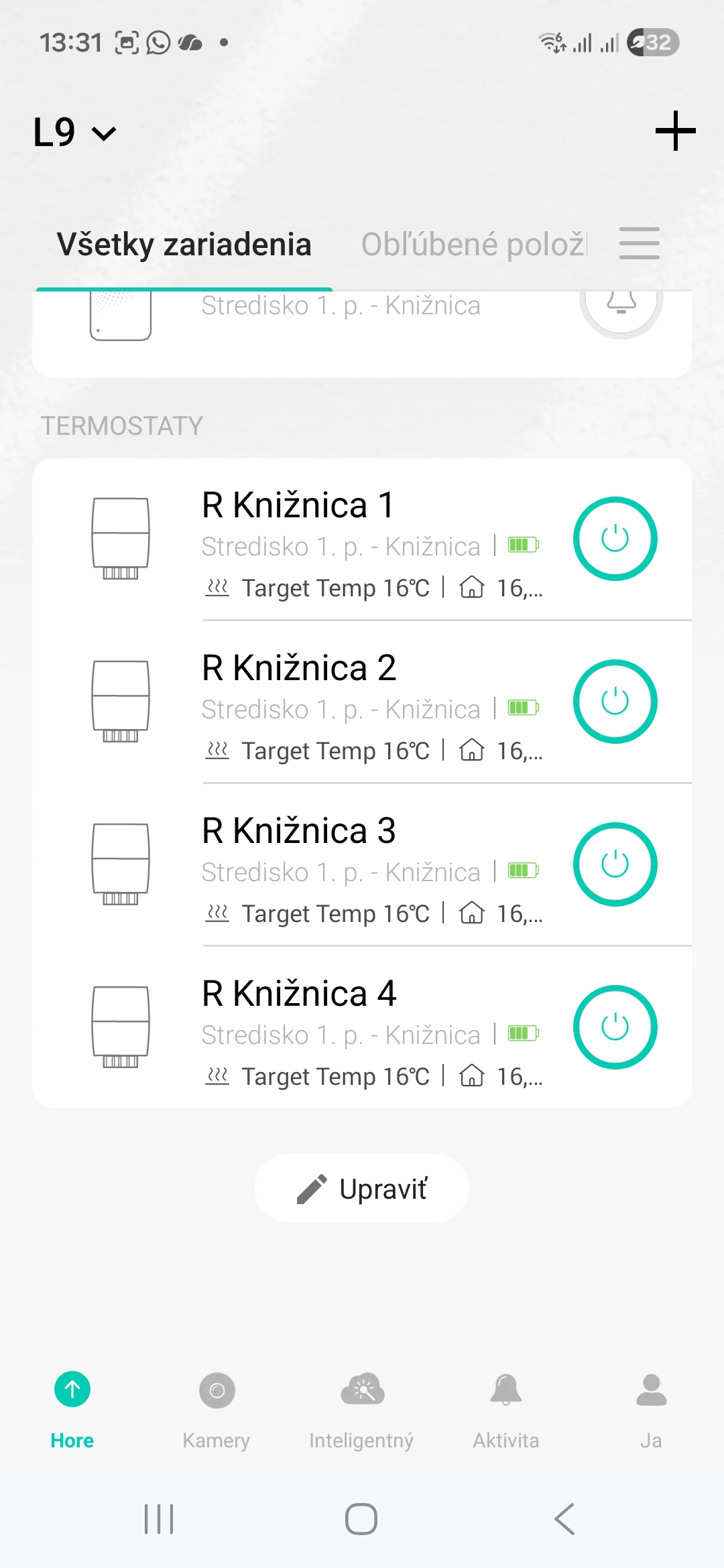
After restarting (after 5 minutes) and connecting to the app, the battery status changed dramatically. Some are dead, some are almost dead. I even put in new batteries, but the result was the same. Only the 4th valve shows 4/4, probably because I had to remove it during installation...
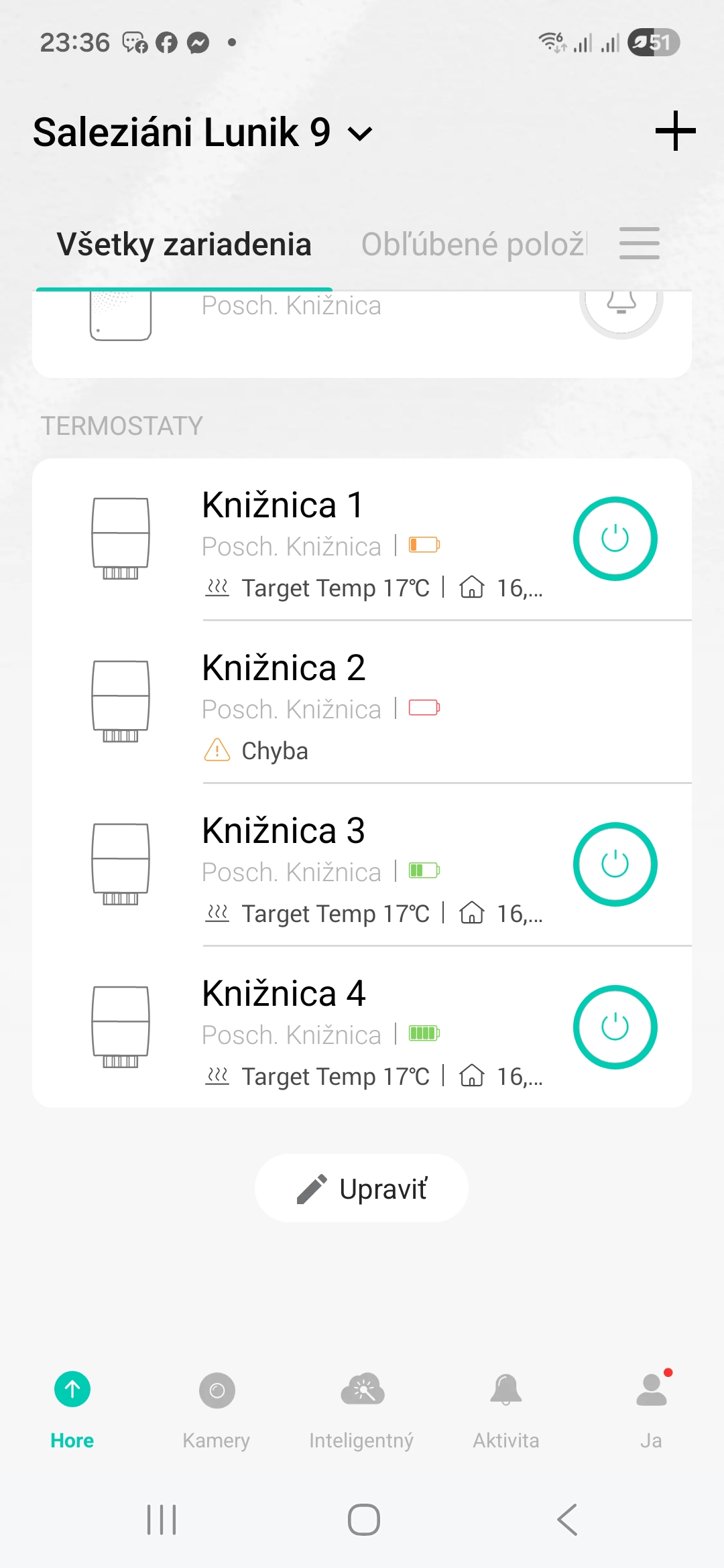
Kasa App 3.4.402
Kasa KE100 1.0 Firmware 2.10.0
- Copy Link
- Report Inappropriate Content
Information
Helpful: 0
Views: 5973
Replies: 32
Voters 0
No one has voted for it yet.