
HS110 not howing power data
 This thread has been locked for further replies. You can start a new thread to share your ideas or ask questions.
- Copy Link
- Subscribe
- Bookmark
- Report Inappropriate Content


Factory reset and reconfigure the smart plug, and change a different appliance, see how it works.
*How to reset HS110: Press and hold the Settings button for 10 seconds until the WiFi LED blinks amber rapidly.
Ensure that the device's firmware and your Kasa app are both up to date. You can try to delete and reinstall the app. How to update firmware of Kasa smart devices
- Copy Link
- Report Inappropriate Content
SonnyKA wrote
@Wayne-TP Thank you for your response.
Here is what I did:
- deleted the HS110 from the Kasa App
- made a factory reset as described
- relinked HS110 to Kasa App
- checked for firmware upgrades - none found - currently installed version is 1.5.6 (hardware version 2.0)
- installed app version is 3.4.150 (4.6.2025)
I can switch the plug on and off remotely.
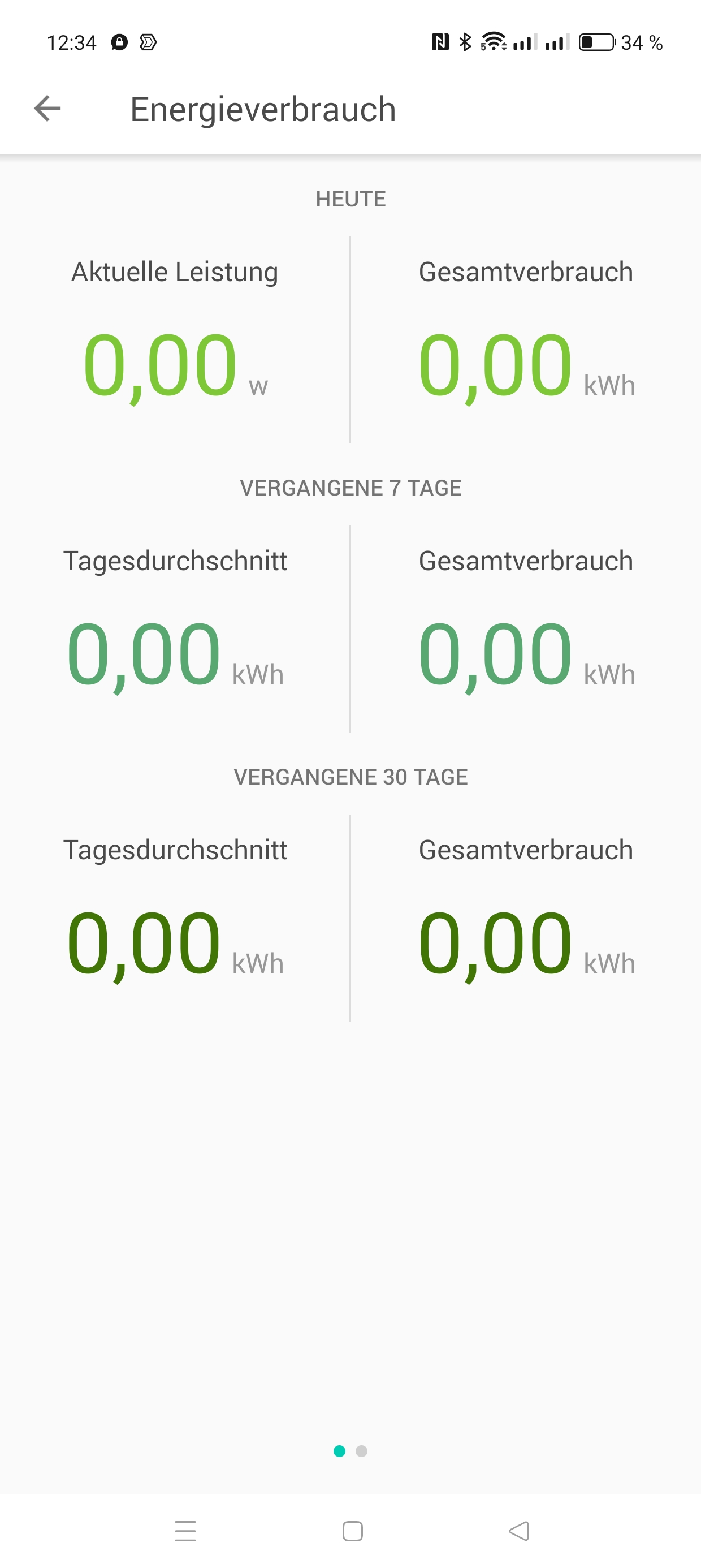
But the power consumption is always shown as 0,00 (all values on the page as shown in the screenshot).
I tried 3 different electrical devices (fan, PC, lamp) with the same - wrong - results.
Given the current situation, we recommend replacing this device. To proceed with the warranty, please reach out to the retailer or local TP-Link support.
- Copy Link
- Report Inappropriate Content
I want to edit the original post - seems I can not do this.
Nor can I add additional screenshots.
Modell: HS110
MAC ac:84:c6:29:0d:a5
connected to WLAN/wifi + internet
- Copy Link
- Report Inappropriate Content
Factory reset and reconfigure the smart plug, and change a different appliance, see how it works.
*How to reset HS110: Press and hold the Settings button for 10 seconds until the WiFi LED blinks amber rapidly.
Ensure that the device's firmware and your Kasa app are both up to date. You can try to delete and reinstall the app. How to update firmware of Kasa smart devices
- Copy Link
- Report Inappropriate Content
@Wayne-TP Thank you for your response.
Here is what I did:
- deleted the HS110 from the Kasa App
- made a factory reset as described
- relinked HS110 to Kasa App
- checked for firmware upgrades - none found - currently installed version is 1.5.6 (hardware version 2.0)
- installed app version is 3.4.150 (4.6.2025)
I can switch the plug on and off remotely.
But the power consumption is always shown as 0,00 (all values on the page as shown in the screenshot).
I tried 3 different electrical devices (fan, PC, lamp) with the same - wrong - results.
- Copy Link
- Report Inappropriate Content
SonnyKA wrote
@Wayne-TP Thank you for your response.
Here is what I did:
- deleted the HS110 from the Kasa App
- made a factory reset as described
- relinked HS110 to Kasa App
- checked for firmware upgrades - none found - currently installed version is 1.5.6 (hardware version 2.0)
- installed app version is 3.4.150 (4.6.2025)
I can switch the plug on and off remotely.
But the power consumption is always shown as 0,00 (all values on the page as shown in the screenshot).
I tried 3 different electrical devices (fan, PC, lamp) with the same - wrong - results.
Given the current situation, we recommend replacing this device. To proceed with the warranty, please reach out to the retailer or local TP-Link support.
- Copy Link
- Report Inappropriate Content
Information
Helpful: 0
Views: 583
Replies: 4
Voters 0
No one has voted for it yet.