New router firmware causing ping spikes

This thread has been locked for further replies. You can start a new thread to share your ideas or ask questions.

New router firmware causing ping spikes

This thread has been locked for further replies. You can start a new thread to share your ideas or ask questions.

New router firmware causing ping spikes
2025-10-11 17:29:35 - last edited 2025-10-20 02:02:08
Model: Archer AX12  
Hardware Version: V1
Firmware Version: 1.2.1 Build 20250729 Rel. 73566(5553)

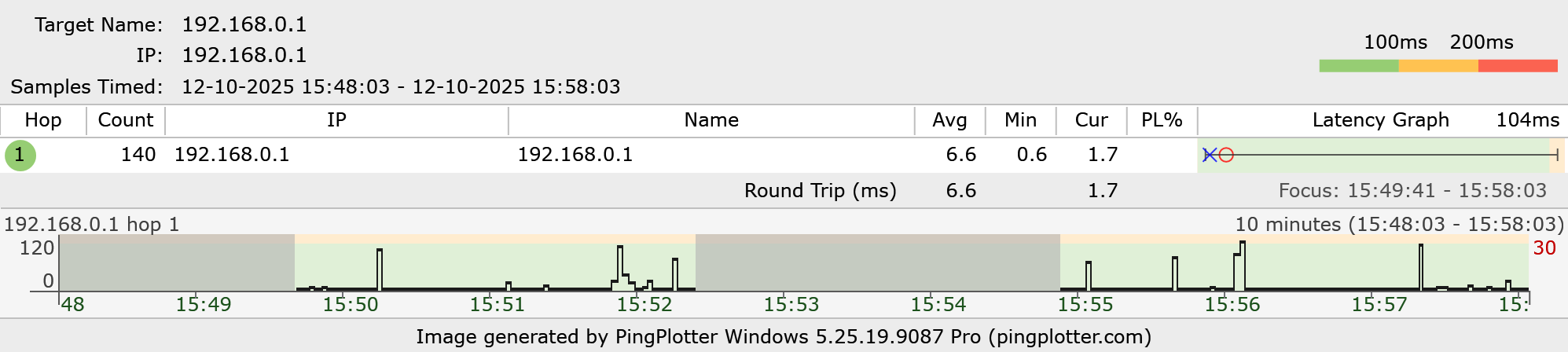
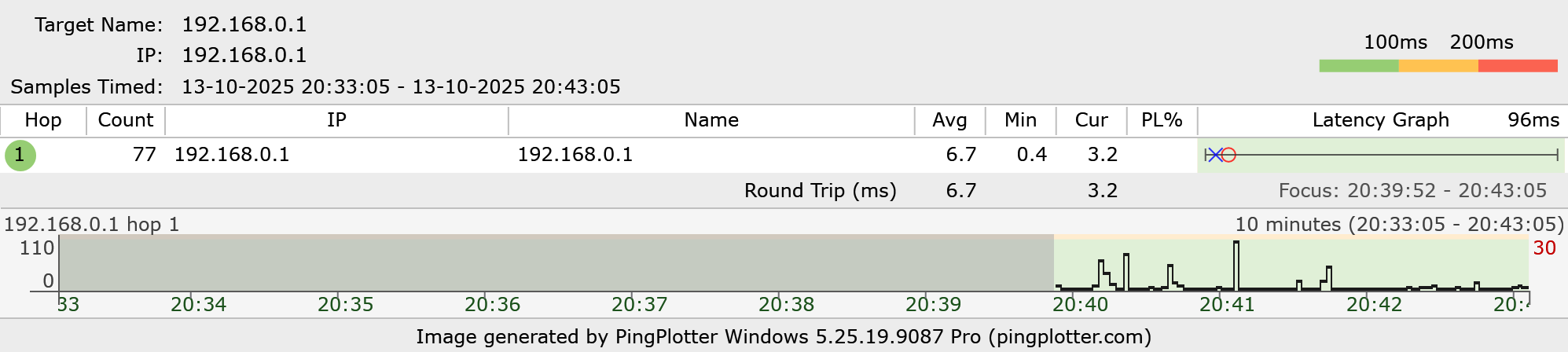
Day before yesterday TP-Link pushed me to update my router firmware to the version mentioned. Since then, I'm facing constant ping spikes even when pinging my router from the desktop directly via a Cat-6 Ethernet cable. This is ruining my whole internet experience by causing voice drops during meetings and unacceptable lags during browsing.


Prompt help will be appreciated

  0      
  0      
#1
Options
1 Accepted Solution
Re:New router firmware causing ping spikes-Solution
2025-10-13 06:40:42 - last edited 2025-10-20 02:02:08

Hello @swastiknag02 ,

Welcome to our community.


May I know if your network topology diagram is as follows:

ISP modem—router)))((( client devices

(Note: — stands for wired connection,)))((( stands for wireless connection )


Have you enabled the QoS? If yes, please disable it for a try.

Please also take screenshots with the ping result and send them here.


Welcome to Community! Urgent problems with your Wi-Fi Router, Range Extender, or DSL Modem? Please reach out via private Message or @Joesph-TP in your new thread directly. Check Out the Latest Posts: △New Firmware for Archer GE550/GE650 V1 Introduces AI-QoS, EasyMesh IoT Expansion, and More! △New Firmware for Archer BE800 V1 to Support VPN Merge, EasyMesh Guest/IoT Extend, and More △New Firmware Releases for Archer BE805/BE450 V1 to Support VPN Merge, New ECO Mode, and More Click Or ☆Recommended Solution if the post/answer helps.
Recommended Solution
  0  
  0  
#2
Options
6 Reply
Re:New router firmware causing ping spikes-Solution
2025-10-13 06:40:42 - last edited 2025-10-20 02:02:08

Hello @swastiknag02 ,

Welcome to our community.


May I know if your network topology diagram is as follows:

ISP modem—router)))((( client devices

(Note: — stands for wired connection,)))((( stands for wireless connection )


Have you enabled the QoS? If yes, please disable it for a try.

Please also take screenshots with the ping result and send them here.


Welcome to Community! Urgent problems with your Wi-Fi Router, Range Extender, or DSL Modem? Please reach out via private Message or @Joesph-TP in your new thread directly. Check Out the Latest Posts: △New Firmware for Archer GE550/GE650 V1 Introduces AI-QoS, EasyMesh IoT Expansion, and More! △New Firmware for Archer BE800 V1 to Support VPN Merge, EasyMesh Guest/IoT Extend, and More △New Firmware Releases for Archer BE805/BE450 V1 to Support VPN Merge, New ECO Mode, and More Click Or ☆Recommended Solution if the post/answer helps.
Recommended Solution
  0  
  0  
#2
Options
Re:New router firmware causing ping spikes
2025-10-13 15:19:15 - last edited 2025-10-13 15:20:08

  @Joseph-TP You are bang on in terms of the network topology, but there's no Deco involved here


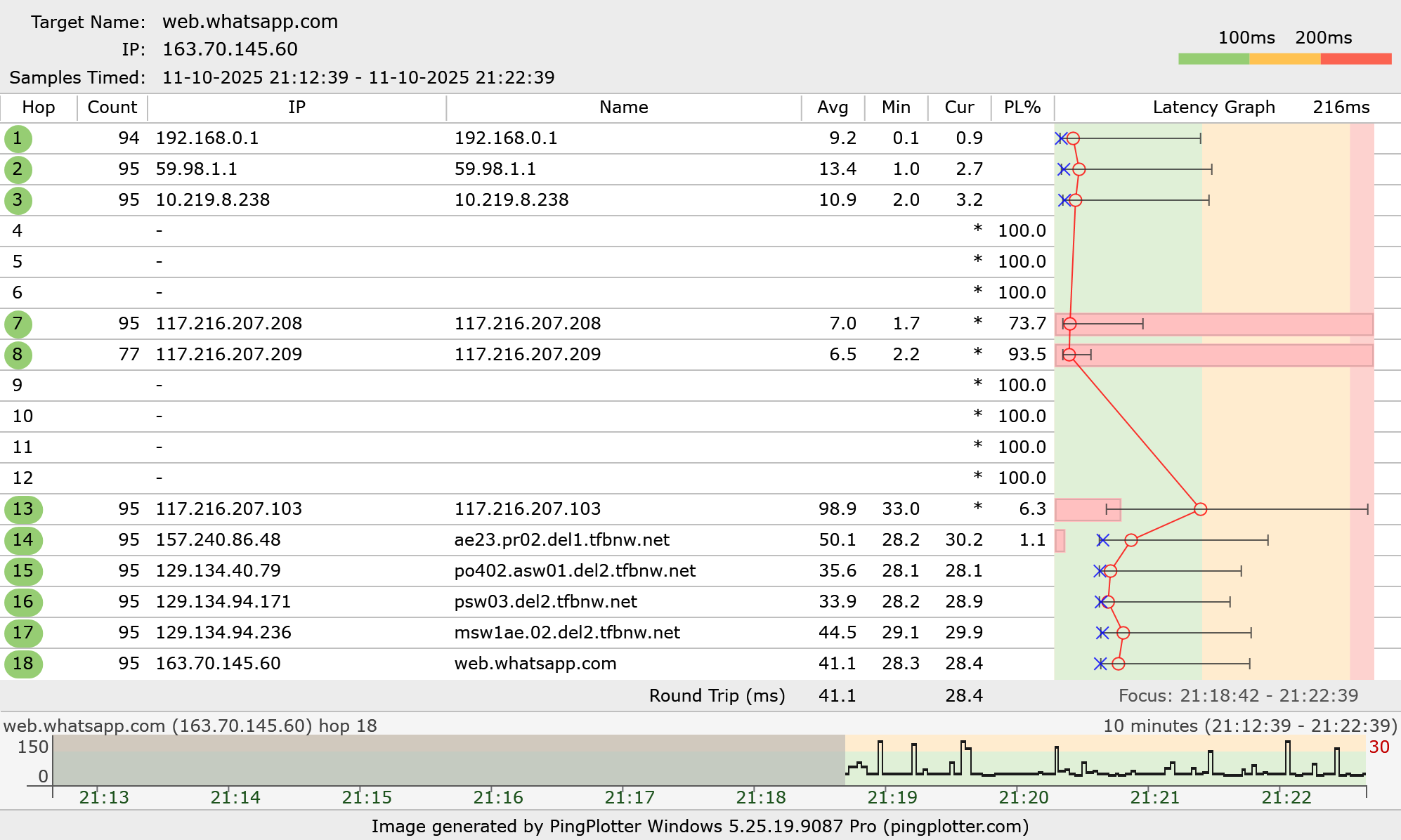
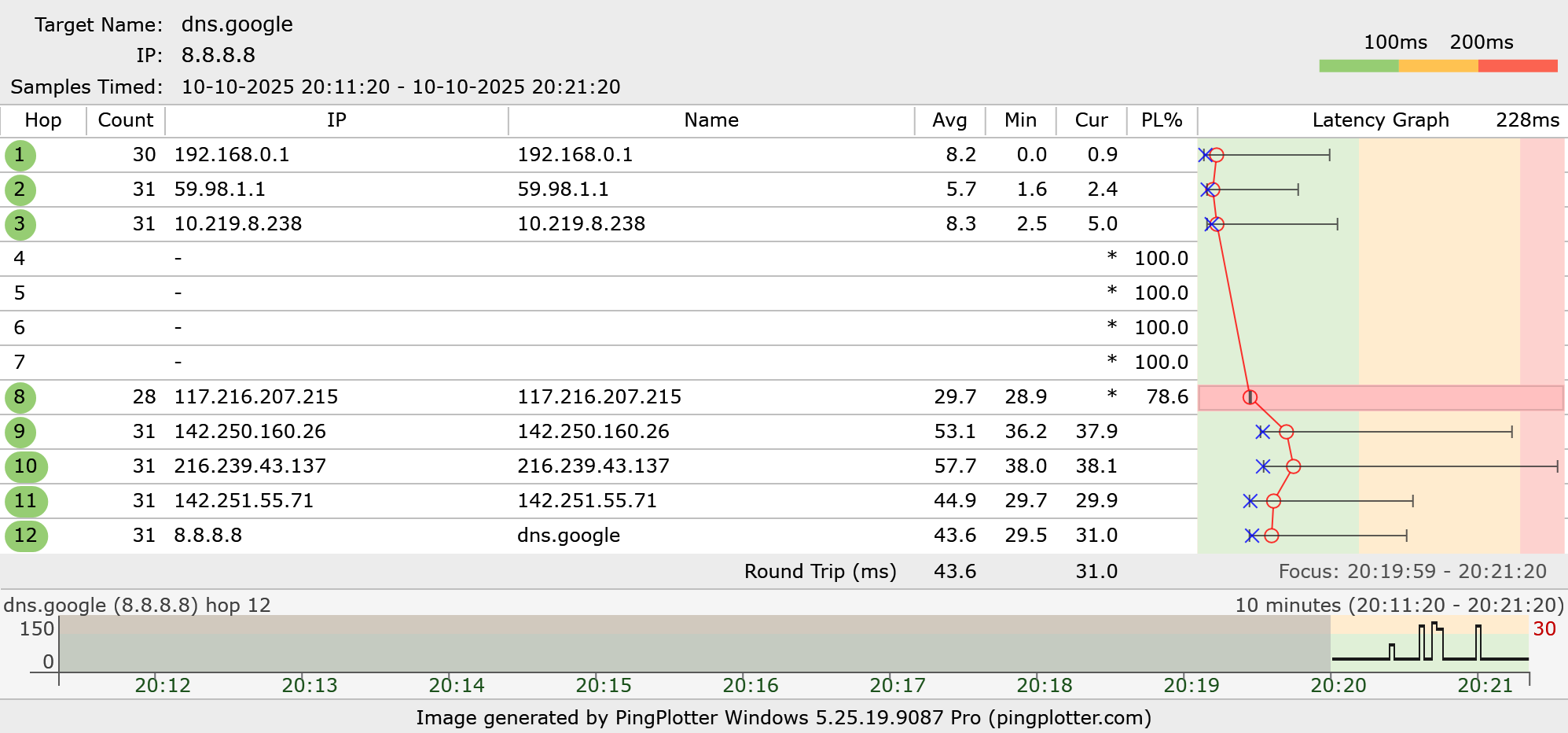
Also, here are my pingplotter results
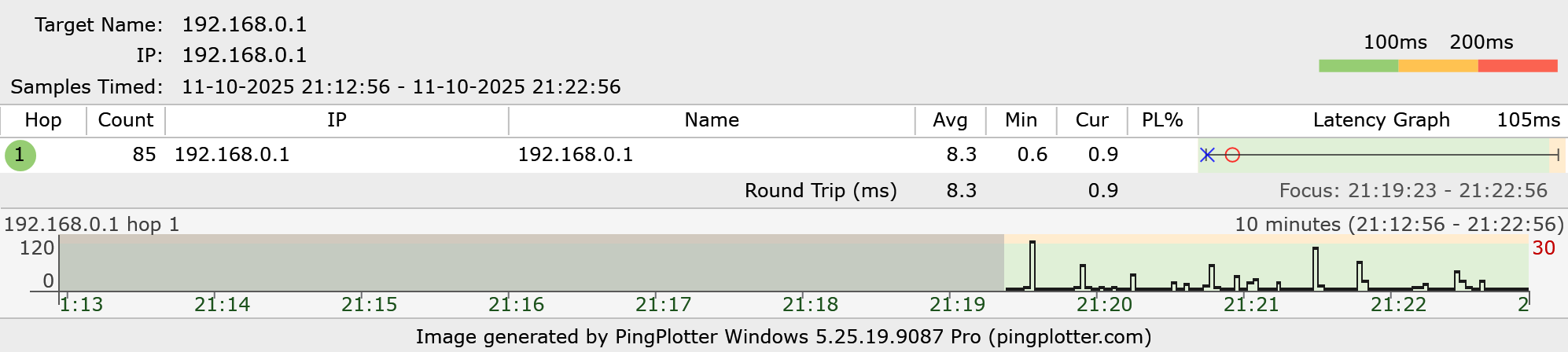
 

Here's my ONU pingplotter result
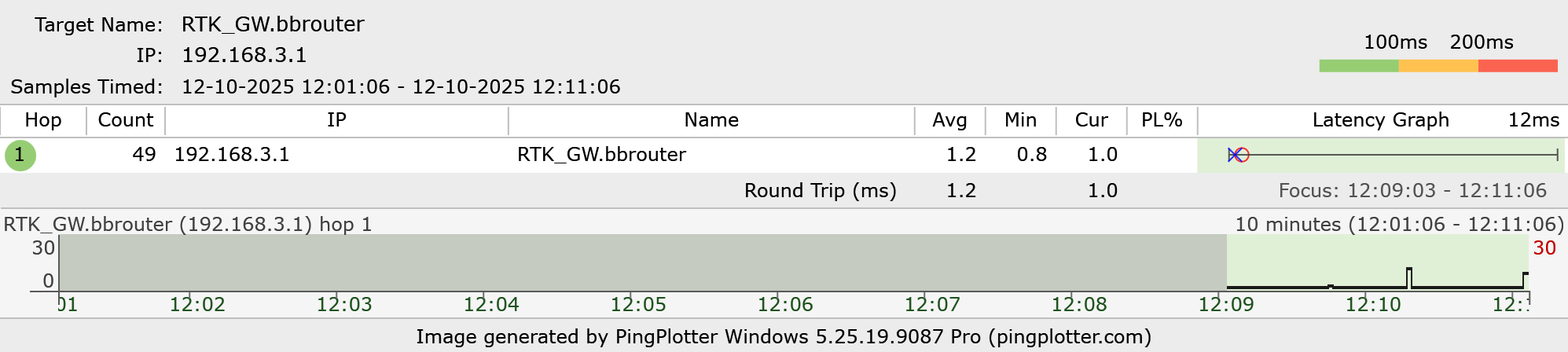
 

Google DNS and WhatsApp ping plot
  0  
  0  
#3
Options
Re:New router firmware causing ping spikes
2025-10-15 02:37:07

Hello @swastiknag02 ,

Thanks for your reply.

The tech team has been made aware of your case; they will likely reach out to you via email to continue troubleshooting. Please check your email inbox and confirm.

Welcome to Community! Urgent problems with your Wi-Fi Router, Range Extender, or DSL Modem? Please reach out via private Message or @Joesph-TP in your new thread directly. Check Out the Latest Posts: △New Firmware for Archer GE550/GE650 V1 Introduces AI-QoS, EasyMesh IoT Expansion, and More! △New Firmware for Archer BE800 V1 to Support VPN Merge, EasyMesh Guest/IoT Extend, and More △New Firmware Releases for Archer BE805/BE450 V1 to Support VPN Merge, New ECO Mode, and More Click Or ☆Recommended Solution if the post/answer helps.
  0  
  0  
#4
Options
Re:New router firmware causing ping spikes
2025-10-15 16:50:52

  @Joseph-TP Yeah, the tech team reached out to me via email and wanted the system logs and the config files. I had sent them everything duly.


Thanks for the support!!

  0  
  0  
#5
Options
Re:New router firmware causing ping spikes
2025-10-16 08:31:49

  @swastiknag02 ,

Thanks. Please review the reply to the ticket to avoid missing any information.

Welcome to Community! Urgent problems with your Wi-Fi Router, Range Extender, or DSL Modem? Please reach out via private Message or @Joesph-TP in your new thread directly. Check Out the Latest Posts: △New Firmware for Archer GE550/GE650 V1 Introduces AI-QoS, EasyMesh IoT Expansion, and More! △New Firmware for Archer BE800 V1 to Support VPN Merge, EasyMesh Guest/IoT Extend, and More △New Firmware Releases for Archer BE805/BE450 V1 to Support VPN Merge, New ECO Mode, and More Click Or ☆Recommended Solution if the post/answer helps.
  0  
  0  
#6
Options
Re:New router firmware causing ping spikes
2025-10-18 05:59:28

  @Joseph-TP I replied to the ticket accordingly, also mentioning a non-functional LAN port due to the firmware upgrade, to which they asked me to communicate to the TP-Link local support with my issue, asking for a replacement. So, I emailed local support for a replacement

  1  
  1  
#7
Options