
When auto lock is enabled it keeps repeating that the door is locked

When the auto lock is enabled and set to 15 seconds, after locking it keeps repeating that "door is locked" every 15 seconds. How can I fix this?
- Copy Link
- Subscribe
- Bookmark
- Report Inappropriate Content


- Copy Link
- Report Inappropriate Content
- Copy Link
- Report Inappropriate Content
To assist with this case, a specialist will help to follow it up through email. Please check your inbox later to confirm. If the email you used to register for the TP-Link community is not your contact email or you cannot access it, please send me your contact email through private message.
- Copy Link
- Report Inappropriate Content

@Wayne-TP Hi Wayne, I am also having the same issue. Has this issue been addressed?
- Copy Link
- Report Inappropriate Content
- Copy Link
- Report Inappropriate Content

My DL110 also suddenly started doing this.
Iny case, I have learned that what is happening is that the deadbolt is not fully extending for some reason. The lock will say "locked" as it thinks everything is fine. But then around 5 or 10 mins later it states "locked" again and again and again as it keeps trying to extend it all the way. In this instance, even if I touch the fingerprint reader, rather than unlock the door, it still states "locked". If touch the fingerprint reader a second time, then it will unlock
At the same time it is now no longer retracting all the way either, meaning I can't open the door and am locked out.
Tried recalibrating, it states that it is calibrated but same issue continues.
This happens even if I test it by leaving the door open to see what it does.
Whether the door is open or closed, if I try locking or unlocking manually, I can feel resistance / binding when the manual control is at about 30 deg from center (see photo).
Lock worked fine until today. Clearly not an alignment issue with the striker plate as it happens even when the door is open.
Is this similar to what anyone else is experienced?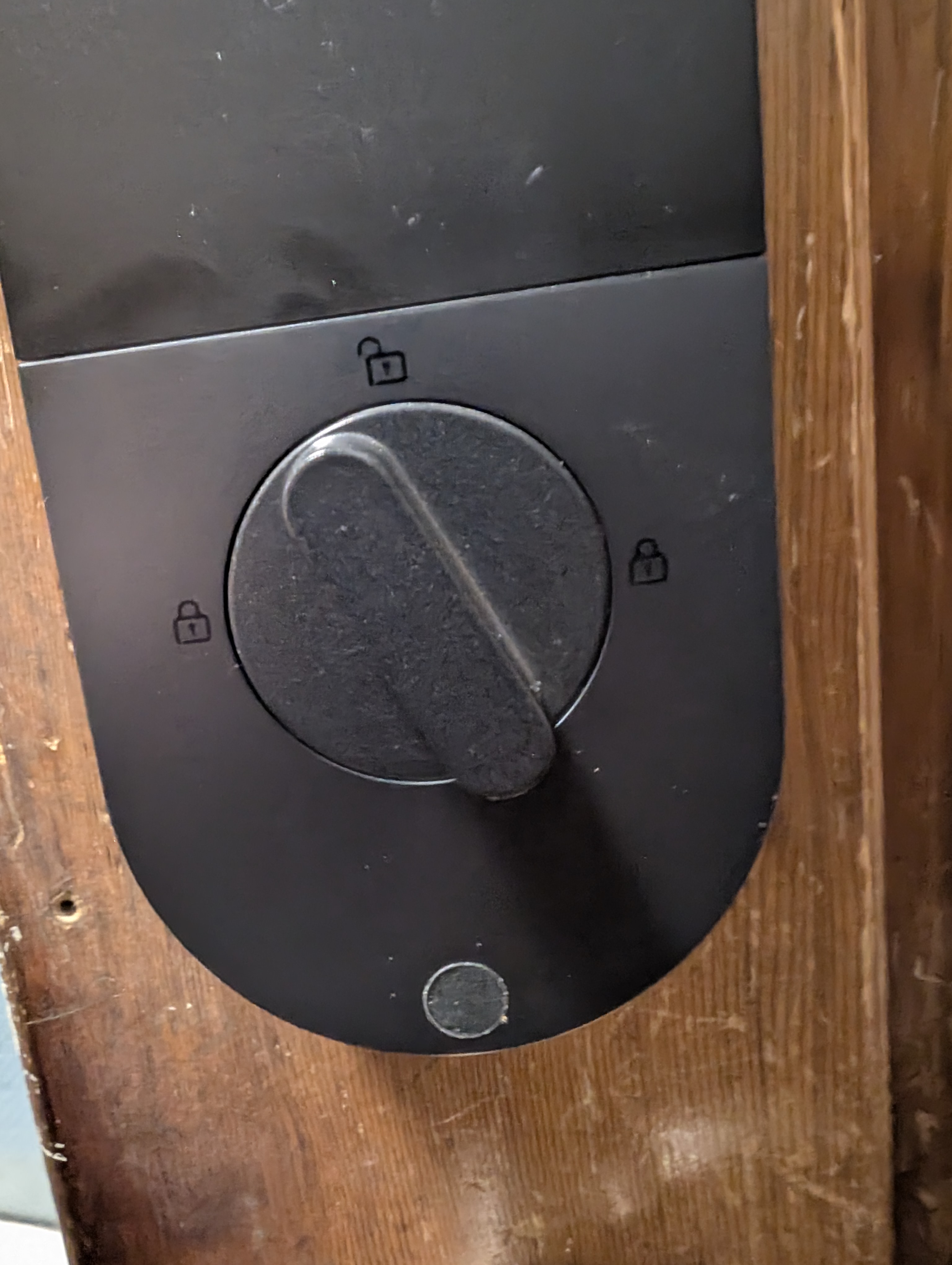
- Copy Link
- Report Inappropriate Content
TheShore wrote
My DL110 also suddenly started doing this.
Iny case, I have learned that what is happening is that the deadbolt is not fully extending for some reason. The lock will say "locked" as it thinks everything is fine. But then around 5 or 10 mins later it states "locked" again and again and again as it keeps trying to extend it all the way. In this instance, even if I touch the fingerprint reader, rather than unlock the door, it still states "locked". If touch the fingerprint reader a second time, then it will unlock
At the same time it is now no longer retracting all the way either, meaning I can't open the door and am locked out.
Tried recalibrating, it states that it is calibrated but same issue continues.
This happens even if I test it by leaving the door open to see what it does.
Whether the door is open or closed, if I try locking or unlocking manually, I can feel resistance / binding when the manual control is at about 30 deg from center (see photo).
Lock worked fine until today. Clearly not an alignment issue with the striker plate as it happens even when the door is open.
Is this similar to what anyone else is experienced?
For your case, we recommend reaching out to the support team for further investigation. Contact Technical Support
- Copy Link
- Report Inappropriate Content

@BillGara Mine is doing this also, Just purchased the DL110 and it continuously keeps saying locked and you hear the motor, although it is locked and the app even states it is. I know it is not a door jam, etc...
Did anyone get a solution to this?
- Copy Link
- Report Inappropriate Content
I basically have up. I had a lot of back and forth with tp link but basically they just kept telling me that it was my fault. Never did find a solution.
- Copy Link
- Report Inappropriate Content
Gerry_T wrote
@BillGara Mine is doing this also, Just purchased the DL110 and it continuously keeps saying locked and you hear the motor, although it is locked and the app even states it is. I know it is not a door jam, etc...
Did anyone get a solution to this?
Please calibrate your lock while the door is open. After that, test it by seeing if it can lock itself with the door still open. If it locks fine in that state, the most likely cause is that your door hole is too shallow, and the deadbolt can’t fully extend when the door is closed.
A quick test: Use the dust box that came with the product. If it fits into your door hole, then the lock’s bolt should also have enough space to work correctly.
- Copy Link
- Report Inappropriate Content
Information
Helpful: 0
Views: 3678
Replies: 10
Voters 0
No one has voted for it yet.